

-
Global Remote MCP Server
StreamNative Cloud now offers a globally available, organization-aware Remote MCP Server athttps://mcp.streamnative.cloud, letting you connect any MCP client - including VS Code - to your StreamNative Cloud resources without running local infrastructure. Sign in once and use a root, organization, or per-cluster endpoint to browse MCP-enabled Pulsar and Kafka clusters in your organization, manage organization-level resources such as service accounts, role bindings, instances, and workspaces, and add static cluster tools to the current session on demand. Kafka clusters can now be enabled for MCP alongside Pulsar, giving developers, administrators, and operators a single managed tool catalog across both protocols. Learn more -
Kafka Queues in StreamNative Kafka Service
StreamNative Kafka Service now supports Kafka Queues on both Latency-Optimized and Cost-Optimized profiles, bringing native queue-style messaging into Kafka through the new share groups consumption model. Share groups let multiple consumers cooperatively process records from the same partition, so you can scale consumers beyond the partition count, distribute work like a queue, and acknowledge or retry individual messages. This removes the need to over-partition topics for peak demand and is ideal for AI/agent task orchestration, notification systems, image and document processing, job scheduling, async workers, and event-driven microservices. Learn more -
StreamNative Kafka Service on Microsoft Azure
StreamNative Kafka Service is now available on Microsoft Azure for Bring Your Own Cloud (BYOC) deployments, completing multi-cloud parity across AWS, Google Cloud, and Microsoft Azure. Organizations can now run Kafka clusters in their own Azure accounts while StreamNative manages operations, giving them greater flexibility to align Kafka infrastructure with existing enterprise cloud strategies. Dedicated and Serverless support on Azure is coming soon. Learn more -
Reserved Throughput Pricing for Cost-Optimized Dedicated Kafka clusters
StreamNative Kafka Service on Dedicated clusters now supports Reserved Throughput Pricing for the Cost-Optimized profile, which uses a diskless architecture backed by object storage. You get the same predictable, capacity-based billing model already available for the Latency-Optimized profile, while significantly reducing infrastructure and storage costs for high-retention, analytics-heavy, and lakehouse-native Kafka workloads. Choose Latency-Optimized for disk-backed low-latency workloads, or Cost-Optimized for storage-efficient, large-scale streaming pipelines, with predictable Reserved Throughput Unit pricing on both. Learn more -
Maintenance Notifications
You can now track planned and ongoing maintenance for your Pulsar clusters and cloud environments directly in the StreamNative Cloud Console. The new Maintenance Notices page under Organization Settings > Observability lists every notice with its change summary, target resource, scheduled window, StreamNative owner, and decision deadline, and the technical contact in your Organization Profile receives email updates before, during, and after each event. For notices marked Action Required, you can Approve, Reject, or Reschedule the maintenance from the detail page. Configuring maintenance windows and taking these actions requires the Enterprise or Production support plan tier. Learn more -
Lakehouse multi-catalog: BigLake and Snowflake Horizon
The Ursa lakehouse storage engine now supports two additional catalog backends: Google BigLake metastore (Iceberg REST for BigQuery) and Snowflake Horizon (Polaris) Catalog with Snowflake role-based governance. You can register multiple catalogs per cluster, so a single Pulsar or Kafka cluster can land topics as governed tables across BigQuery and Snowflake from one streaming pipeline. Learn more -
Per-cluster mTLS for geo-replication
StreamNative Cloud now issues a dedicatedgeo-replication-tlsmTLS certificate for each Pulsar cluster, replacing the previously shared certificate used across clusters in a Pulsar Instance. Per-cluster certificates strengthen isolation between replicated clusters, simplify rotation by scoping renewals and revocations to a single cluster, and add defense-in-depth for cross-cluster replication traffic. The certificate lifecycle is fully managed by StreamNative Cloud, so no customer action is required. Learn more
-
Native Kafka Service in Public Preview
StreamNative Cloud now offers a Native Kafka Service in Public Preview, built on the lakehouse-native Ursa Engine to deliver a wire-compatible Kafka API with separated compute and storage. The service is available for Dedicated and BYOC deployments on AWS and Google Cloud, and for BYOC deployments on Microsoft Azure; Serverless support is coming soon. You can run unmodified Kafka clients and tools while gaining cost-efficient object storage retention and topic-as-table lakehouse integration for downstream analytics. Learn more | Read the announcement -
Kafka cluster sizing with Throughput Units
You now size Kafka clusters using Throughput Units (TUs), a capacity-planning abstraction that maps directly to ingress, egress, and entry-rate capacity instead of infrastructure details like CPU, memory, or broker counts. During cluster creation, an in-app help panel explains how TUs work so you can pick the right capacity without leaving the page or hunting through docs. The result is more predictable sizing and a clearer path from workload requirements to cluster configuration. Learn more -
Safer feature lifecycle: no accidental disable or deletion
The Cloud Console now blocks both disabling and deleting a cluster feature while active resources are still attached to it. This prevents accidental disruption to running workloads and unintended configuration changes, so you must remove or migrate dependent resources before turning a feature off or removing it. Learn more -
Audit Logs now under the Monitor section
In the Cloud Console, Audit Logs have moved from the Admin area to the Monitor section of the left navigation. This places audit events alongside your other monitoring tools, so you can investigate authorization activity, anomalies, and access patterns without hopping between sidebar areas. Cluster tabs in this view have also been renamed for clarity, making it easier to scope audit events to the right cluster. Learn more -
Refreshed deployment-type selection
Deployment type cards in the StreamNative Cloud Console now highlight features and capabilities instead of pricing, and the documentation site is reorganized around the three deployment types: Serverless, Dedicated, and BYOC. Together, these changes make it faster to compare options at instance creation and easier to find deployment-type-specific guidance once you’ve made your choice. Learn more
-
API Key v2 Now Generally Available
API Key v2, StreamNative Cloud’s next-generation authentication framework, is now fully enabled in production for all organizations. API Key v2 introduces organization-level API keys that work across your entire organization, eliminating the need to manage separate credentials per instance. You can now use a single API key to authenticate to both Pulsar and Kafka clusters as well as StreamNative Cloud APIs, with role-based access control (RBAC) for fine-grained permissions. Read the announcement | Learn more -
Audit Log for Pulsar Clusters
You can now view and search audit log events for your Pulsar clusters directly in the Cloud Console. The new Audit Log page gives administrators and operators a centralized view of authorization activities — such as topic creation, permission changes, and produce/consume events — without needing to query Pulsar topics manually. This makes it faster to investigate access patterns, troubleshoot issues, and maintain security compliance for your streaming infrastructure. Learn more -
Billing Credits & Discounts
You can now view and manage credits and discounts directly from the StreamNative Cloud Console. The new Credits & Discounts settings page provides full visibility into applied discounts, available credits, and their usage across your organization. This makes it easier to track cost savings and understand how credits and discounts affect your billing without contacting support. Learn more -
Auto-Scaling Feature Flag
You can now enable auto-scaling on a per-cluster basis through your subscription’s feature flags. When enabled, StreamNative Cloud automatically adjusts your cluster resources based on real-time workload demands, eliminating the need for manual scaling decisions. This helps optimize resource utilization and reduce costs by scaling up during traffic spikes and scaling down during quiet periods. Learn more
- StreamNative Remote MCP Server Public Preview is now available in StreamNative Cloud.
- Static Egress IP Support in StreamNative Cloud allows secure outbound traffic from StreamNative Cloud into your own internal environments and applications by providing a fixed, predictable IP address.
- Availability: Enabled by default for all new Dedicated, BYOC, and Serverless clusters across AWS, Azure, and Alibaba Cloud (GCP support coming to new clusters soon).
- How to get your IP: While we work on exposing these IPs in the Cloud Console, you can retrieve your specific environment’s static IP today by Submitting a Support Request.
- Ursa Lakehouse Schema Evolution
- Schema evolution is supported on Pulsar clusters configured with either the Latency-Optimized or Cost-Optimized profile. Support for Iceberg tables is currently available in Private Preview.
- Iceberg V3 Variant Type Support
- Iceberg V3 variant types are supported on Pulsar clusters configured with either the Latency-Optimized or Cost-Optimized profile. This capability is currently available in Private Preview.
- Users can quickly switch between instances and resources (Pulsar Cluster, Kafka Cluster, and Agent Workspace) from any page.
- Organization Settings provides a dedicated space to manage organization-level resources and administrative workflows, clearly separated from instance-level, day-to-day operations.
Apache Pulsar
- Added structured JSON logging support, including ECS-compatible log formats, making logs easier to integrate with modern observability platforms.
- Improved broker performance for idle topics by optimizing metadata access and reducing storage reads.
- Enhanced correctness and stability for replicated subscriptions, backlog reporting, and topic metadata queries.
- Improved overall broker reliability, addressing edge cases that could previously lead to instability.
Kafka on Pulsar (KoP)
- Improved Kafka ecosystem compatibility by adopting the Confluent Avro Schema Provider and upgrading the Confluent Schema Registry.
- Enhanced reliability of producer state management, including better recovery behavior, support for no-zone deployments, and more robust state persistence.
- Improved Kafka correctness and error handling, ensuring accurate offset tracking and clearer errors when operations fail.
- Enhanced diagnostics and observability for Kafka and Schema Registry interactions.
Function Mesh
- Added support for configurable component resource limits, giving users more control over resource usage.
- Introduced plain authentication support for Kafka Connect and individual function worker deployments, expanding security configuration options.
Cloud Platform – API & Control Plane
- Introduced AuthV2, delivering a more robust and extensible authentication and authorization framework across Pulsar and Kafka management.
- Expanded mTLS support across Pulsar, Kafka, and AuthV2, simplifying secure cluster and client connectivity.
- Improved API key management, including updated issuer behavior, clearer scoping, and better handling of global API keys.
- Enhanced OIDC integration, with improved issuer configuration and key management for secure identity federation.
- Strengthened RBAC behavior, ensuring permissions are applied and synchronized more reliably.
- Expanded Kafka management capabilities, including feature flags, lifecycle reconciliation, backend configuration automation, and Cruise Control support.
- Improved networking flexibility, with support for additional service domains, automatic port generation, and enhanced TLS configuration.
- Enhanced serverless and storage defaults, enabling lakehouse storage by default and improving Oxia lifecycle management and visibility.
Cloud Manager (UI)
- Added new dashboards and metrics improvements, including backlog visibility and timezone-aware metrics views.
- Improved cluster provisioning and management experience through Cluster Profile–based workflows.
- Enhanced entitlement-aware UI behavior, ensuring features are enabled or disabled correctly based on subscription.
- Improved alerts and safeguards, including better subscription expiry notifications and schema deletion reminders.
- Refined overall UI experience, with usability, onboarding, and marketplace flow improvements.
-
Key Innovations from StreamNative - Data Streaming Summit
- Ursa (Lakehouse-Native Engine)
- Reduces cloud costs while preserving low-latency pipelines
- One canonical copy lands directly in the lakehouse
- Supports both cost-optimized and latency-optimized workloads
- Available across all deployment models
-
Unity Catalog + Iceberg
- Topics become governed, queryable tables instantly
- No connectors or duplicate storage required
- Built-in PII masking, SQL queries, and lineage
-
Orca Agent Engine
- Deploy Python agents directly into the stream
- Supports at-least-once delivery, replay, delayed tasks, and RBAC
- Enables dynamic agent discovery and event-driven automation
- Now in Private Preview
- Ursa Everywhere : Lakehouse-Native Streaming for All Deployments Announced at the Data Streaming Summit 2025, Ursa, our next-gen lakehouse-native streaming engine, is now available across all deployment models — extending its storage layer as a Lakehouse for Classic Engine clusters, marking a major step in StreamNative’s evolution. Learn more
- Orca Agent Engine: Event-Driven AI for Streams** Also announced at the Summit, Orca (now in Private Preview) gives agents a durable, event-native runtime with memory, tool calls, and observability built in. With LangGraph support, agents can reason, act, and collaborate directly on live data streams. Learn more
- October Launch: Adaptive Linking + Cloud Spanner Connector + Orca + LangGraph This month’s release adds Adaptive Linking for flexible cross-cluster migrations, a Cloud Spanner Source Connector for real-time CDC, and LangGraph support in Orca for intelligent, event-driven automation. Learn more
- Ursa Wins VLDB 2025 Best Industry Paper
Ursa takes center stage at VLDB 2025 with the Best Industry Paper award. Learn how the first lakehouse-native streaming engine for Kafka enables real-time, Iceberg-ready pipelines and sets a new benchmark for streaming and analytics convergence.
Learn more - TiDB Cloud Changefeed Integrates with StreamNative Cloud
Discover how the new TiDB Cloud + StreamNative Cloud integration simplifies building end-to-end, real-time pipelines. This changefeed enables seamless streaming from TiDB into Pulsar-powered systems, bridging transactional and analytical workloads.
Learn more - General Availability of Role-Based Access Control (RBAC) StreamNative Cloud
Strengthen security across your data streaming platform with RBAC in StreamNative Cloud, now generally available. Gain granular permissions from organization to topic level, simplify access management, enforce least-privilege policies, and secure workloads across Serverless, Dedicated, and BYOC clusters.
Learn more
- Universal Connectivity (UniConn) is Now Generally Available
Transform your streaming pipelines with Universal Connectivity (UniConn), now generally available on StreamNative Cloud. UniConn unifies Pulsar IO and Kafka Connect to enable seamless real-time data movement and provides a consistent way to deploy, manage, and monitor connectors at scale. Learn More - StreamNative Serverless is now Generally Available on AWS, Google Cloud, and Azure, delivering effortless, elastic streaming and messaging with no infrastructure setup required. Learn More
- StreamNative Cloud is now available in Public Preview on the Alibaba Cloud Marketplace, expanding access to cloud-native streaming on Asia’s largest public cloud. Learn More
-
StreamNative Universal Linking: Expanded Capabilities Now in Public Preview
Break down data silos and streamline how your teams connect to real-time streams—no matter where they live. With expanded capabilities, StreamNative Universal Linking lets you seamlessly bridge Pulsar clusters across clouds, regions, and environments. Simplify hybrid and multi-cloud messaging, enable global data access, and reduce operational overhead—all without complex workarounds. Learn More -
New in StreamNative Cloud: Notifications for Functions
Stay effortlessly in sync with your serverless workflows. With StreamNative Cloud Notifications for Functions, you’ll get real-time alerts when functions start, stop, fail, or succeed—so you can respond faster, troubleshoot smarter, and keep your streaming applications running smoothly. No more guesswork, just clear, actionable visibility. Learn More
-
StreamNative Ursa Is Now Available for Public Preview on Microsoft Azure
We’re thrilled to announce the Public Preview of Ursa on Microsoft Azure, bringing our leaderless, lakehouse-native data streaming engine to the Azure ecosystem. Building on our momentum from AWS and GCP, this milestone makes it easier than ever for organizations to adopt a cost-efficient, cloud-native alternative to legacy streaming platforms on Azure. Learn More -
StreamNative Expands Unity Catalog Integration with Managed Iceberg Tables
StreamNative partners with Databricks for the Private Preview of Managed Apache Iceberg tables and Iceberg REST Catalog in Unity Catalog. Discover how StreamNative’s Ursa engine simplifies real-time data pipelines from Pulsar/Kafka to a governed lakehouse with unified governance and optimized performance. Learn More
- Introducing snctl 1.0: Your One-Stop CLI for All StreamNative Interactions We are thrilled to announce the v1.0 version of snctl, a unified command-line interface (CLI) designed to simplify and streamline your interactions with Apache Pulsar, Apache Kafka, and the entire StreamNative ecosystem. Whether you’re working with Pulsar protocol, Kafka protocol (including Ursa clusters), or the comprehensive range of StreamNative Cloud resources, snctl consolidates it all into one convenient place. Learn More
-
Introducing the StreamNative MCP Server: Connecting Streaming Data to AI Agents
We’re excited to unveil the open-source StreamNative MCP Server! It connects any Kafka/Pulsar service to AI agents using the MCP protocol, whether on StreamNative Cloud or not. With it, you can manage real-time data and cluster resources using natural language—configure topics, publish/consume data, and more, all without complex commands. Learn More -
Introducing the StreamNative Agent Engine (Early Access): Your Intelligent Event Backbone for Enterprise-Scale AI Agents
Say goodbye to fragmented data and high operational costs. Built on Apache Pulsar’s robust framework, StreamNative Agent Engine empowers AI agents to seamlessly interact in real-time, transforming them from isolated tools into dynamic, autonomous systems. Unlock the future of AI with effortless integration and unparalleled efficiency. Learn More -
E-Book: Reducing Kafka Costs with Leaderless Architecture
This e-book explores how StreamNative’s Ursa engine can handle 5 GB/s workloads at a fraction of the cost of traditional clusters, providing insights into cost-saving strategies, benchmarking methods, and comparisons with other platforms like WarpStream, MSK, Redpanda, and self-managed Kafka. Download for Free
-
Ursa Engine Available for Public Preview on GCP
Ursa Engine - a Lakehouse-Native data streaming engine with 95% Kafka cost savings - is now available in Public Preview on Google Cloud Platform (GCP). Following the success of our General Availability launch on AWS, this exciting expansion brings the same cost-effective, high-performance streaming capabilities to organizations eager to modernize their data infrastructure on GCP. Learn More -
Migrating from Kafka Services to StreamNative
Ready to move your Kafka workloads to a modern, cloud-native streaming platform? Download the Kafka Migration Guide from StreamNative and get step-by-step guidance to ensure a smooth and reliable transition.
- UniLink Public Preview
Effortless Kafka Migration & Real-Time Data Replication UniLink is a powerful solution that simplifies Kafka migration and enables real-time data replication across environments. UniLink seamlessly connects various data sources and destinations, making it easier than ever to migrate or replicate data streams without operational overhead. Learn more - Ursa Engine GA on AWS BYOC
Lakehouse-Native Data Streaming with 95% Kafka Cost Savings Ursa Engine is now generally available on AWS Bring Your Own Cloud (BYOC). This groundbreaking engine optimizes real-time data streaming by eliminating traditional leader-follower architectures, reducing Kafka costs by up to 95%. Learn how Ursa Engine can transform your data infrastructure. Learn more - Amazon S3 Table Integration Seamless Streaming to Amazon S3 Tables Amazon S3 now supports direct integration with StreamNative Ursa Engine, enabling seamless data ingestion into S3-based lakehouses. This integration ensures high-performance, real-time streaming for analytics and AI workloads. Read the AWS blog
- Seamless Streaming to Lakehouse: StreamNative + Databricks Unity Catalog
Discover how StreamNative Cloud integrates with Databricks Unity Catalog, enabling real-time data ingestion into your lakehouse with governance and AI-readiness built-in. Learn more - StreamNative Enables Streaming into Apache Iceberg™ with Snowflake Open Catalog
Bringing cost-effective, real-time data ingestion to Iceberg tables in Snowflake Open Catalog, StreamNative eliminates high compute costs while ensuring unified governance. Learn more - Datadog native integration
Monitor and analyze your StreamNative clusters in real-time with Datadog’s native integration. Get deep visibility into performance, health,
-
New Snowflake Connector with Snowpipe Streaming Support
StreamNative is proud to launch a new connector supporting Snowpipe Streaming for seamless real-time data integration with Snowflake. Learn more -
BigQuery console integration
As an official partner of Google Cloud, StreamNative is now available on Google Cloud BigQuery Console. Connect real-time data into BigQuery without leaving the GCP console. -
RBAC support and predefined roles
Predefined roles are now available for streamlined access control. Learn More New organization profile page, Kafka Schema Registry RBAC Support, enhanced cluster naming flexibility, Ursa engine availability in Azure for private preview, New slim image that uses BOM for dependency management and more Check out January product launch blogpost
-
RBAC is now available for Public Preview with predefined roles. Learn more. The supported roles are:
- Org Admin (
org-admin) - Org Read Only (
org-readonly) - Tenant Admin (
tenant-admin) - Tenant Read Only (
tenant-readonly) - Topic Producer (
topic-producer) - Topic Consumer (
topic-consumer)
- Org Admin (
- Kafka Connect is now supported on clusters with Cost Optimized Profile. Try out the Kafka Connect connector with Clusters With Cost Optimized Profile.
-
Self-service BYOC improvements
- Bring Your Own Network [BYOC Pro Feature] and Bring Your Own DNS [BYOC Pro Feature] are now available on Azure, following the launch on AWS and GCP.
-
Self-service BYOC improvements
We have made several improvements to the self-service BYOC experience:
-
Self-service BYOC provisioning on Azure
- You can now provision a BYOC cluster on Azure through the StreamNative Cloud Console. Learn more.
-
Bring Your Own Network [BYOC Pro Feature]
- You can now use your own Virtual Private Cloud (VPC) when creating a BYOC Pro cluster. Learn more.
-
Bring Your Own DNS [BYOC Pro Feature]
- You can now use your own DNS service when creating a BYOC Pro cluster. Learn more.
-
Self-service BYOC provisioning on Azure
- Serverless available on AWS & Azure: We have expanded the Serverless offering to include AWS and Azure. Get started in seconds with Serverless clusters. Learn more.
- Azure Marketplace Launch: StreamNative Cloud is now available on Azure Marketplace, supporting Serverless, Dedicated, and BYOC deployment options through annual or pay-as-you-go subscriptions.
-
RBAC support on Metrics API: Metrics API supports scraping metrics data from a normal service account with
metrics-viewerrole. Learn more about RBAC. - Build-in Grafana Dashboard: You can now quickly set up Grafana dashboard and alert rules using our templates. Learn more.
What’s New
-
Revamped Cloud Console: We continue to enhance the StreamNative Cloud Console, aligning additional pages with the new streamlined navigation to improve usability. Updates include:
- Namespace Configuration pages
- Organization List page
- Users management pages
- Function pages
- pfSQL pages
- Cloud Environment pages
-
Name length limit enforcement: To ensure seamless resource management and avoid issues with excessively long names, we have introduced character limits for instance and cluster names:
- Instance names: Maximum of 40 characters
- Cluster names: Maximum of 10 characters
-
Improved Log Console: Logging is essential for debugging and monitoring connectors and functions. The log console has been redesigned to enhance user experience. Key improvements include:
- Viewing logs in an intuitive interface
- Advanced filtering options
- Search functionality for quick log analysis

What’s New
- Ursa Engine
- Ursa Engine is now available in Public Preview for AWS BYOC clusters. Learn more.
- Geo Replication
- StreamNative instance supports creating multiple Pulsar clusters and Pulsar clusters within the same StreamNative instance will now share the configuration store and built-in support geo-replication. Learn more.
What’s New
- Kafka Connect Support
- StreamNative Cloud now supports the ability to upload and run a Kafka Connect based connector. Learn more.
- Serverless Cluster
- StreamNative now supports a new type of deployment called Serverless that enables users to get started in seconds. Learn more. Read our announcement here.
What’s New
- Revamped Cloud Console Navigation: Our updated navigation is designed to make managing your resources easier and more efficient. The new interface dynamically displays menus and contextual actions relevant to each level of your information architecture. As you navigate from Instance to Cluster, and then to Tenant and Namespace, the relevant resources at each level will be prominently highlighted, allowing you to focus on what’s most important at every stage. To help you get familiar with the new navigation, we’ve created a short video tour that walks you through the updates. You can watch it here.
-
GCP and Azure Support:
- Both GCP and Azure now support Cloud Environment and Cloud Connection via the UI . Learn more)
Other Updates
- Improvements
- Security:
- Optimized TLS Performance by reducing unnecessary buffer copies, significantly improving performance of encrypted communications.
- AES-GCM Cipher Optimizations: Enhanced the performance of the AES-GCM cipher for TLS encryption, resulting in faster data encryption and decryption.
- Improved Bundle Ownership Notifications : More accurate and timely notifications during the load management process ensure smoother transitions and balanced workloads, enhancing scalability and reducing the risk of performance bottlenecks.
- Pulsar Admin Connection Management: The new maxConnectionsPerHost and connectionMaxIdleSeconds settings give users more granular control over client connections, leading to better resource management and lower operational costs.
- ServiceUrlProvider Failover Support: This new feature increases reliability and uptime by automatically failing over to secondary clusters in the event of an issue with the primary cluster, ensuring continuous availability.
- Improved Topic Load Failure Metrics: Enhanced metrics provide better visibility into topic loading failures, allowing administrators to quickly identify and resolve issues, leading to improved uptime and system reliability. To see all bug fixes and improvements, go through our weekly change logs.
- Security:
What’s New
-
Redesigned Topic Page:
- Detail Tub Improvements: We’ve restructured the detail tub to be more intuitive, making it easier for users to find the information they need quickly.
- Optimize Schema Tub: The redesign of the schema tub focuses on improving the ease of managing schemas, ensuring a more user-friendly and visually appealing experience.
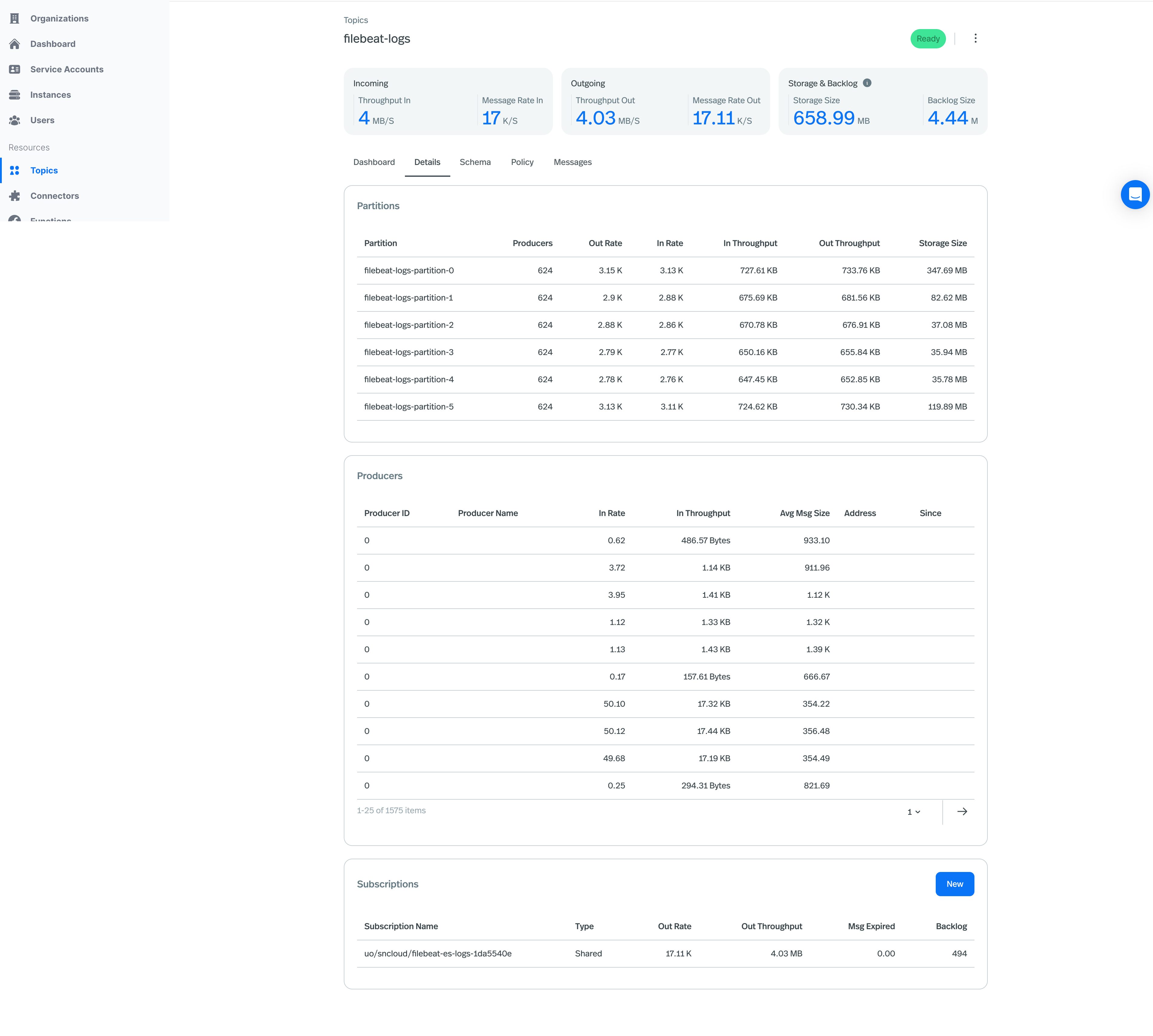
-
Enhanced Organization Usage Page:
- Tailored Time Window: The usage time window is now automatically aligned with your organization’s contractual periods, eliminating the need to manually select dates.
- Quick Usage Snapshots: High-level doughnut charts provide an instant overview of your usage, offering key insights at a glance.
- Enriched CSV Exports: Downloaded usage data now includes additional metadata, improving clarity and enabling more precise offline analysis.
- Consistent Legends: Graph legends are standardized, making it easier to compare resource usage across different instances.
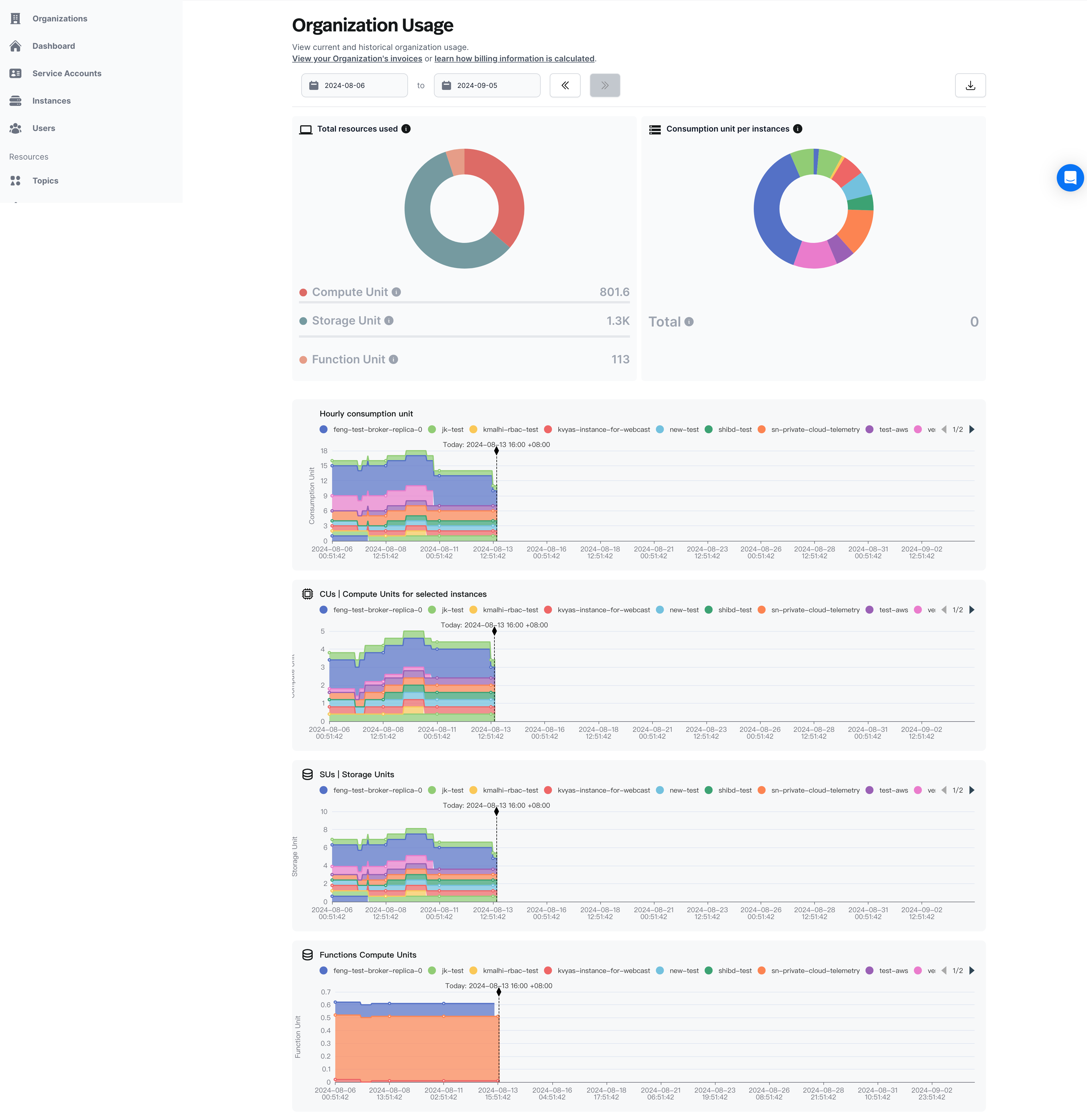
-
Support JVM metrics on Source and Sink connector metrics endpoint:
- You can find the newly added JVM metrics on Source Connector metrics.
- You can find the newly added JVM metrics on Sink Connector metrics.
Other Updates
- Deprecate Service Account JWT token
- Service Account deprecated the JWT token generation and replaced by the API Key.
What’s New
- Self-Service Console UI to setup Bring Your Own Cloud Infrastructure
- Users can now leverage a self-service user experience within StreamNative Cloud to set up the infrastructure for the StreamNative Bring Your Own Cloud (BYOC) offering. This enhancement eliminates the need to file support tickets and wait for the StreamNative engineering team to set up the infrastructure, allowing users to create clusters more efficiently and independently. Learn more.
- JVM metrics are now supported on Function Metrics endpoint
- You can find the newly added JVM metrics on this link within the Function metrics section.
- Lakehouse Storage Support for Delta Lake is now in Private Preview
- Lakehouse Storage is part of the Ursa Engine, which seamlessly integrates with Pulsar brokers. It offers the capability to write streaming data to popular lakehouse products like Delta Lake and Apache Iceberg, while supporting open table formats. This feature enables both streaming and batch-read operations from the lakehouse, enhancing data accessibility and processing efficiency. Learn more at the links listed below.
- Pinecone Connectors is now available in Private Preview
- This connector allows access to pinecone.io with a pulsar topic. The sink connector takes in messages and writes them if they are in a proper format to a Pinecone index. Learn more
What’s New
- Paymentless Trial
- We understand that you want to try our platform and do not want to go through corporate approvals to spin up a trial and evaluate our platform. Now, you no longer need a credit card to spin up for a trial to avail the 200 credit.
- Function Auto-Scaling
- Functions can now be configured to scale automatically. This allows you to build your streaming data pipelines without worrying about unforeseen spikes and reduce costs when the load reduces. All of this, with just a few settings. This feature is currently in Private Preview. We blogged about it a while back
- Cloud API Documentation
- Watch our for our Cloud API documentation (currently in Private Preview). You will be able to get full details on using API’s to access resources like Clusters, Instances, API Keys, Users and Service Accounts. We can’t wait to see how you have used these API’s. Here is a sneak preview
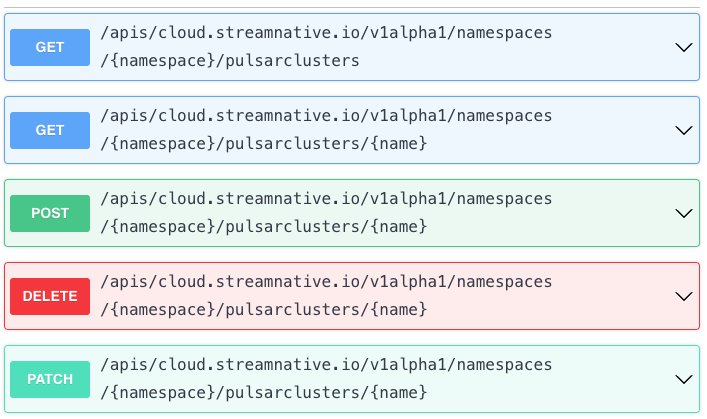
- Watch our for our Cloud API documentation (currently in Private Preview). You will be able to get full details on using API’s to access resources like Clusters, Instances, API Keys, Users and Service Accounts. We can’t wait to see how you have used these API’s. Here is a sneak preview
- Cloud Resource Metrics
- You now have access to metrics around Pulsar resources, functions, source and sink connectors so that you can get full insights into your streaming data infrastructure. You can find all the metrics endpoints here as well as integration with top Observability vendors.
What’s New
- Release Channel support
- StreamNative Hosted and Bring Your Own Cloud managed launched the Release Channel as a Public Preview feature. Learn more.
- Broker Auto-Scaling support
- StreamNative Hosted launched the Auto-Scaling as a Public Preview feature. Learn more.
- New observability dashboards
- StreamNative Cloud Console added extra observability dashboards for Pulsar namespaces, Pulsar topics, Pulsar functions and Pulsar connectors.
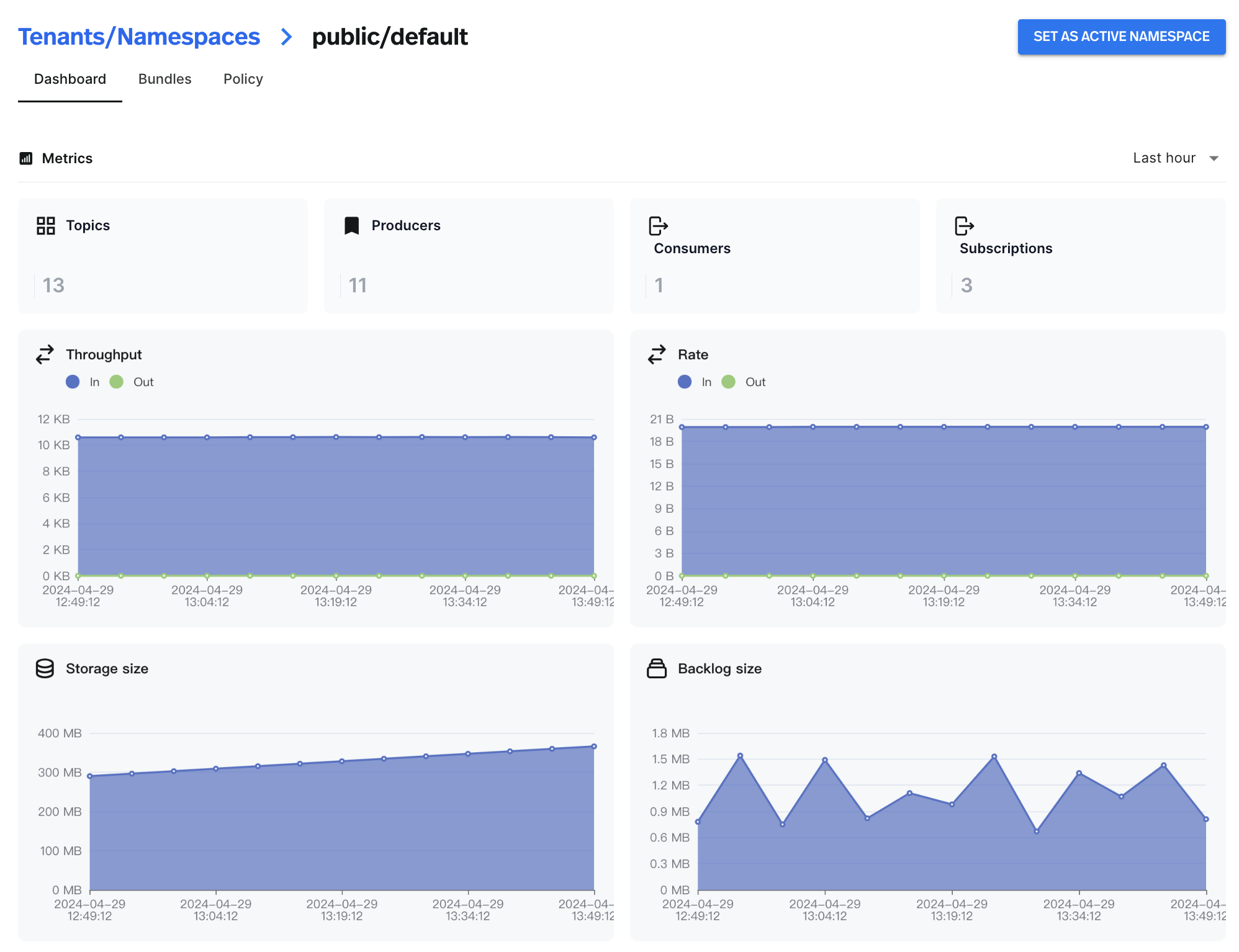
- StreamNative Cloud Console added extra observability dashboards for Pulsar namespaces, Pulsar topics, Pulsar functions and Pulsar connectors.
- Terraform Provider for StreamNative
- StreamNative Cloud launched the Terraform Provider for StreamNative to support manage StreamNative Cloud resources with the Terraform. Learn more.
What’s New
-
StreamNative Support On Azure
- StreamNative Hosted and Bring Your Own Cloud managed offerings are now supported on Microsoft Azure . Learn more .
- StreamNative Hosted and Bring Your Own Cloud managed offerings are now supported on Microsoft Azure . Learn more .
-
Datadog agent’s support for StreamNative Cloud Metrics
- The updated Datadog agent allows users to pull metrics from StreamNative Cloud Metrics API with oauth2 authentication. Learn more.
- New connectors on StreamNative Cloud
-
New feature in BigQuery Sink connector
- BigQuery Sink Connector is enhanced with protobuf-native support.
-
Delete subscription from StreamNative Cloud
- StreamNative Console now supports the ability to delete subscriptions.
-
Improved console uptime
- Now, users can access the console while the cluster environment is getting set up.```
-
MOP Default on New Clusters
- MQTT on Pulsar (MOP) is now available by default on new clusters. Learn more.
-
Updated Breadcrumb
- In order to ensure each user has access to the right resources, the breadcrumb has been updated to require users to select their cluster, tenant, and namespace when navigating around the StreamNative Console. Learn more.
What’s New
-
ACH Payment Option
-
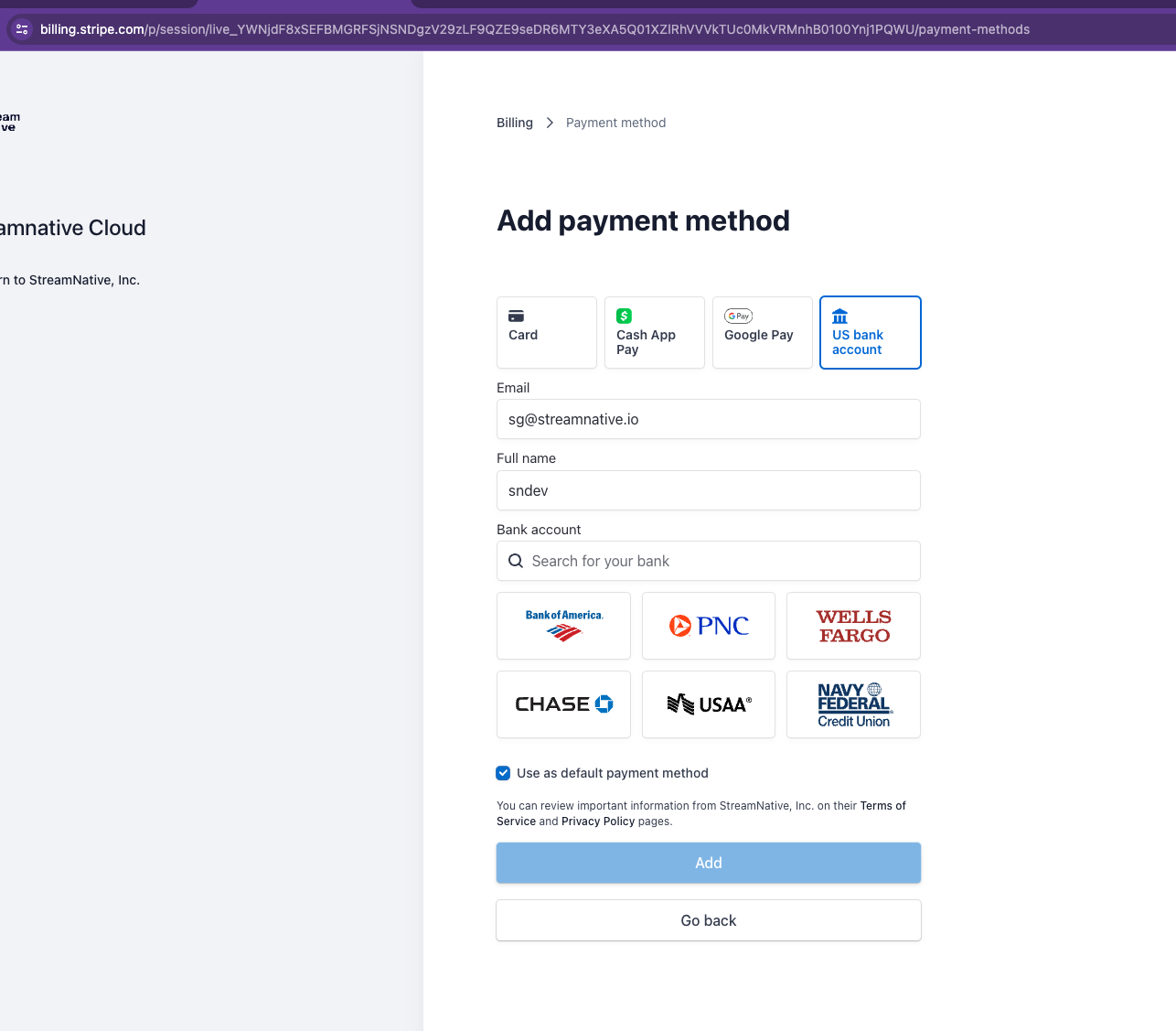
ACH is now accepted as a valid payment option on StreamNative Cloud. To use ACH, click the Billing & Payment button on the dashboard, and enter bank details within the Stripe portal.
-
ACH is now accepted as a valid payment option on StreamNative Cloud. To use ACH, click the Billing & Payment button on the dashboard, and enter bank details within the Stripe portal.
Other Updates
- The Oxia Java client library has now been open-sourced, laying the groundwork for a direct integration between Oxia and in Pulsar 3.3, which will allow Pulsar to scale beyond one million topics. See the announcement blog for more details.
Bug Fixes
- Fixed a bug in graph display logic on the Organization Usage page that would cause usage to appear as if it dropped to zero if there are gaps in the data returned from Prometheus.
- New Connectors Experience in Cloud Console
- The Cloud Console now features a new Connectors experience, including a refreshed user interface and the ability to use secrets to reference credentials in the StreamNative Console.
- Logs and exceptions are now available for connectors, allowing for greater visibility into connector operations, and easier debugging. These can be viewed by clicking into an individual connector from the Connectors page on the StreamNative Console.
- Cluster Default Settings Updates
- Newly created Pulsar clusters on StreamNative Cloud will now have the following features enabled by default:
- Automatically select a location when creating secret
- When creating a new secret, the Location of the secret will now be automatically prefilled. Check out our documentation to learn more about secrets.
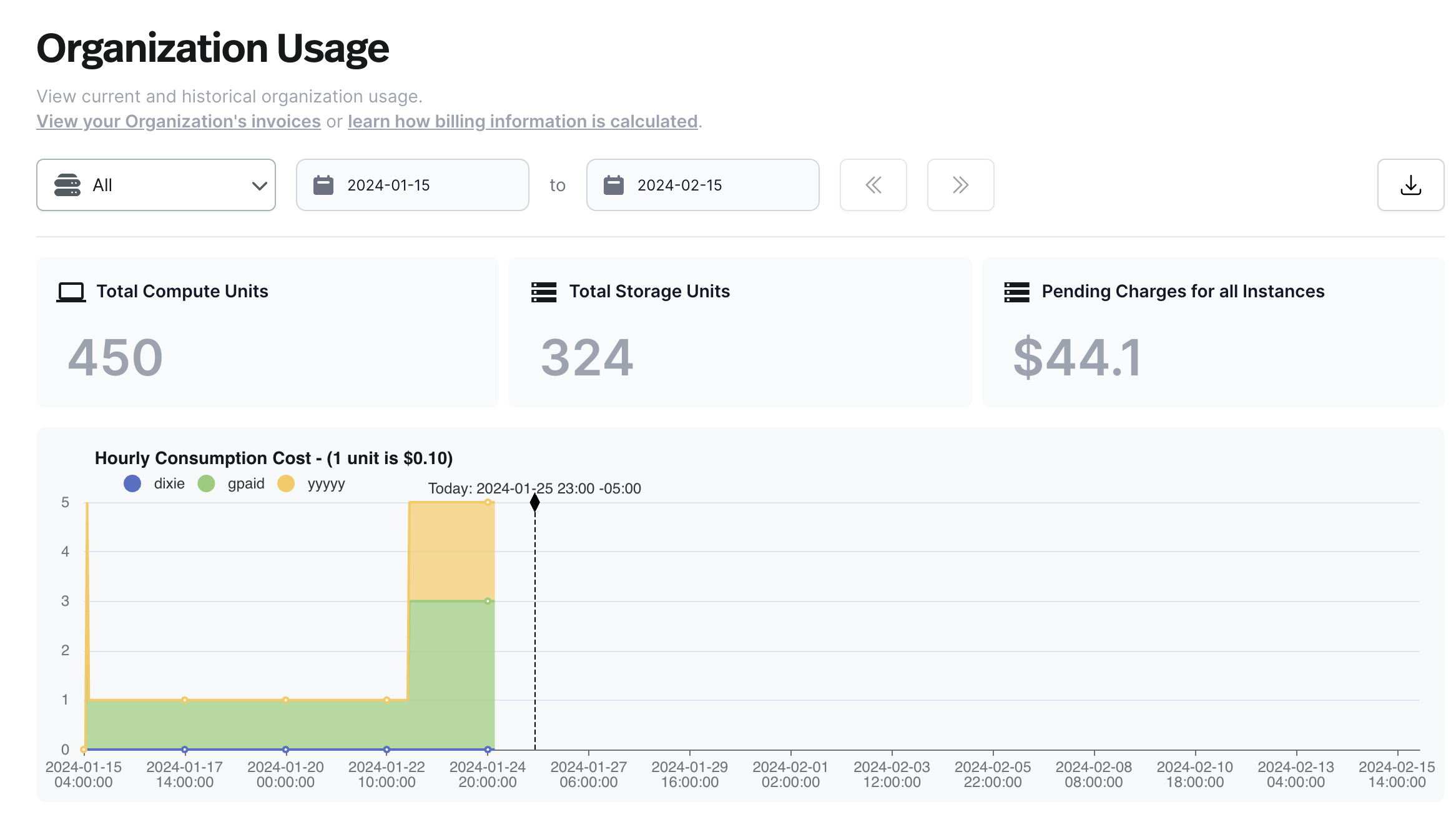
- Usage Page Updates: The Organization Usage page has been updated to grant users greater insight into how cluster usage connects to cost.
- Hourly Cost Available on Usage Page: Hourly cost, as well as pending charges, are now available on the Organization Usage page, as well as the csv export. While the Hourly Cost chart can be filtered by Instance, the Pending Charges metric is always an Organization-wide metric spanning across all Instances.
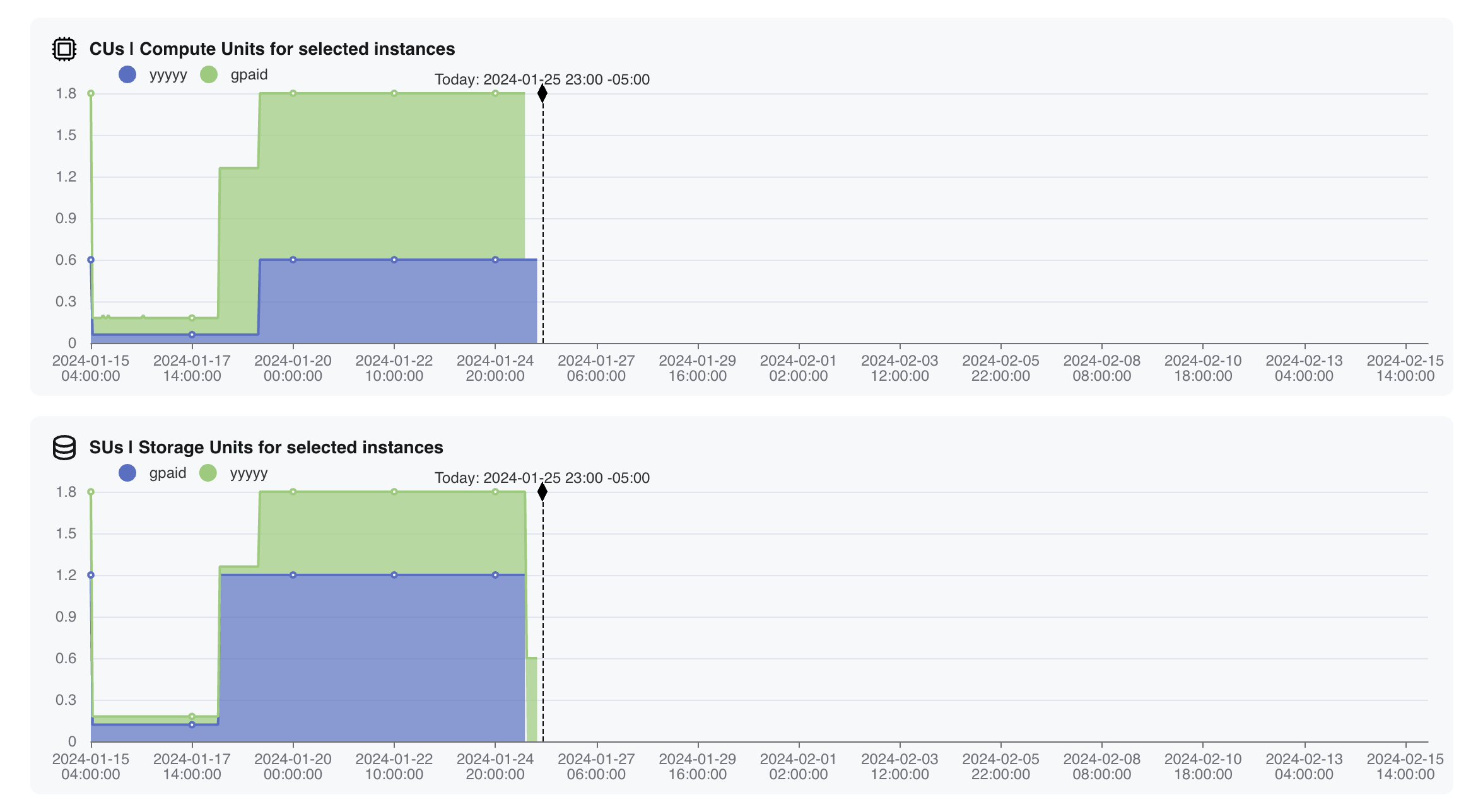
- Compute and Storage Units Grouped By Instance: Usage charts for Compute Units and Storage Units are now broken down by instance, giving insight into how each instance contributes to overall usage.
- The Usage Page now supports TB on the y-axis, for organizations where compute or storage usage extends to terabytes.
- Hourly Cost Available on Usage Page: Hourly cost, as well as pending charges, are now available on the Organization Usage page, as well as the csv export. While the Hourly Cost chart can be filtered by Instance, the Pending Charges metric is always an Organization-wide metric spanning across all Instances.
- Cluster Page Enhancements: The Cluster page of the StreamNative Console has been expanded to give you more insight on your clusters.
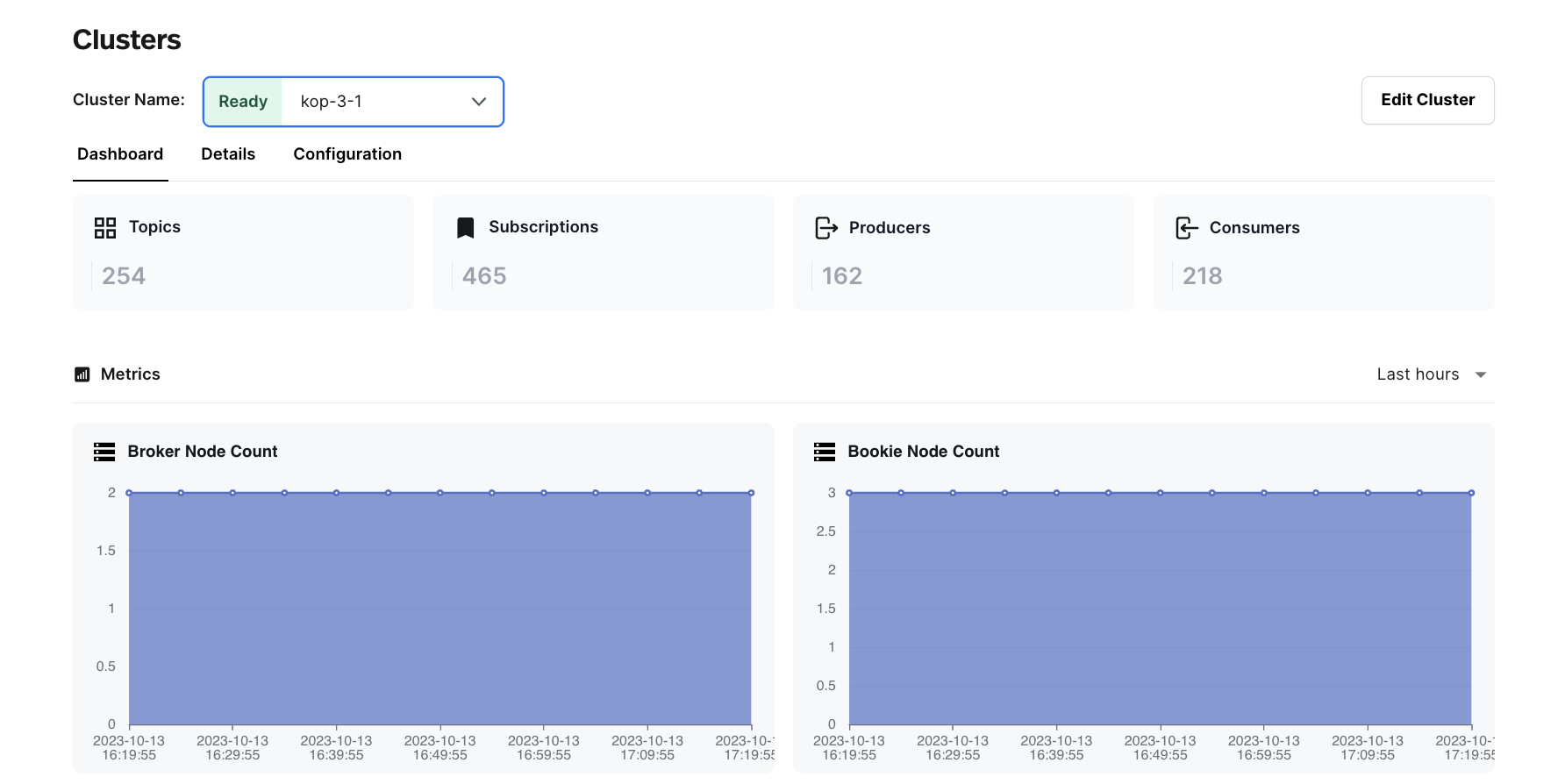
- Broker Node Count and Bookie Replica Count on Dashboard: Charts showing the broker and bookie replicas have been added to the Dashboard tab of the Cluster page, to create a record of configuration changes over time.
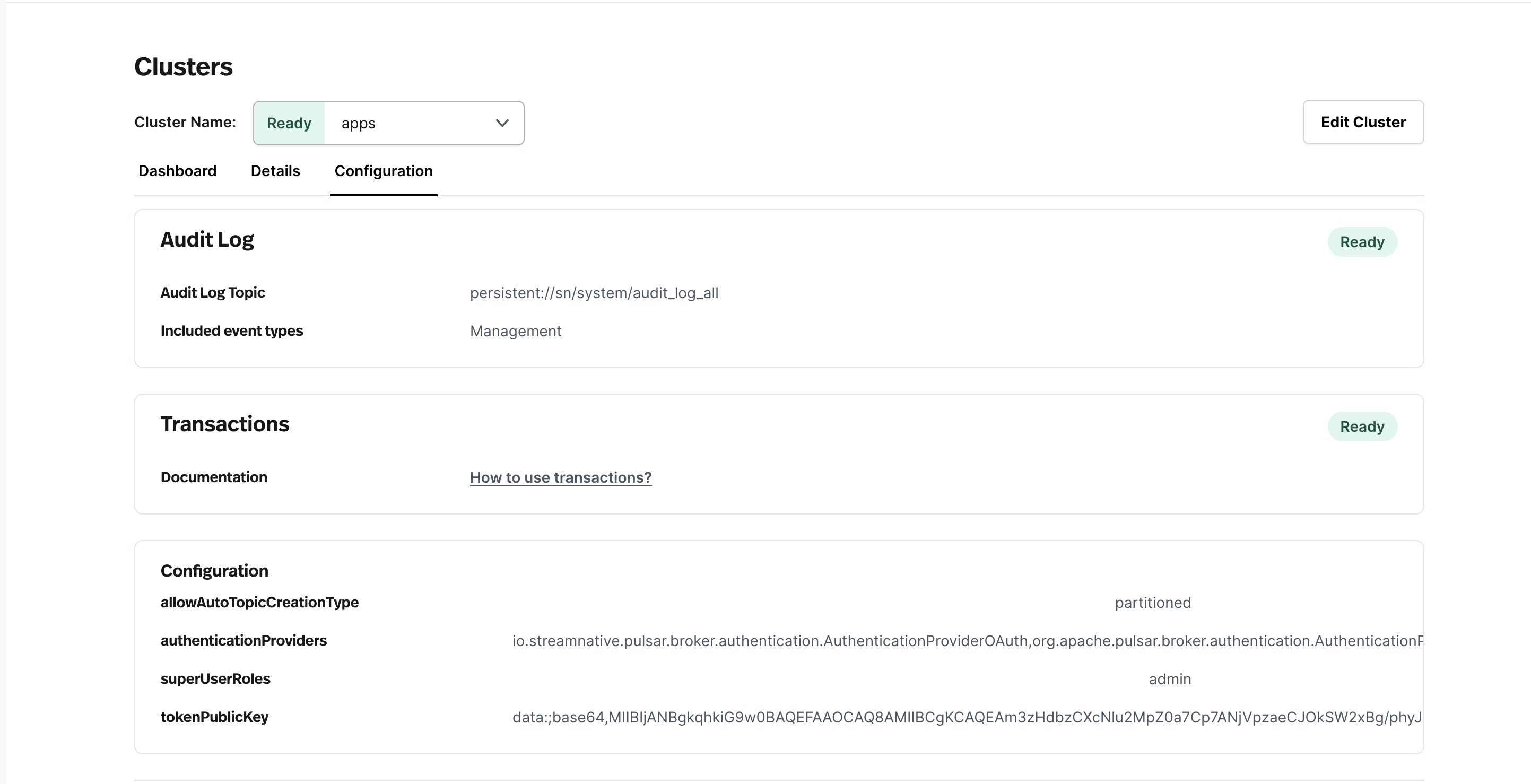
- New Configuration Tab: A new Configuration tab has been added to the cluster details page, containing information on which settings are enabled, as well as general configuration information.
- Broker Node Count and Bookie Replica Count on Dashboard: Charts showing the broker and bookie replicas have been added to the Dashboard tab of the Cluster page, to create a record of configuration changes over time.
- Service Account Permissions for Functions: Users can now view and edit which service accounts have permissions to work with functions and connectors on the Service Accounts page. To make changes to a service account’s bindings, open the
...menu on the service accounts page, and select the poolmember to which you want to give your service account access.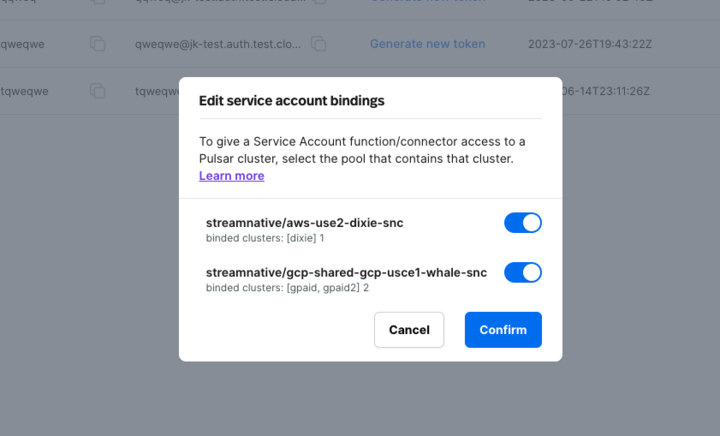
- Instance and cluster names can now be up to 64 characters: instances and clusters can now have more descriptive names, making it easier to manage several of them.
What’s New
-
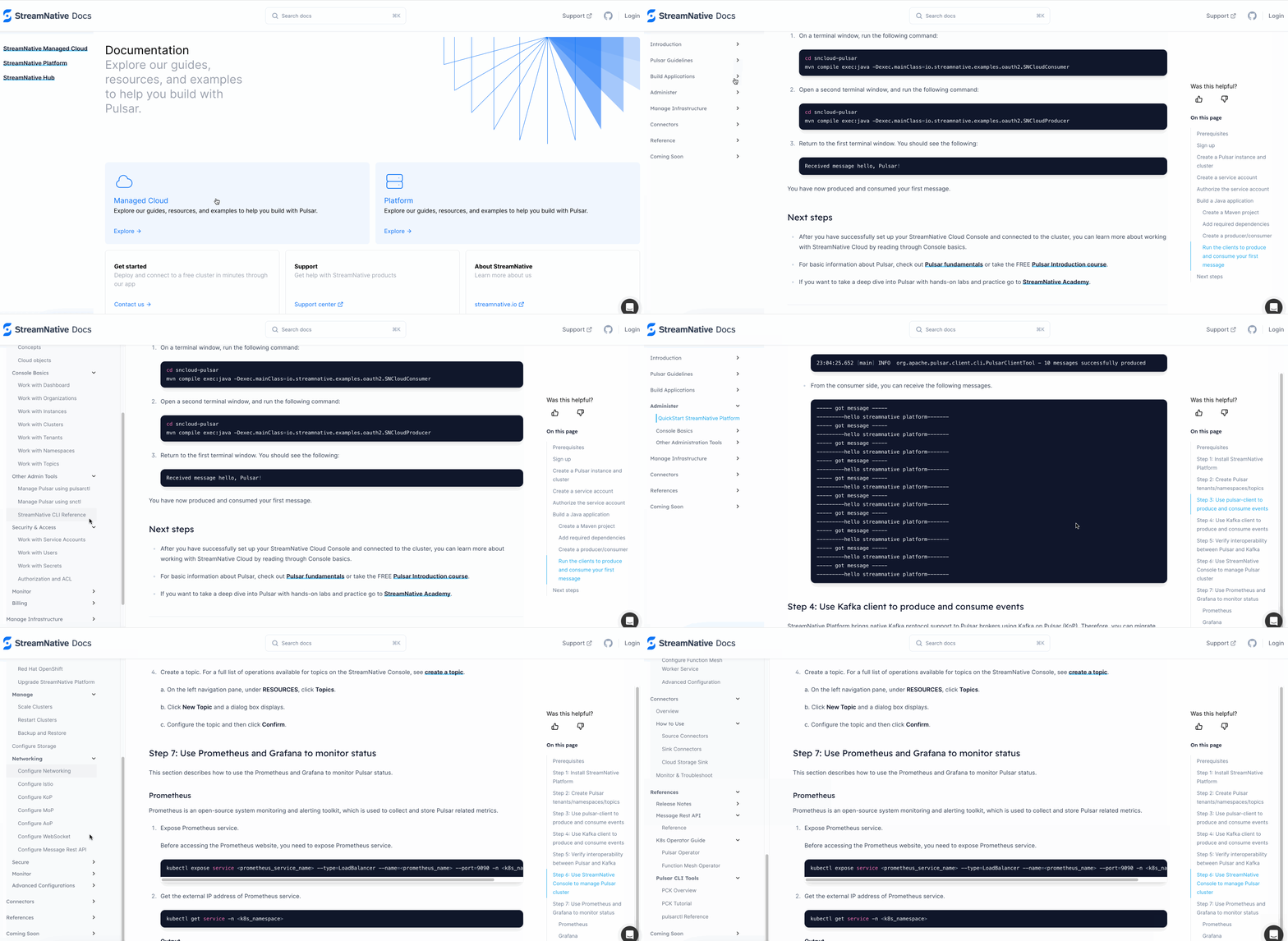
Documentation Site Refresh
StreamNative’s documentation site has been redesigned. There are now two separate sub-sites for StreamNative Cloud and StreamNative Platform, and each section is organized by the type of work that you are trying to do:
- Build Applications: This section is for Pulsar users within companies that are using Pulsar to build applications, such as application development teams. (They do not need to know anything about managing or architecting/administering Pulsar.)
- Administer: This section is for Pulsar power users and core platform teams that manage Pulsar components. This section includes information on creating tenants, namespaces, and topics, as well as managing organizations and instances.
- Manage Infrastructure: This section is primarily for customers who are managing clusters and infrastructure. (That is, SRE folks - cluster, metrics, logs.)
Other Enhancements
-
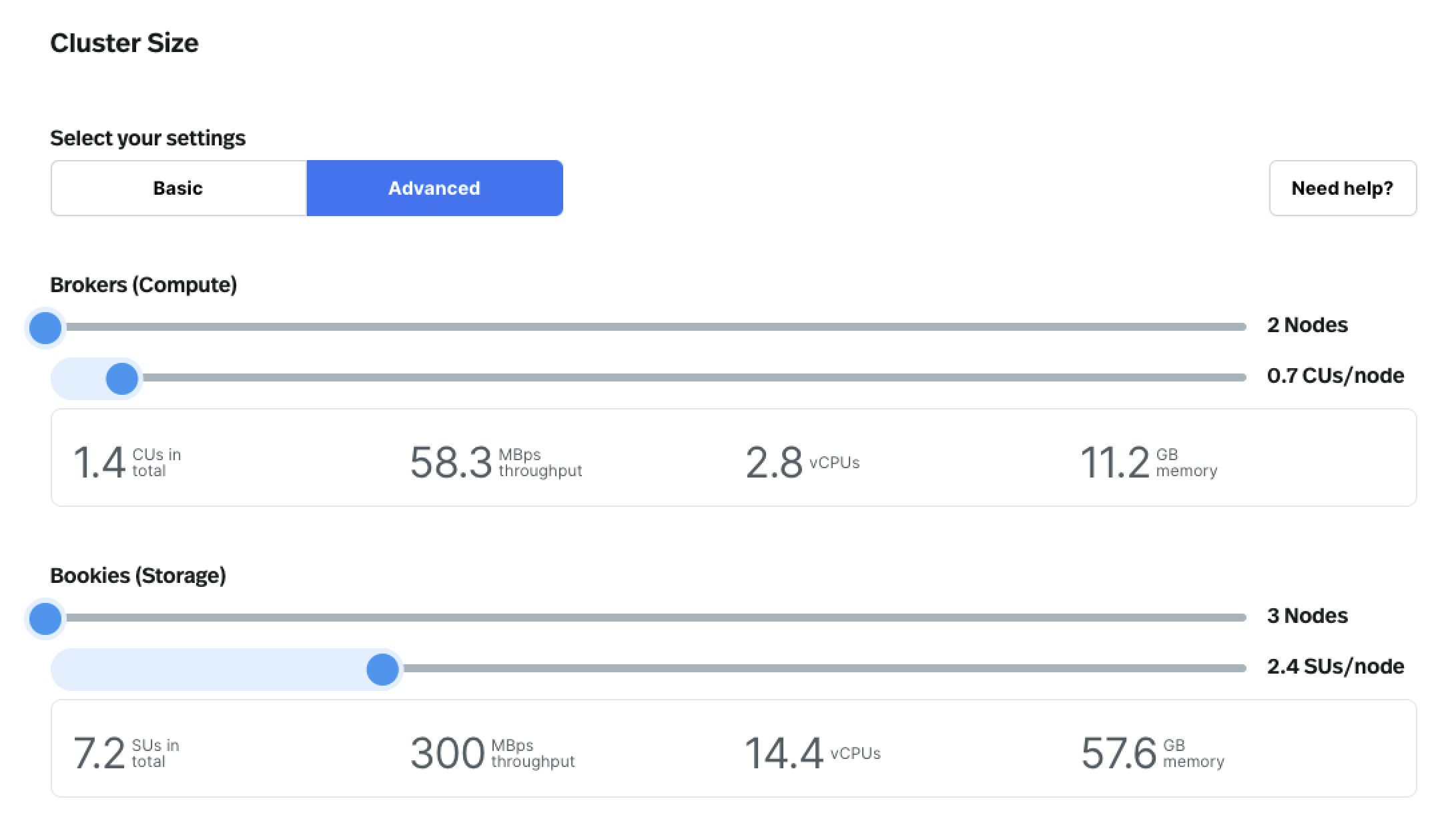
Show memory and CPU when configuring Brokers and Bookies
The Advanced tab for configuring a Pulsar cluster now surfaces both memory and CPU for Brokers and Bookies, making it easier to understand your cluster’s compute and storage capabilities.
-
Pulsar version 2.11.1.2 for newly deployed Hosted clusters
Updates from version 2.10.3.7 include the following:
- Upgrade Pulsar server Java build version to 17.
- Support chunking with shared subscriptions.
- Support the pluggable topic factory.
- Support configuring the compression type for
ManagedCursorInfoto balance storage resource usage.
-
Pulsar Admin Go version 0.1.1
Pulsar Admin Go library v0.1.1 has been released, and includes the following updates:
- Add two new parameters (
BrokerClientTrustCertsFilePathandBrokerClientTlsEnabled) to support TLS when creating a cluster. - Add
GetMessageIDto the API, which returns the message ID by timestamp(ms) of a topic.
- Add two new parameters (
-
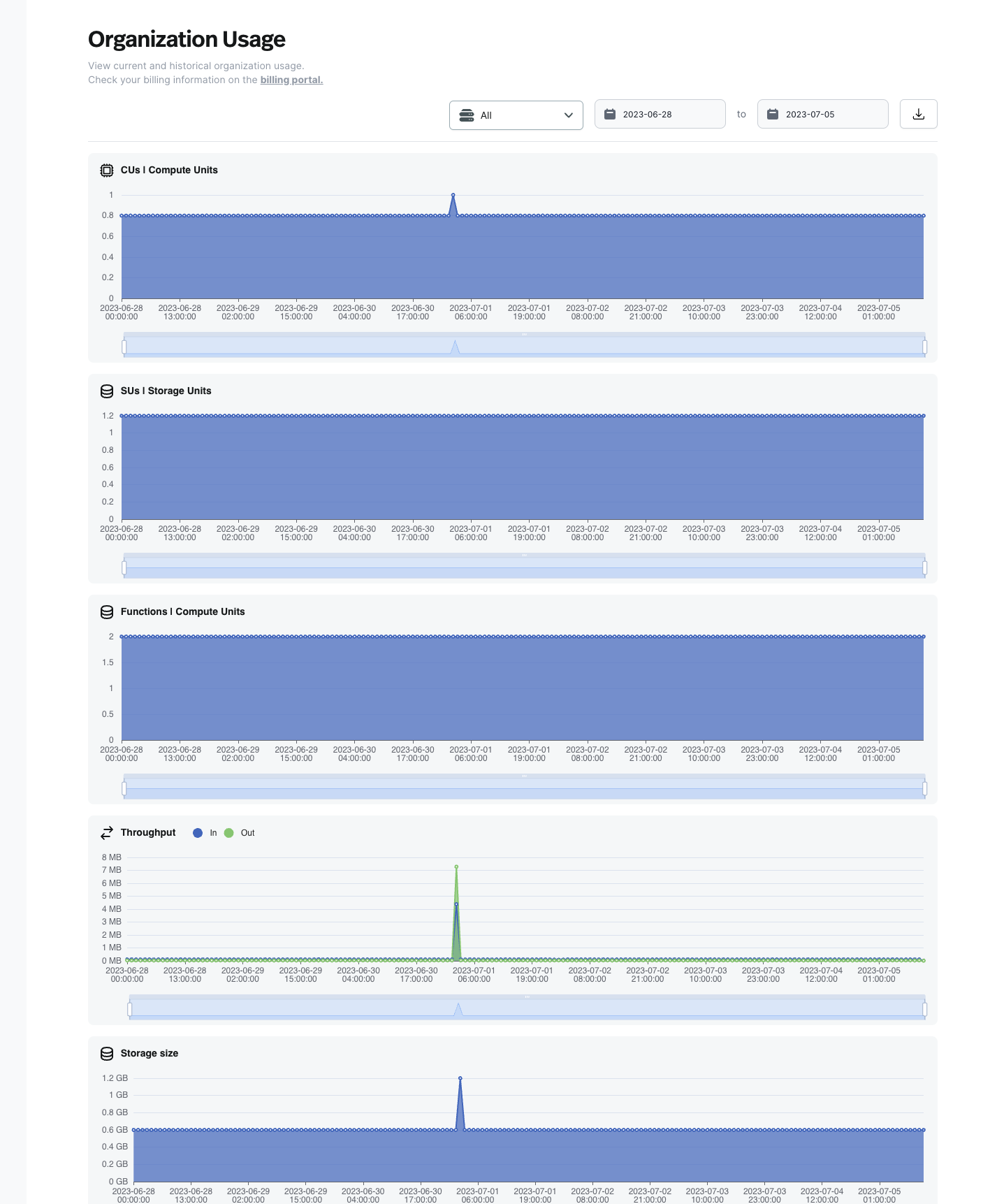
Functions Usage Chart
The Organization Usage page on StreamNative Cloud Console now includes a chart showing an organization’s function usage in Compute Units (CUs), for organizations that have functions enabled.
Bug Fixes
Fixed a bug that caused the same metrics to show up for multiple Pulsar clusters within an instance.What’s New
-
New Connector: AWS EventBridge Sink Connector
- The StreamNative team has built a new connector for open source Pulsar - the AWS EventBridge Sink Connector! With it, you can pull data from a Pulsar cluster and persist it to AWS EventBridge, making it easier to build scalable event-driven applications. To learn more, check out our recent blog post.
- Additionally, the AWS Eventbridge Sink Connector is also available on StreamNative Cloud! For a detailed setup tutorial, check out our blog post announcing the integration. If you would like to use it, please reach out to the StreamNative Support Team.
-
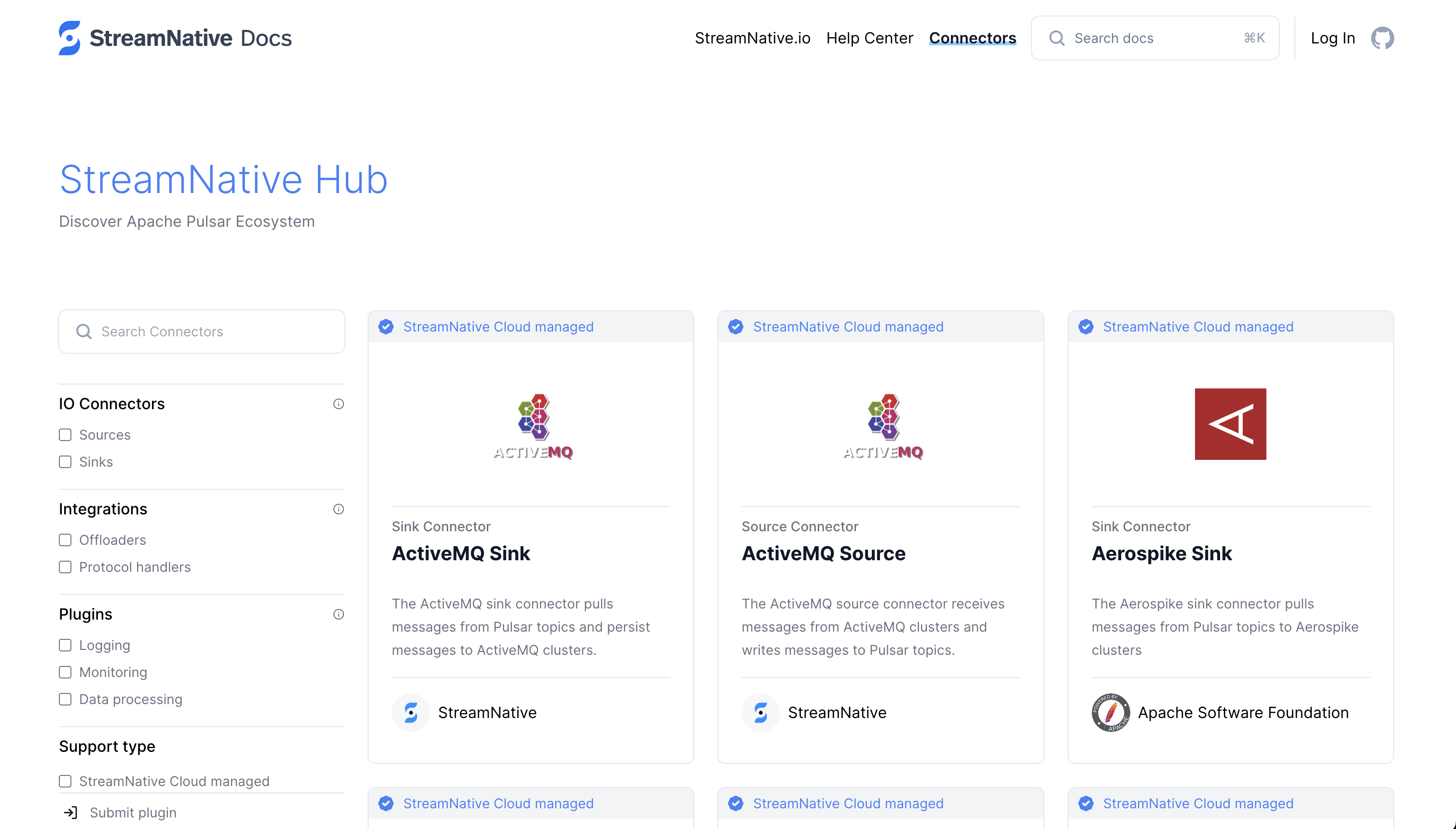
StreamNative Hub
The StreamNative Hub has a new design and is quickly accessible from the StreamNative Docs site, making it easier to find connectors and understand which connectors are supported on StreamNative Cloud.
- Pulsar 3.0 available on StreamNative Cloud Pulsar 3.0, the next evolution of Pulsar, is now available on StreamNative Cloud. Pulsar 3.0 allows teams to run even bigger workloads, and is easier for developers to work with on their local machines. Updates include LTS support, an improved load balancer, several performance improvements, and Docker images for M1/M2 Macs. You can try Pulsar 3.0 on a new cluster or reach out to the StreamNative Support Team about upgrading existing clusters.
Other Enhancements
-
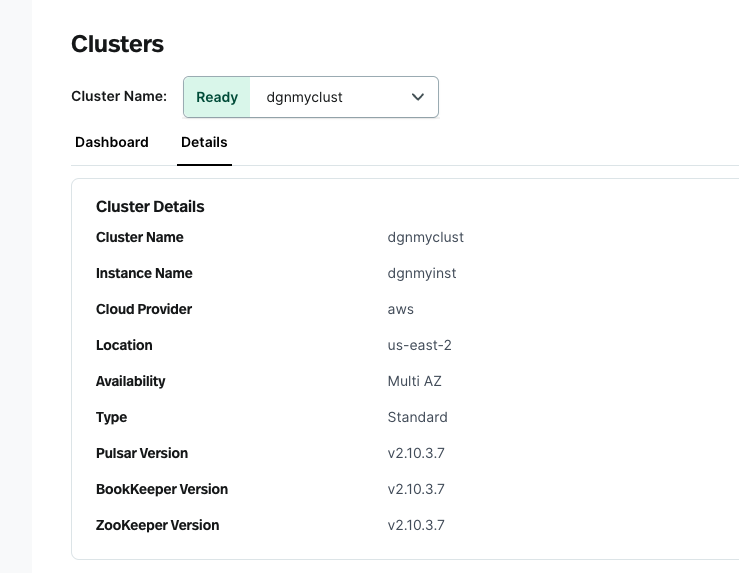
Additional Version Details available on StreamNative Cloud Console
Pulsar, BookKeeper, and ZooKeeper versions are now available on the cluster details page, giving you greater insight into your cluster’s configuration details.
-
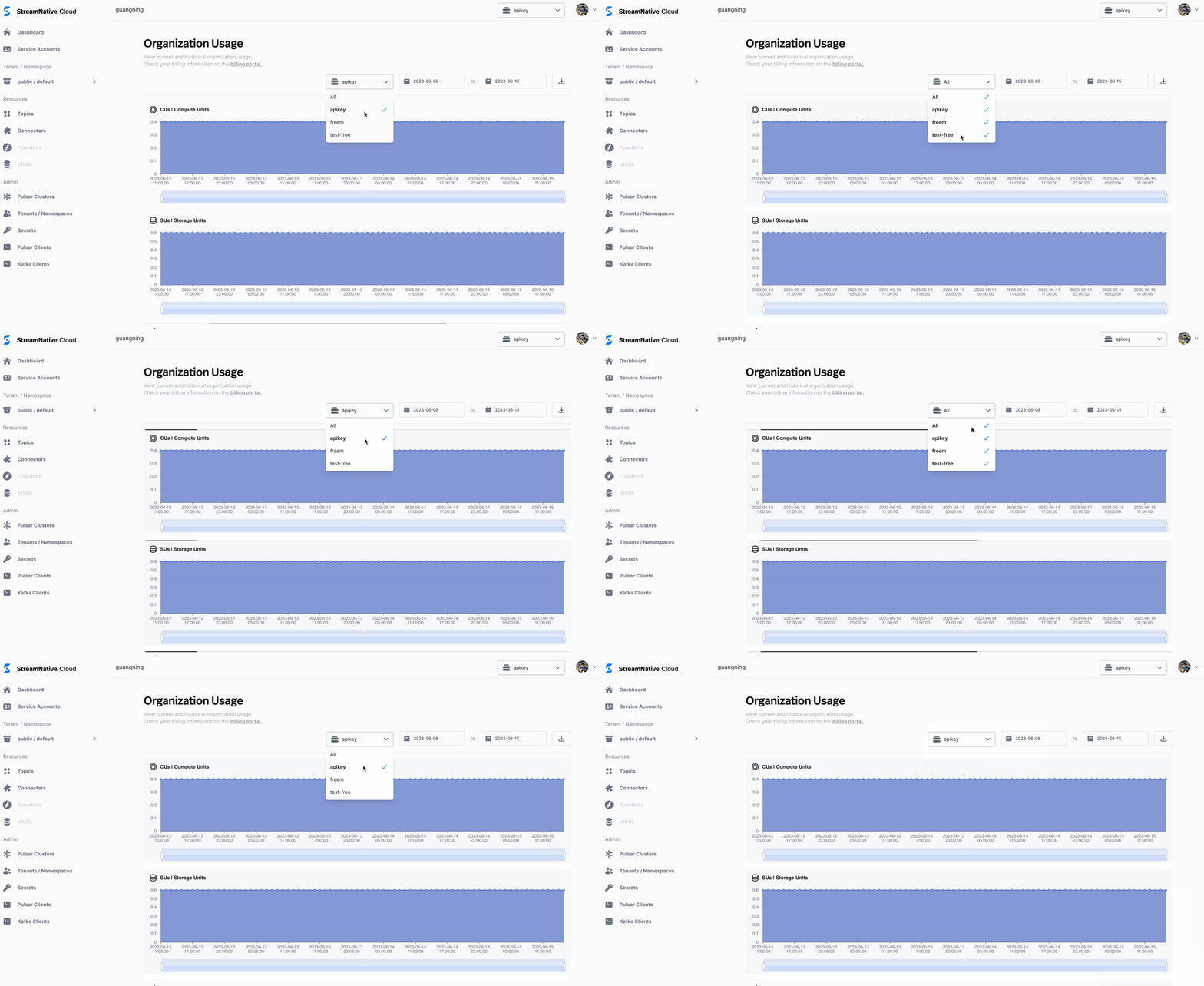
Improved experience on the Organization Usage page
It is now easier to understand how many resources your clusters consume. You can view usage metrics (such as compute, storage and data) for a specific instance and then compare it to the organization’s usage across all instances.
- AWS Marketplace listing update We have updated our product listing on AWS Marketplace. With the more streamlined listing, you can view usage data via the Organization Usage page.
What’s New
-
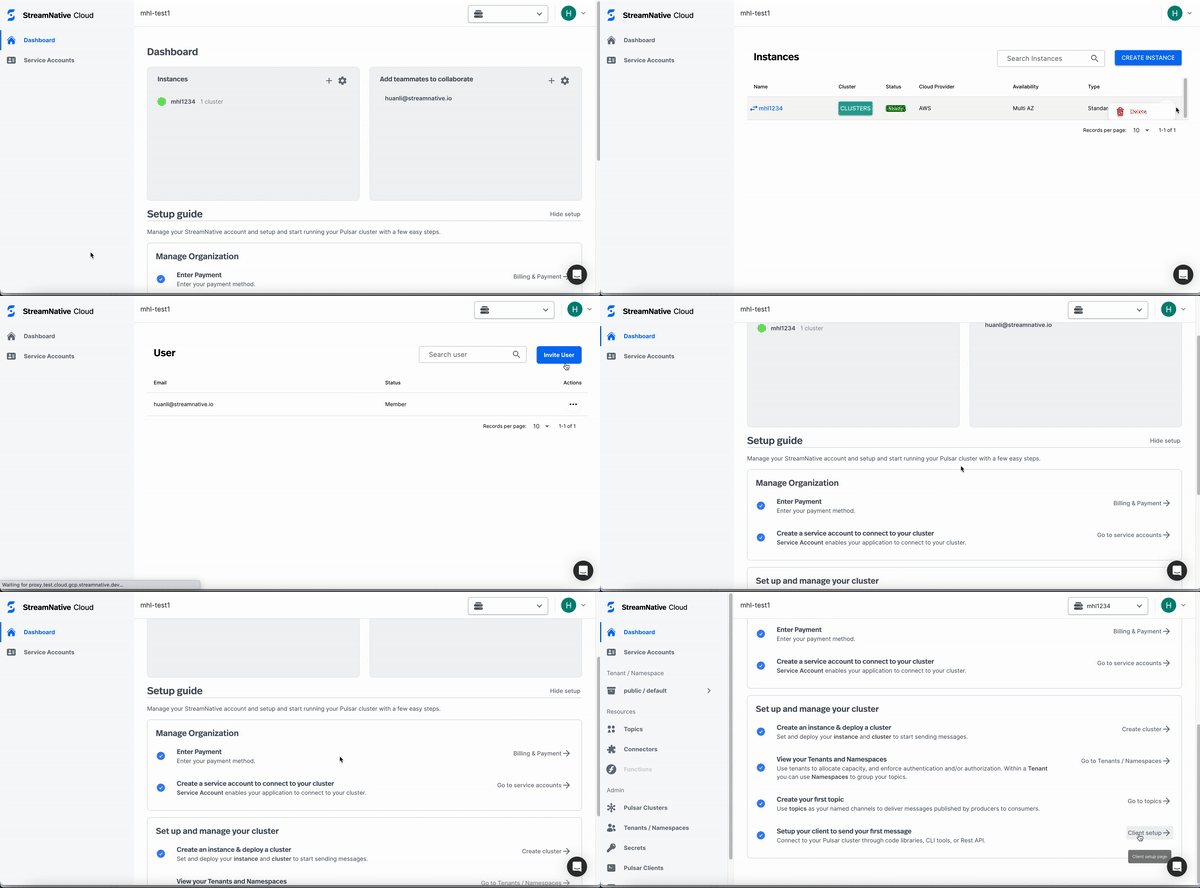
New Setup Guide. A new setup guide has been added to the Dashboard page and contains everything that you need to get up and running with a hosted cluster. On the Dashboard page, you will see step-by-step instructions on adding a payment method, creating and configuring Pulsar clusters, creating topics, setting up clients, and sending messages. The setup guide can be viewed by logging in to the StreamNative Cloud Console and clicking Dashboard on the left navigation pane.
-
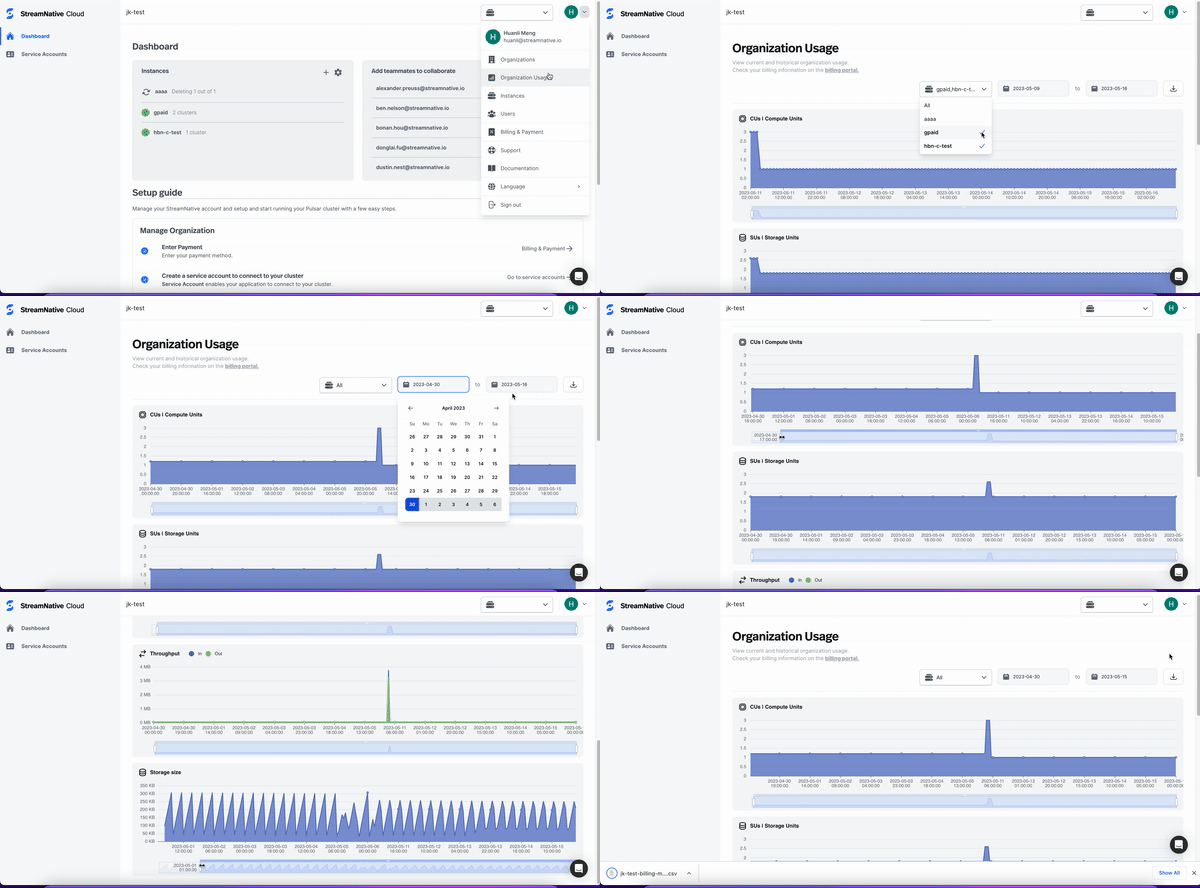
Organization Usage Page. Customers with StreamNative Managed Clusters (Hosted + BYOC) can now view both real-time and historical cluster usage data on the new Organization Usage page. This page features charts visualizing the usage dimensions (Compute Units, Storage Units, Throughput, and Storage Size) for all clusters within an organization. You can view usage by instance or in aggregate across your organization and narrow the date range to hone in on usage over a specific time period. You can view up to the past 60 days of usage.
-
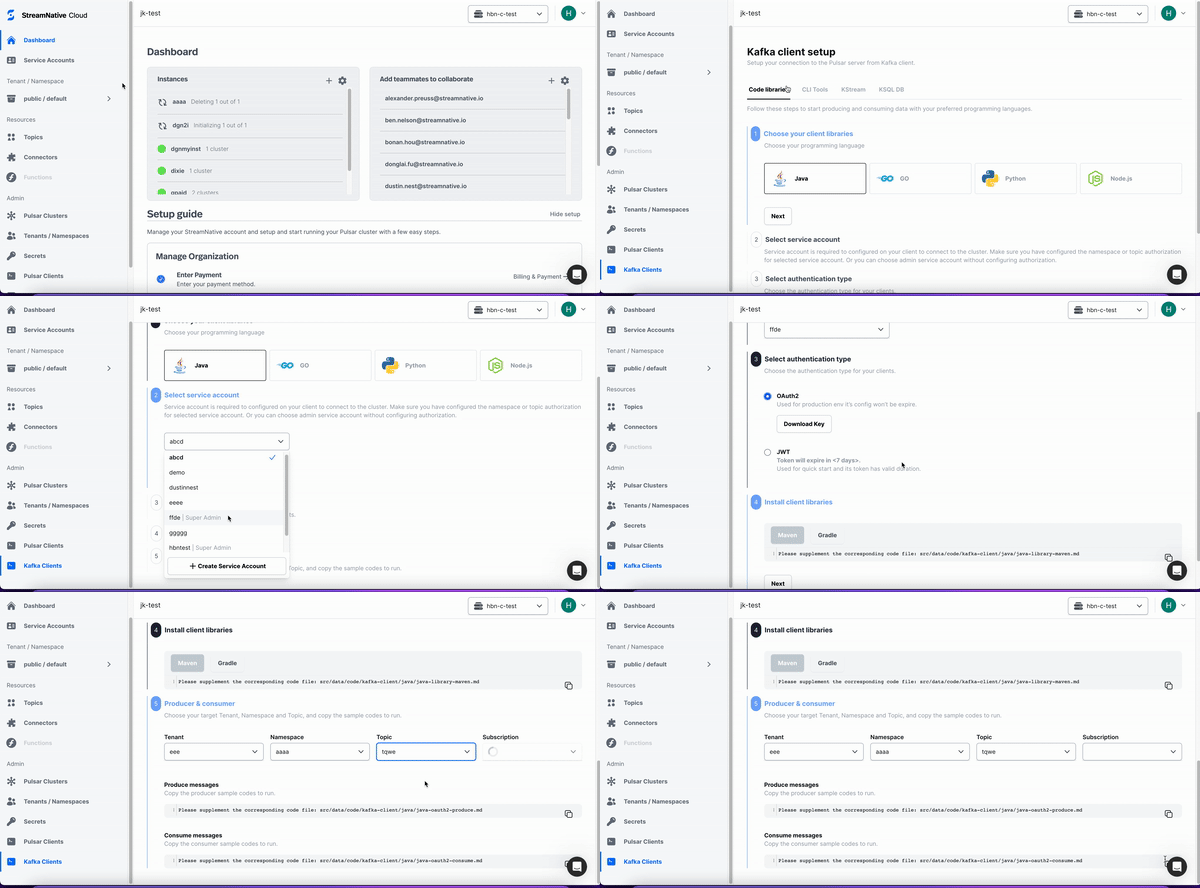
Improved Usability for Kafka Clients. Customers with clusters that have Kafka protocol enabled will include a new Kafka Clients page that walks you through using Kafka clients to connect to your clusters. The Kafka client setup wizard enables application developers using Kafka clients to easily connect to their organization’s Pulsar cluster. This page includes client libraries (Java, Go, Python, C++, Node.js), Apache Kafka CLI tools, KStream applications, and KSQL. In addition, the Kafka protocol is also enabled by default on all new managed Pulsar clusters (Hosted + BYOC).
Other Enhancements
- Refreshed Dashboard for managing instances and user accounts on StreamNative Cloud Console. You will see two new cards on the Dashboard page, surfacing additional information about your organization’s instances and user accounts, allowing you to manage instances and user accounts directly from the Dashboard page without going to a separate screen.
-
New hosted clusters on Pulsar 2.10.3.7. New hosted Pulsar clusters (clusters hosted on StreamNative’s public cloud account) will now be on version 2.10.3.7, where they were previously on version 2.9.3.21. As a result, you will benefit from the following enhancements:
- Pulsar provides automatic failure recovery between the primary and backup clusters.
- With the lazy-loading feature added to
PartitionedProducer, fewer producers are needed and the broker memory utilization is improved. - Topic map support added with a new
TableViewtype using key values in received messages.
-
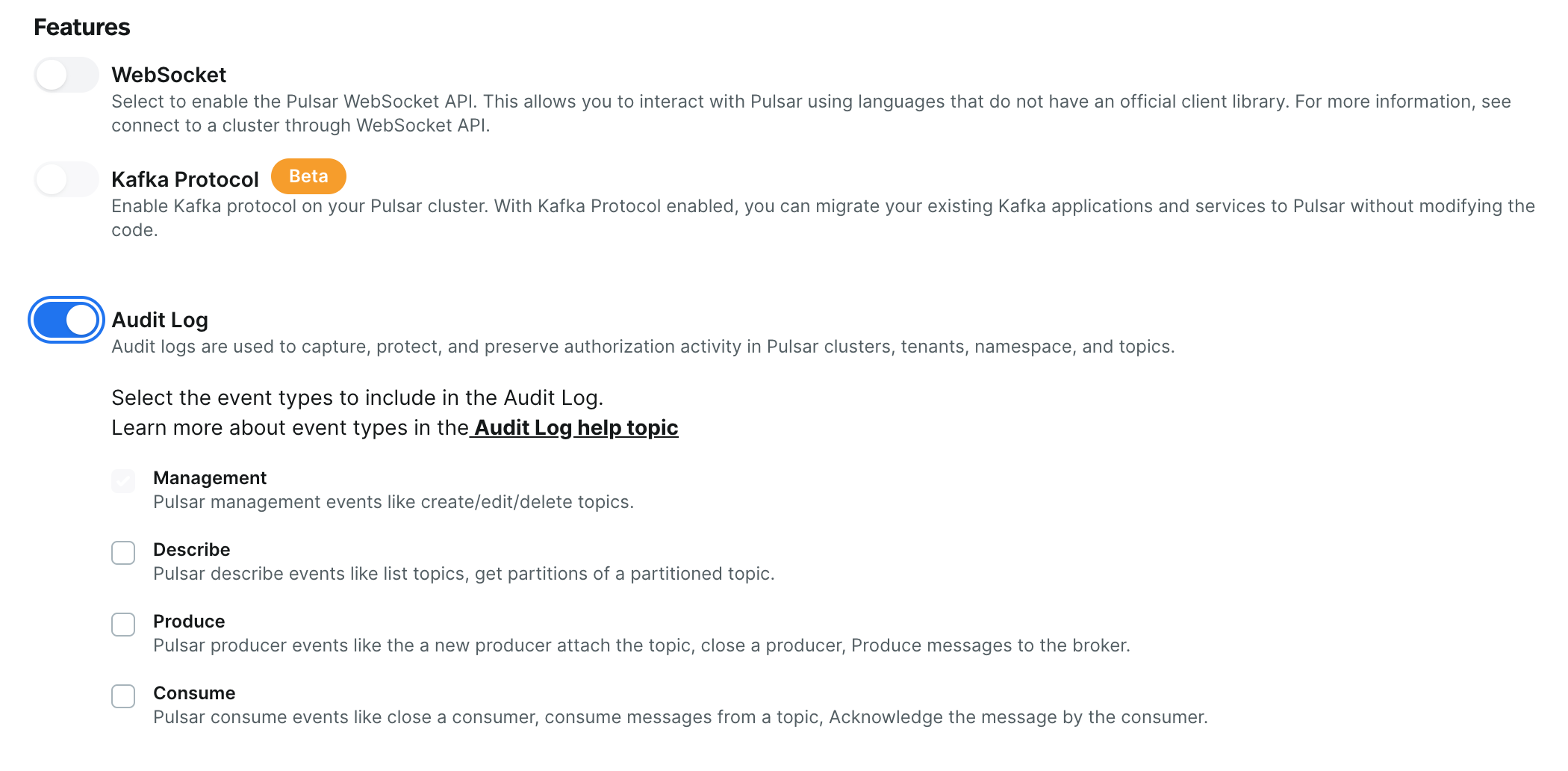
Audit log now includes produce and consume events. For clusters on Pulsar 2.10.3.7 and later, Produce and Consume events can now be tracked in the audit log.
-
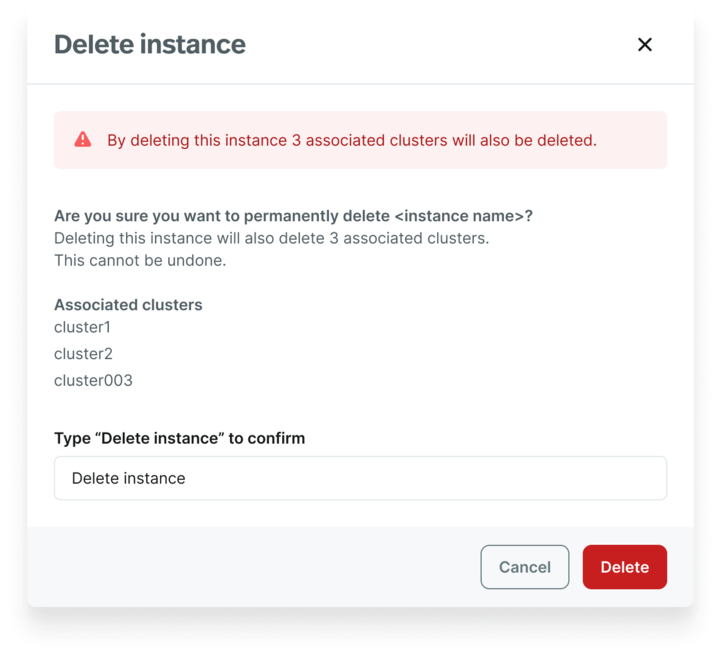
Streamlined instance deletion experience. You can now delete an instance and all Pulsar clusters within it in one step, rather than having to individually delete all associated clusters before deleting the instance.
-
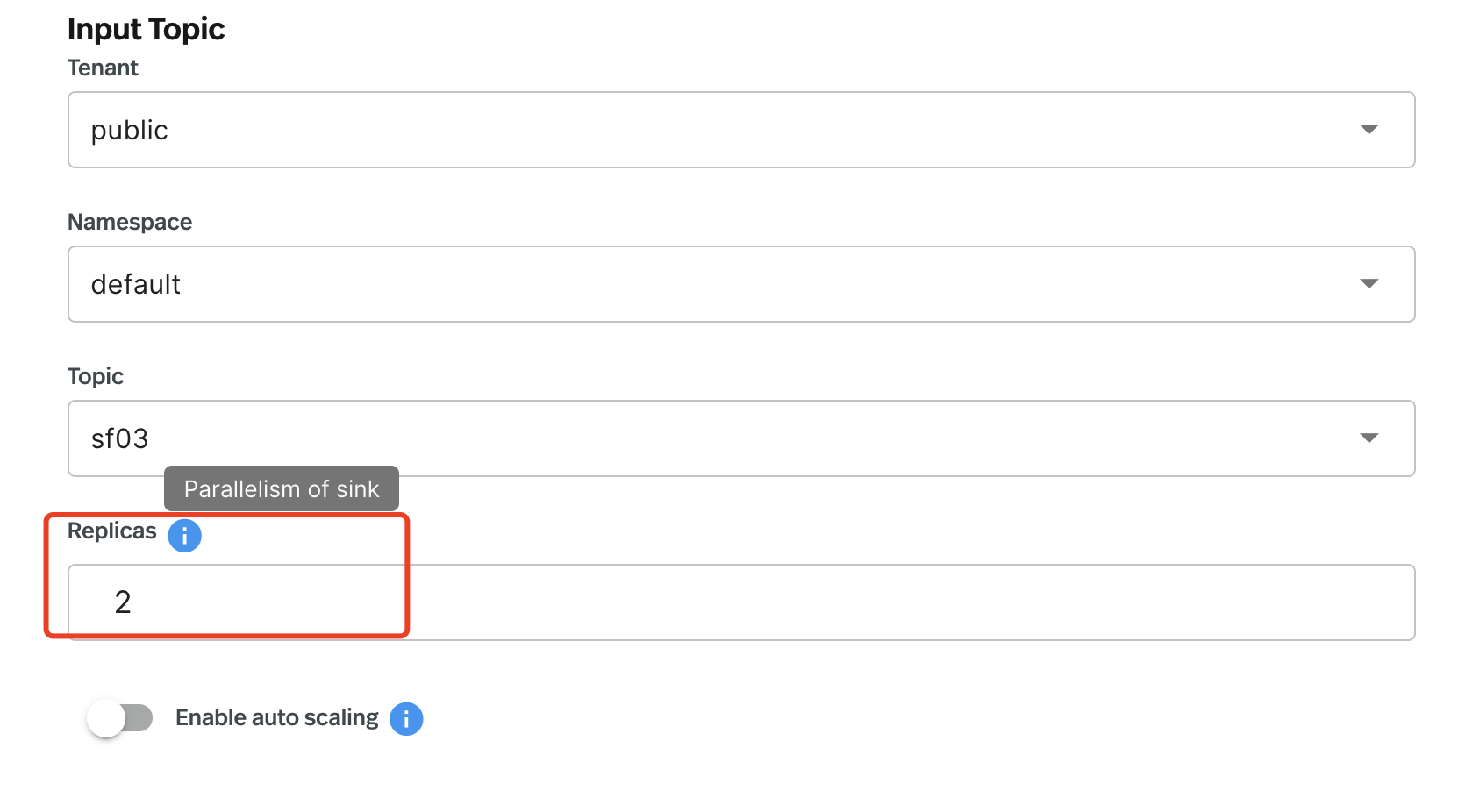
Snowflake Sink Connector upgrade. The Snowflake Sink Connector on StreamNative Cloud Console has been upgraded from 2.9.4.1 to 2.10.3.4. In addition to smaller bug fixes, this connector now supports concurrency where it previously did not, meaning the replicas can now be set to more than 1 when configuring a connector.
Bug Fixes
- Fixed an issue preventing the creation of a Debezium-Postgres connector via the StreamNative Cloud Console.
- Fixed an issue where namespaces with lots of topics would sometimes show a spurious error on the Namespace page of the StreamNative Cloud Console.
- Fixed an issue causing configuration details on the Functions page to display without formatting.
What’s New
-
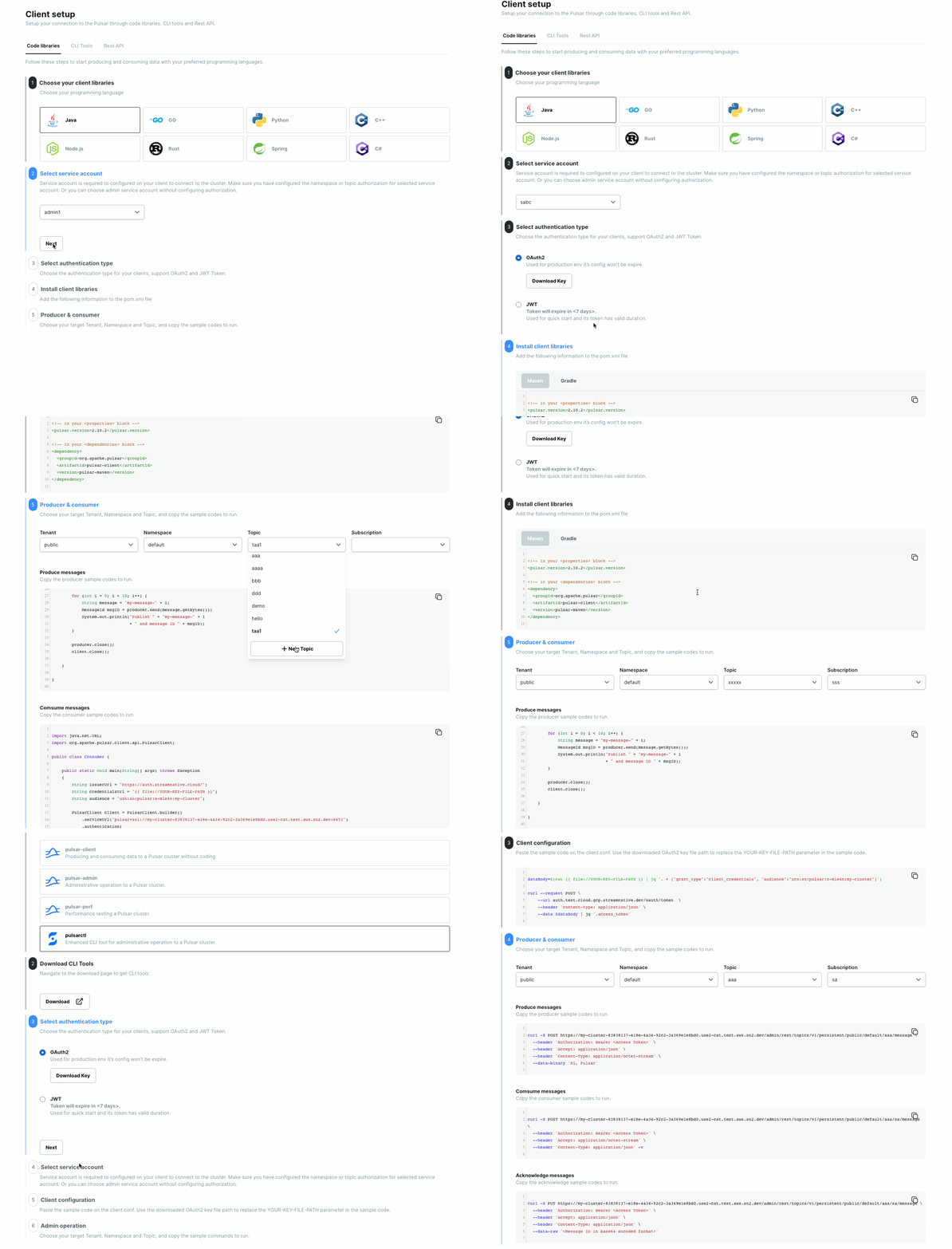
New Clients Page. The Clients page makes it easier to connect to a Pulsar cluster with your client of choice. You’ll find comprehensive example snippets with better syntax highlighting, more programming languages (Java, Go, Python, C++, Node.js, Rust, Spring, C#), and more REST API and CLI tool examples.
You can download authentication tokens (either an OAuth2 credential file or a JWT token) directly from the Clients page.
To view the new page, select a programming language, CLI tool, or REST API. Then, you can see installation and connection instructions. Watch the video below for an example of connecting to a cluster using the Java client.
-
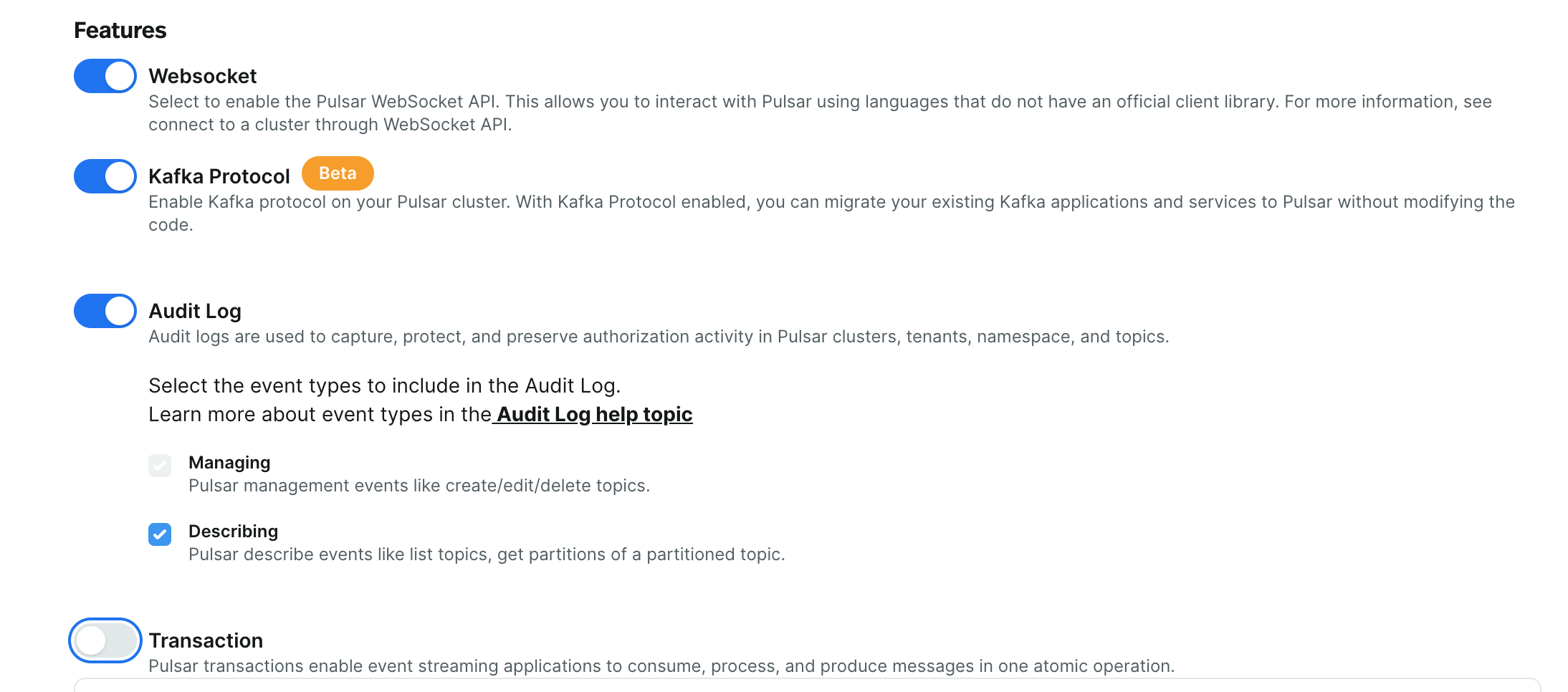
Pulsar Transactions on StreamNative Cloud. You can now configure Pulsar Transactions using the StreamNative Cloud Console.
Pulsar Transactions (in Beta on StreamNative Cloud) enable event-streaming applications to consume, process, and produce messages in one atomic operation, including:
- Atomic writes across multiple topic partitions
- Atomic acknowledgments across multiple topic partitions
- All the operations made within one transaction either all succeed, or all fail
- Consumers are ONLY allowed to read committed messages
Improvements
-
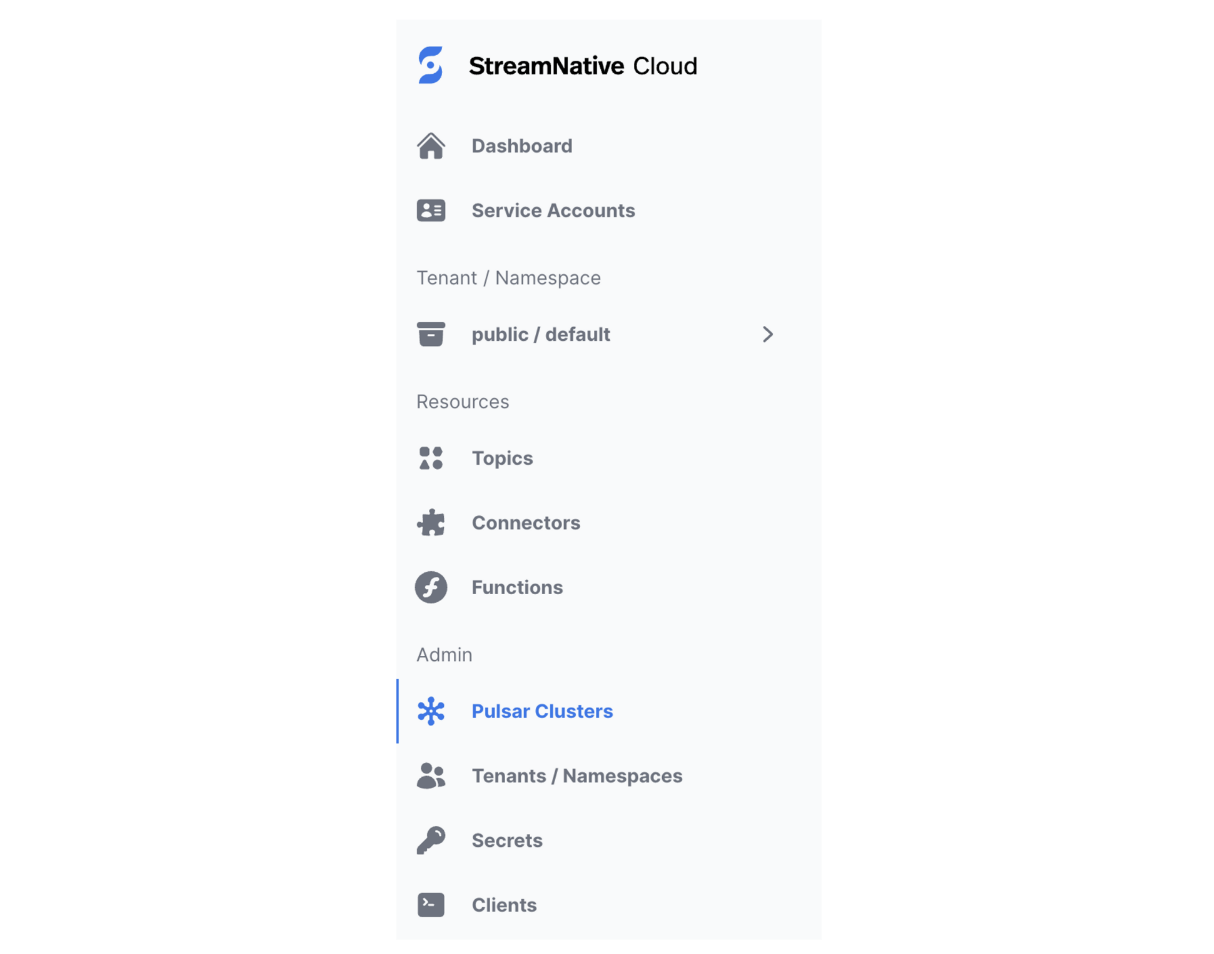
Navigation bar refresh. The new design for the navigation bar on the StreamNative Cloud Console includes a lighter theme and updated icons, making it easier to navigate the console. To colocate all Admin tasks, the Clients tab was moved to the Admin section.
- Pulsar cluster names. With this release, the maximum number of characters for Pulsar cluster names is 10 characters. (Note: Existing Pulsar clusters with names longer than 10 characters are not affected by this change.)
-
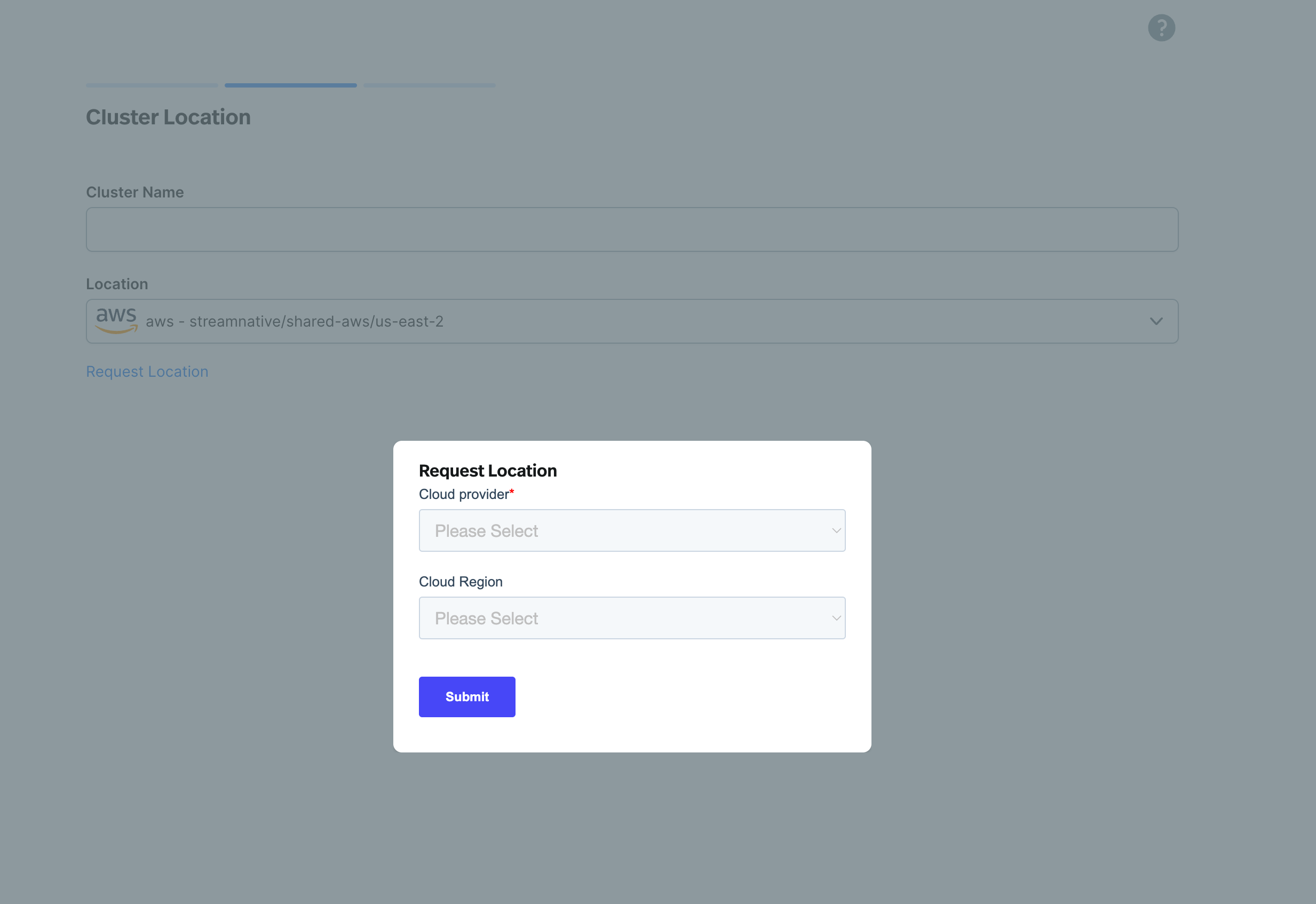
Request a region. If you are creating a new cluster using StreamNative Cloud Console and a region is not currently supported, you can request support for that region.
Bug Fixes
- Previously, it was possible to delete instances with active clusters. Now, before you can delete an instance, you must first delete all clusters within that instance.
- Previously, you could not disable the audit log once it was turned on (enabled). With this release, it is now possible to toggle the audit log on and off.
Breaking Changes
- Deprecation of free cloud. New customers can no longer sign up for free clusters. If you are interested in requesting access to StreamNative Cloud, please Contact us.
New provisioning changes for hosted clusters
We have improved the customer experience for self-service provisioning, making it easier for you to provision StreamNative hosted clusters.- You can provision new clusters through StreamNative Cloud console, with a prompt to update payment information.
- New changes will not impact existing clusters. To adjust the sizing of existing clusters, please submit a ticket, and our team will assist with this one-time migration.
Audit Log
Audit Log allows you to monitor which user accounts and applications are accessing data, and what they do with it. Audit Log supports various audit event types, including creating, updating, and deleting clusters, tenants, namespaces, and topics.New connectors
New connectors are available on StreamNative Cloud:- Debezium / Microsoft SQL Server Source - Pulls messages from the SQL Server and persists the messages to Pulsar topics.
- Google BigQuery Source - Feeds data from Google Cloud BigQuery tables and writes data to Pulsar topics.
- Google BigQuery Sink - Pulls data from Pulsar topics and persists data to Google Cloud.
- Snowflake Sink (available through the CLI) - Loads data from Pulsar topics to Snowflake in real time.
Cluster Metrics in Beta
StreamNative Cloud offers a new endpoint and dashboard for Cluster Metrics to help provide visibility into your Pulsar clusters and track performance over time. Collect and monitor cluster health and performance metrics in real time, analyze trends, and proactively maintain your applications to ensure optimal performance.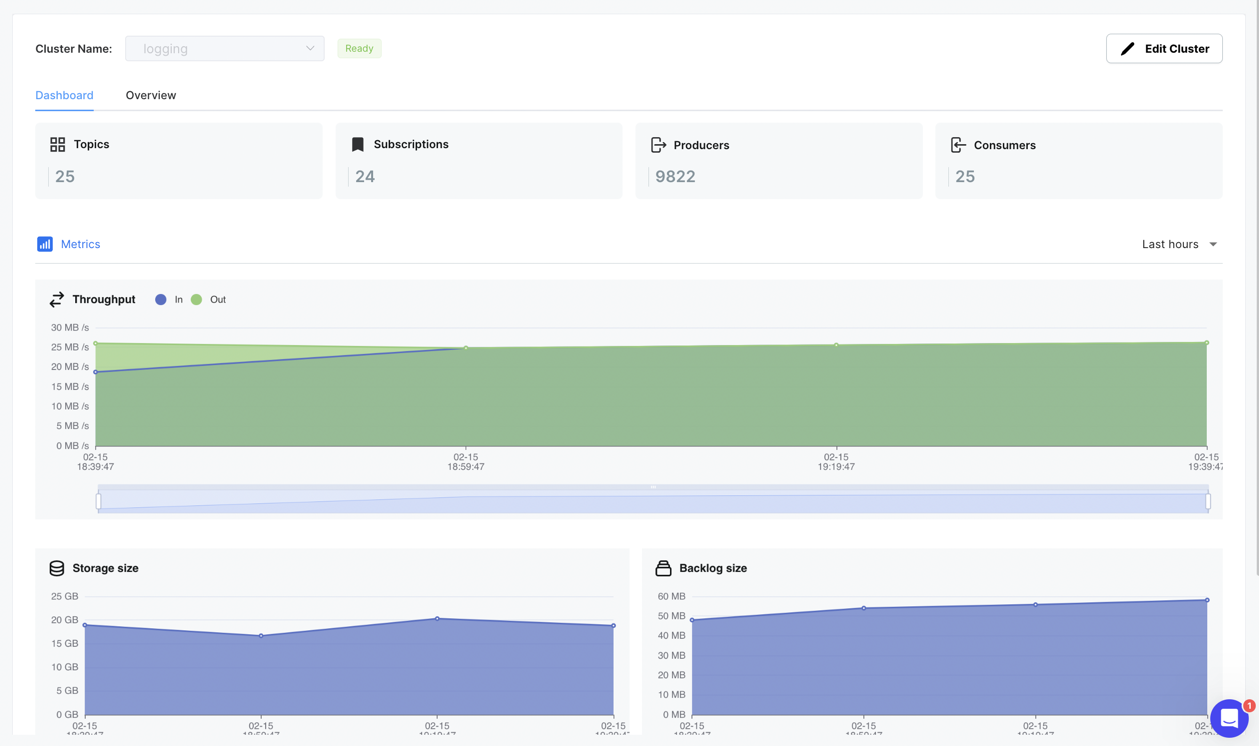
Pulsar Functions on Cloud in Beta
Pulsar Functions are now available on StreamNative Cloud. Pulsar Functions on StreamNative Cloud enable you to build real-time data pipelines for ETL jobs, event-driven applications, and simple data analytics applications.Check out this demo of Pulsar Functions in action:https://www.youtube.com/watch?v=ycfwzlKhI5AREST API
New REST API for StreamNative Cloud allows the following:- Produce, consume, and acknowledge messages
- Monitor the state of your Pulsar clusters
- Perform a wide range of administrative actions
Improvements for new clusters
We have made several improvements to new Pulsar clusters on StreamNative Cloud. These changes will not impact existing clusters, but new clusters will benefit from the following enhancements:- All new clusters are based on Pulsar v2.9.3.21.
Cluster configurations added to the cluster Overview tab
You can view a new configuration section on the Overview tab on the Clusters page in the StreamNative Cloud Console for better visibility and accessibility. This allows you to quickly access and manage information on the backlog quota, backlog retention policy, subscription throttling rate, and producer/consumer limits per topic.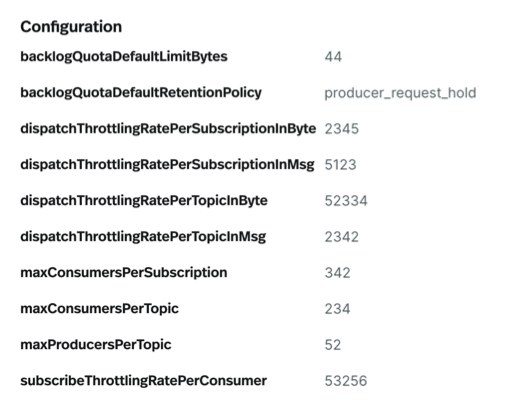
Cloud Console optimizations
To facilitate easier debugging and troubleshooting of data issues with a topic, a new Stats tab has been added to the Topic page in StreamNative Cloud. This tab displays the output of the commandstopic-stats and topic-stats-internal, making it easier for you to access and analyze topic statistics, streamlining the debugging process.Instance selection made clearer
The StreamNative Cloud Console dashboard now clearly indicates the currently selected instance through the addition of a checkmark. This enhancement eliminates confusion and allows you to easily identify the active instance.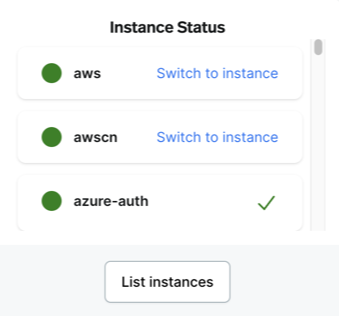
Documentation updates
In January 2023, the StreamNative Cloud Documentation Team rolled out the first version of a new documentation experience. We implemented several new features and sections for the documentation site, including the following:- A card-style landing page.
- Enhanced navigation with breadcrumbs and back/next links on every page.
- A new search engine for faster, more accurate search results.
This update includes changes to the StreamNative Hosted Cloud documentation.
- The procedure for creating a StreamNative Cloud account through the AWS Marketplace was updated and the help topic now reflects the correct workflow. For details, see the AWS billing page.
- The Google BigQuery sink was added as a new connector and the documentation page was updated accordingly. For details, see the Create Connectors.
- The name StreamNative Cloud Manager was updated to StreamNative Cloud Console throughout the documentation site. This change was made to be consistent with the app.
This update includes enhancements and updates to the StreamNative Cloud Manager interface.
- In StreamNative Cloud Manager Release 2.2.2, a new sign in flow was added for first-time users. For details, see the quick start.
- The Flink SQL UI option has been deprecated. However, you can still work with Flink SQL through the CLI.
- A new source connector, Debezium Microsoft SQL Server, was added. For details, see the Create Connectors.
This update reflects several important changes to the onboarding flow for StreamNative Cloud Manager including support for Single Sign-On (SSO), automatic organization deployment, and more choices in cloud regions for clusters.
- For StreamNative Cloud Manager Release 2.1.7, support for SSO was added to the login process. For details, see the Quick start.
- A default organization is now created for you when you sign up for StreamNative Cloud, saving you time in the set up process. For details, see Work with organizations.
- Clusters include more choices in cloud provider regions. For details, see Work with clusters.
StreamNative Cloud is designed to make it easy for teams to leverage the power of Apache Pulsar. We are working hard on improving the StreamNative Cloud Console to make it simpler for teams to provision and understand their Pulsar clusters.Today, we are pleased to announce the release of an updated Cloud Console that brings some new features and refinements to better meet your needs. This release features a new Cloud Dashboard and Navigation to provide better visibility into your clusters and to provide more intuitive navigation. This is the first in many releases, and over the coming weeks and months. Expect to see more improvements that add additional features and refinements in the future.If you have any questions or issues about this update, don’t hesitate to reach out through the support portal or give us feedback through the chat app.
Highlights
- New Dashboard page that serves as a quick health check of your instances with your most important tasks close at hand.
- Updated navigation menu to simplify and streamline the management of StreamNative and Pulsar resources.
- Significant internal re-architecture to make the UI faster and more responsive, without some of the previous delays of API changes not being shown in the UI.
What’s New
- Cloud Console Dashboard and login changes
- This new home page is designed to make it easy for you to see the status of your instances and to quickly get started with StreamNative Cloud.
- The Cloud Console now remembers your most recent organization and instance.
- New Navigation
- The navigation menu has been significantly changed to make navigation more intuitive.
- A new quick switcher for tenants and namespaces has been added to the navigation bar.
Changes
- Update your bookmarks! The links have changed. The previous links did not allow for deep linking.
- Certain metrics, such as number of topics in a namespace, traffic, and others have been removed. These metrics were a point-in-time snapshot that was often out-of-date, potentially leading to confusion.
- Numerous bug fixes and performance improvements have been implemented. These bug fixes include issues with changes via the Pulsar REST API not being visible within the UI and issues with large numbers of topics or namespaces.
Future plans
This update is just the beginning. More features are coming soon, including:- Additional dashboard cards with contextual actions to simplify managing your Pulsar infrastructure.
- Richer, historical metrics to see how your instance and applications are performing.
- Additional improvements to the provisioning workflow to make it easier to deploy and manage instances and clusters.
Documentation improvements
- Several topics were updated to reflect the updated StreamNative Cloud Manager UI. This was a major update to the UI, reflecting StreamNative’s commitment to continuous improvement.
- The Node.js client topic was updated to reflect support for OAuth2 authentication. For details, see connect to Pulsar clusters through the Node.js client.
- The AWS Lambda sink connector is onboarding to StreamNative Cloud. For details, see the Create Connectors.
This release covers several documentation updates.
- A new topic on StreamNative Cloud Secrets was added to the Managed Access section. StreamNative Cloud Secrets allow you to store and manage sensitive data such as passwords, tokens, and private keys. You can create Secrets and refer to them for computing purposes (Pulsar connectors, Pulsar Functions, Flink SQL and general Flink jobs). For details, see work with Secrets.
- Per-topic throughput limit and storage limit for clusters was updated in the Clusters topic.
- Billing information was removed from the Billing topic, as up-to-date billing information is on the StreamNative website.
- The snctl reference topic was updated with an improved order of information.
Going forward, you will continue to see changes and improvements to the documentation site, in addition to keeping up with product changes. Updates will include the following:
- New layout and formatting
- Clear, consistent language for faster reading
- Improved cross-referencing for easier navigation
- Streamlined procedures
- Updated organization
- New sections for specific use cases
<doc-team@streamnative.io>.Updated topics in this Release- Overview
- Quick Start with StreamNative Cloud Manager
- snctl reference
StreamNative Cloud 1.11 is now available.
CLI updates
Added a new experimental command that configurespulsarctl CLI tool to connect to a given Pulsar cluster.In release 1.11, we added a new command snctl x update-pulsar-config --cluster-name <cluster_name> -O <organization_name> that appends a specific Pulsar cluster to the Pulsar configuration file for the pulsarctl CLI tool. With this command, you can connect to the specified cluster directly without manually setting up some options, including the token, the cluster Service URL, and so on. For details, see Get Started with pulsarctl.StreamNative Cloud 1.10 is now available.
- Added support for enabling WebSocket service at the cluster level. The Pulsar WebSocket API provides a simple way to interact with Pulsar using languages that do not have an official client library. For details, see connect to cluster through WebSocket API.
-
Added support for customizing some cluster configurations. You can customize their clusters either by defining
spec.config customfield in the cluster YAML file or specifying cluster configurations using StreamNative Cloud Manager. For details, see work with clusters.
Feature Enhancements
Three Debezium source connectors are now available in StreamNative Cloud. They provide a convenient way to move data into the cloud without writing any code.- Debezium MongoDB: the Debezium MongoDB source connector pulls messages from MongoDB and persists the messages to Pulsar topics.
- Debezium MySQL: the Debezium MySQL source connector pulls messages from MySQL and persists the messages to Pulsar topics.
- Debezium PostgreSQL: the Debezium PostgreSQL source connector pulls messages from PostgreSQL and persists the messages to Pulsar topics.
StreamNative Cloud 1.9 is now available.
AWS Marketplace
Added support for subscribing to StreamNative cloud service on AWS Marketplace. If you already have an AWS account, you can subscribe to the StreamNative cloud-hosted product in AWS Marketplace. You can create an organization associated with that AWS subscription. Usage for resources created under that organization, such as Pulsar cluster and Flink cluster are billed through your AWS account. For details, see here.Feature enhancements
StreamNative Cloud Console
- Added more fine-grained and easy-to-use configuration of Pulsar connectors. You can specify each configuration from the StreamNative Cloud console.
- Added monitoring support for connectors. You can view the status of a connector including when a connector fails to be created, updated, or cloned. For details, see here.
snctl CLI tool
- Added support for installing snctl CLI tools on Linux and MAC OS using Homebrew.
StreamNative Cloud 1.8 is now available.
General changes
- StreamNative Cloud supports Pulsar 2.8.0.
- Connectors are now available in StreamNative Cloud. They provide a convenient way to move data in and out of the cloud without writing any code.
- This release supports pre-approved connectors for SQS, Kinesis, AWS S3, and Lambda functions on AWS and Google Cloud cloud-hosted platforms.
- You can configure and manage connectors using the pulsarctl CLI tool or the StreamNative Cloud Manager. For details, see here.
Bug fixes
Previous issues with Flink SQL statement queries were fixed to support more types of Flink SQL statements, including:- Basic (select, insert, filter, aggregate)
- TimeSeries Aggregation (watermark, event time, session time, processing time)
- Joins
StreamNative Cloud introduces Flink SQL, which enables you to execute interactive SQL queries within StreamNative Cloud. The pricing has also been defined for Flink SQL on Google Cloud and AWS cloud platforms.
- You can create a Flink Cluster through either snctl or StreamNative Cloud Manager.
-
You can interact with Flink SQL through StreamNative Cloud Manager to perform the following operations:
- Run streaming queries on data stored in Pulsar topics using Flink SQL.
- Explore query results.
- StreamNative Cloud now enables to deploy clusters on AWS cloud platform. The pricing has also been defined for newly created clusters on AWS cloud platform.
- Support different locations for clusters deployed on the Google Cloud and AWS cloud platforms.
- Add an Instance Setting option on the left navigation pane of the StreamNative Cloud Manager, where you can check detailed information about created instances and delete the target instance.
- StreamNative Cloud provides a promotion code for users who want to use the StreamNative Cloud service. Contact us to get a promotion code. For details about how to apply the promotion code, see apply promotion code.
- Updated the layout of the Sign up page.
This is the first official release of StreamNative Cloud. The StreamNative Cloud provides an easy-to-use and fully-managed Pulsar service in the public cloud. You can sign up on StreamNative Cloud through the StreamNative website to create and manage Pulsar clusters. After signing up for the cloud service, you can use the StreamNative Cloud CLI tool (snctl) for managing the clusters or use the StreamNative Cloud UI (StreamNative Cloud Manager) for monitoring and managing the created cluster.This release includes the following major highlights:
Security
- Secure clusters based on OAuth 2.0 and TLS.
Functionality
You can work with the following StreamNative Cloud resources and Pulsar components through StreamNative Cloud:- StreamNative Cloud resources
- Pulsar components