

Every StreamNative Cloud cluster — Pulsar or Kafka, Latency-Optimized or Cost-Optimized — runs on URSA. The profile determines the WAL, metadata store, and exposed protocols. Native Pulsar protocol support on the Cost-Optimized profile is coming after the Apache Pulsar 5.0 release; today, Cost-Optimized Pulsar Clusters expose the Kafka-compatible protocol.
URSA engine
URSA is StreamNative’s unified stream storage engine, recognized with the VLDB 2025 Best Industry Paper award. It provides the storage layer for Lakestream and delivers:- Native Kafka support for Kafka Clusters.
- Native Pulsar support for Pulsar Clusters (on the Latency-Optimized profile today; on Cost-Optimized after Apache Pulsar 5.0).
- Multiple WAL options — Apache BookKeeper for Pulsar low-latency, KRaft + local disks for Kafka low-latency, and object storage (Amazon S3, Google Cloud Storage, Azure Blob Storage) for cost-optimized profiles.
- Multiple metadata stores — ZooKeeper, Oxia, or KRaft, depending on cluster type and profile.
- Lakehouse integration across all profiles, with data available in Iceberg and Delta Lake formats on open object storage.
Cluster profile configurations
Each cluster profile maps to a specific WAL, metadata store, and protocol surface:
See Cluster Profiles Overview for deployment-option availability (Serverless, Dedicated, BYOC).
Classic configuration (legacy naming)
Classic is a historical label for the Apache Pulsar deployment configuration that uses ZooKeeper for metadata and Apache BookKeeper for WAL. It is the default configuration for Latency-Optimized Pulsar Clusters today and remains the reference implementation for low-latency Pulsar workloads. In current documentation, this configuration is an option within the URSA engine — not a separate engine. If you see “Classic Engine” referenced elsewhere in StreamNative materials, it refers to this Latency-Optimized Pulsar configuration (BookKeeper WAL + ZooKeeper metadata). The Kafka protocol is available on this configuration through the KSN protocol handler with full Kafka feature parity.Ursa Stream Storage
At the heart of the URSA engine is the concept of Ursa Stream Storage — a headless, multi-modal data storage layer built on lakehouse formats. For Cost-Optimized profiles, Ursa Stream Storage uses a WAL implementation based on object storage. This design writes records directly to object storage services like Amazon S3, bypassing BookKeeper and eliminating the need for inter-broker replication. Brokers are stateless and leaderless, meaning any broker can handle produce or fetch requests for any partition. This eliminates inter-AZ replication traffic and reduces network costs by up to 95%, at the cost of higher end-to-end latency (typically sub-second, tunable down to ~200 ms).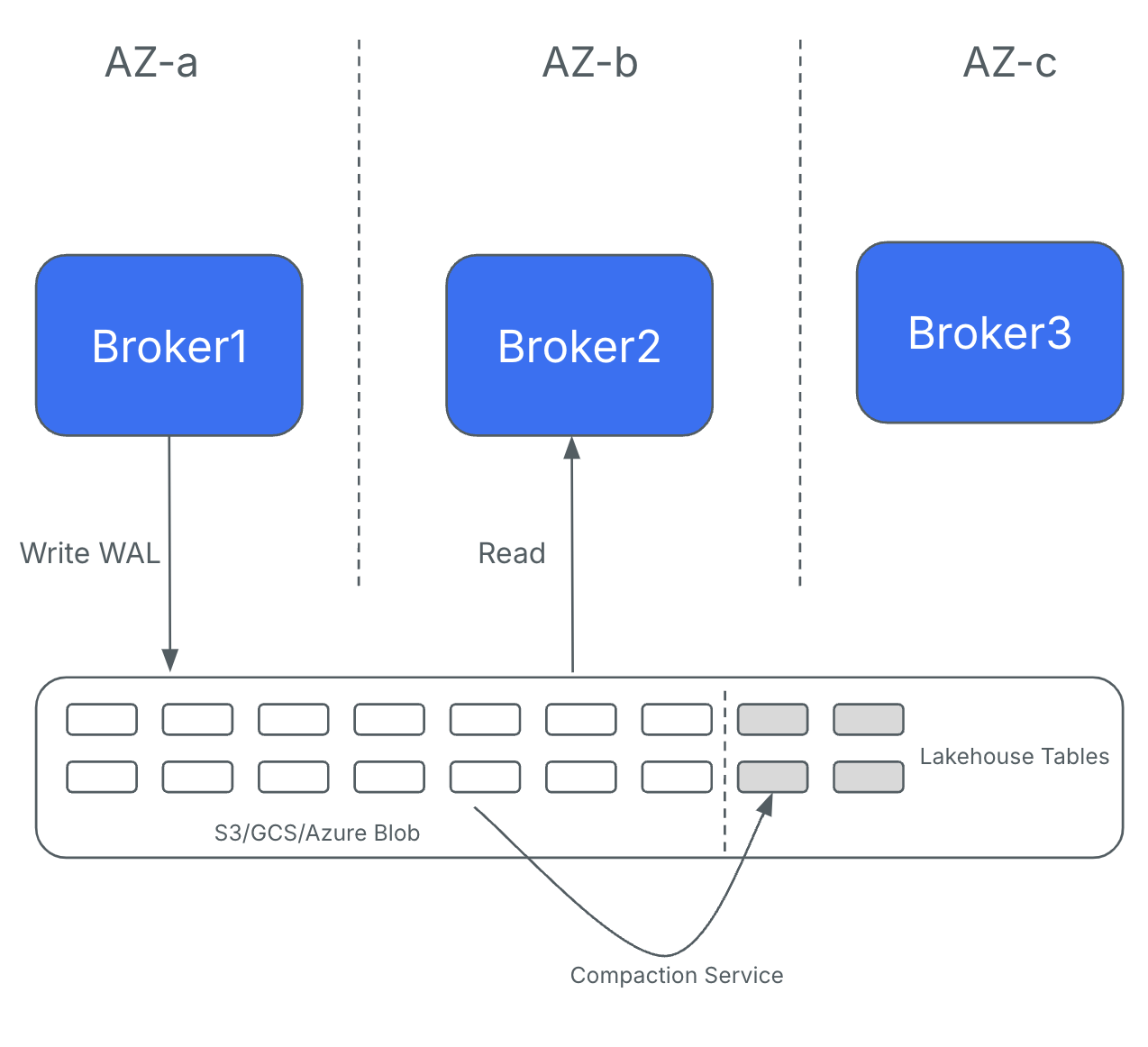
Compare cluster profiles
Use this summary to pick the profile that matches your workload. For the full feature matrix, see Cluster Profiles Overview.Choose the right profile for your workload
- Latency-Optimized Pulsar — when you need native Pulsar protocol (flexible subscriptions, multi-tenancy, geo-replication) with sub-10 ms latency.
- Cost-Optimized Pulsar — when you need Kafka-compatible access to Pulsar Clusters with object-storage economics, and you can wait for native Pulsar protocol on this profile.
- Latency-Optimized Kafka — when you need native Apache Kafka with full feature support at sub-10 ms latency.
- Cost-Optimized Kafka — when you need native Apache Kafka at up to 95% lower infrastructure cost, and your workload does not require Kafka transactions or topic compaction yet.