

View function status
This section describes how to view function status usingsnctl, pulsarctl, pulsar-admin, and console.
If you want to monitor functions using
snctl, pulsarctl or pulsar-admin, make sure you have set up your client tool. For more information, see set up client tools.exclamation.
- snctl
- pulsarctl
- pulsar-admin
- Console
To check the status of the function
exclamation, run the following command:snctl pulsar admin functions status --tenant public --namespace default --name exclamation
{
  "numInstances": 1,
  "numRunning": 1,
  "instances": [
    {
      "instanceId": 0,
      "status": {
        "running": true,
        "error": "",
        "numRestarts": 0,
        "numReceivedFromSource": 2622,
        "numSystemExceptions": 0,
        "latestSystemExceptions": [],
        "numSourceExceptions": 0,
        "latestSourceExceptions": [],
        "numWritten": 2622,
        "lastReceivedTime": 1691532145625,
        "workerId": "test"
      }
  ]
}
To check the status of the function
exclamation, run the following command:pulsarctl functions status --tenant public --namespace default --name exclamation
{
  "numInstances": 1,
  "numRunning": 1,
  "instances": [
    {
      "instanceId": 0,
      "status": {
        "running": true,
        "error": "",
        "numRestarts": 0,
        "numReceivedFromSource": 2622,
        "numSystemExceptions": 0,
        "latestSystemExceptions": [],
        "numSourceExceptions": 0,
        "latestSourceExceptions": [],
        "numWritten": 2622,
        "lastReceivedTime": 1691532145625,
        "workerId": "test"
      }
  ]
}
To check the status of the function You should see the following output:
exclamation, run the following command:./bin/pulsar-admin functions status --tenant public --namespace default --name exclamation
{
  "numInstances" : 1,
  "numRunning" : 1,
  "instances" : [ {
    "instanceId" : 0,
    "status" : {
      "running" : true,
      "error" : "",
      "numRestarts" : 0,
      "numReceivedFromSource" : 433,
      "numSystemExceptions" : 0,
      "latestSystemExceptions" : [ ],
      "numSourceExceptions" : 0,
      "latestSourceExceptions" : [ ],
      "numWritten" : 433,
      "lastReceivedTime" : 1691452485845,
      "workerId" : "test"
    }
  } ]
}
- From the left navigation pane, under Resources, click Functions.
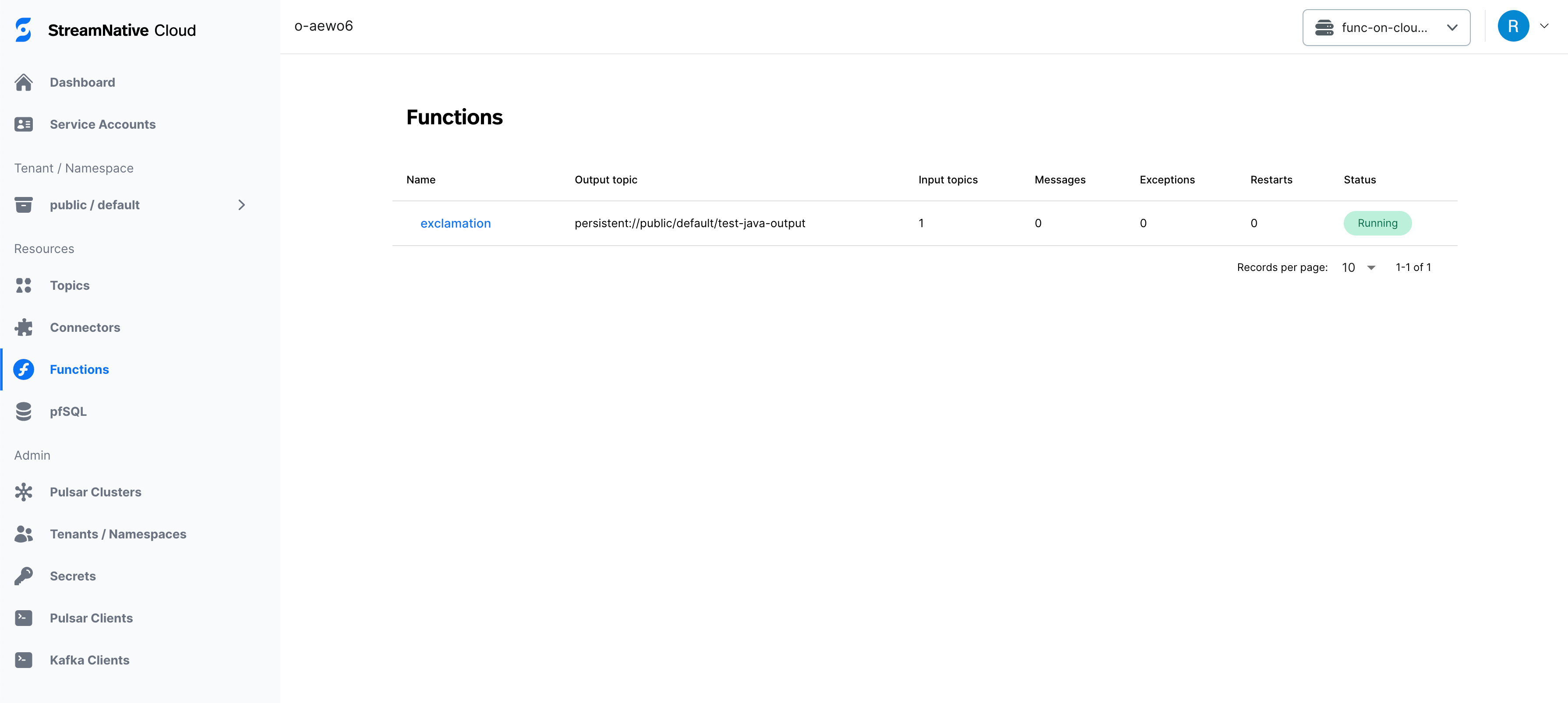
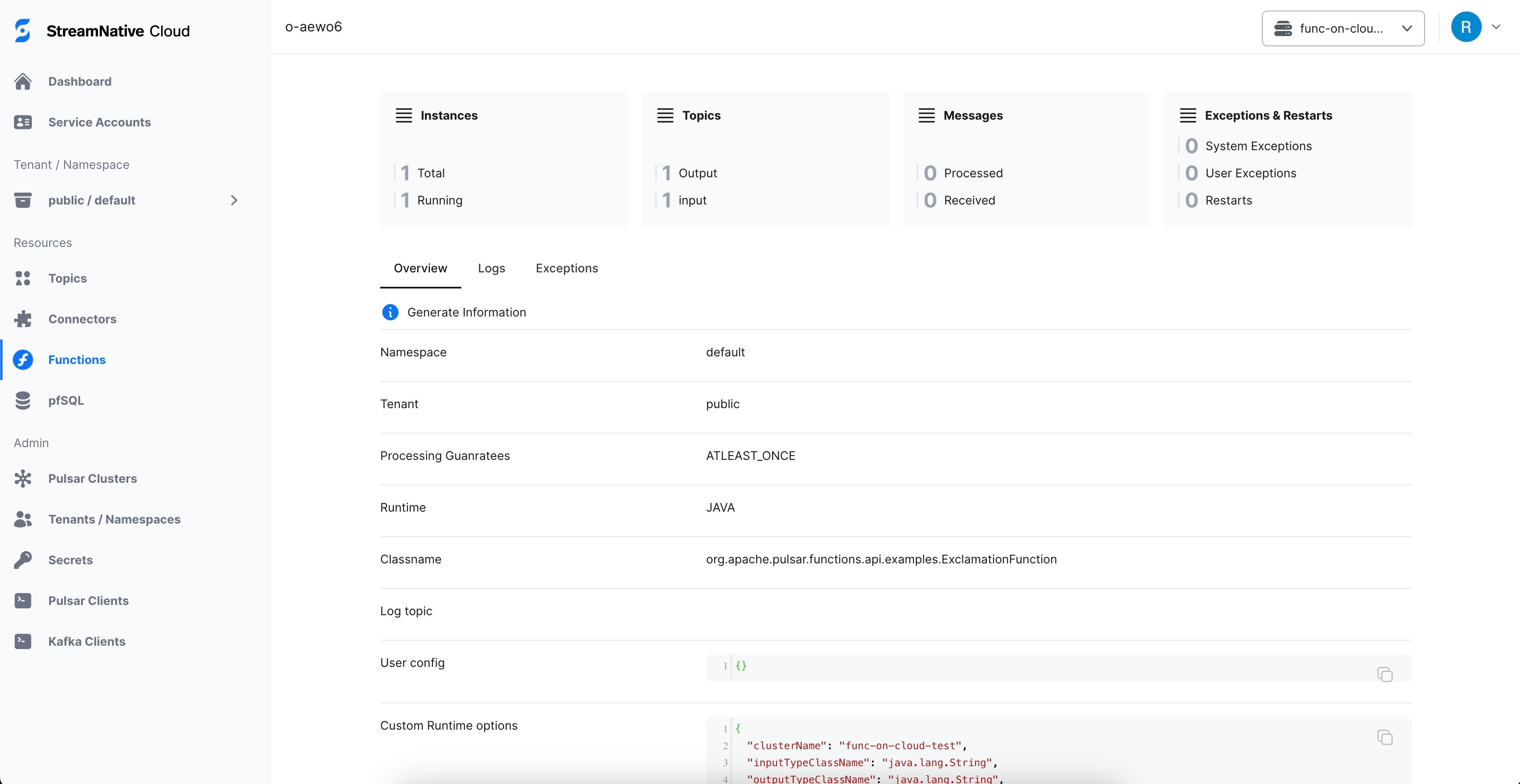
- Select the function item to view the status and exceptions of the function, as well as the system exceptions.
View function logs
View the function logs using snctl
This section describes how to view function logs using snctl.
This example assumes you have installed snctl and initialized snctl configurations.
snctl logs command to view logs for a specific function. This table outlines the configuration options that are used for viewing function logs. For details about all supported fields, you can use the snctl logs -h command to list more information.
| Option | Descriptions |
|---|---|
-c or --cluster | The name of your Pulsar cluster where the function is created. |
-p or --component | The type of component to monitor. Available options are function, sink, and source. |
-f or --follow | Continuously list the function log history. |
-h or --help | Show usage information about the snctl logs command. |
-i or --instance | The name of your Pulsar instance where the function is created. |
--name | The name of your function. |
-o or --organization | The name of your organization where the function is created. |
--previous | Print the logs that are generated before the configured timestamp. |
--pulsar-tenant | The name of your Pulsar tenant where the function is created. |
--pulsar-namespace | The name of your Pulsar namespace where the function is created. |
--since | List logs more recent than the specific time. Available units are second, minute, and hour, such as 24h. |
-s or --size | Specify how many lines of recent logs to display. |
--timestamp | Include timestamps on each line in the log output. |
exclamation function’s logs within the last 5 hours.
snctl logs --since 5h --organization sndev --instance aws --cluster aws --name exclamation --pulsar-tenant public --pulsar-namespace default -p function -f -s 60
The package 'function://public/default/exclamation@v0.1' downloaded to path 'download/pulsar_functions/api-examples.jar' successfully
shardId=0
Using function root classloader: jdk.internal.loader.ClassLoaders$AppClassLoader@14dad5dc
Using function instance classloader: java.net.URLClassLoader@42dafa95
SLF4J: Class path contains multiple SLF4J bindings.
SLF4J: Found binding in [jar:file:/pulsar/lib/org.apache.logging.log4j-log4j-slf4j-impl-2.18.0.jar!/org/slf4j/impl/StaticLoggerBinder.class]
SLF4J: Found binding in [jar:file:/pulsar/instances/java-instance.jar!/org/slf4j/impl/StaticLoggerBinder.class]
SLF4J: See http://www.slf4j.org/codes.html#multiple_bindings for an explanation.
SLF4J: Actual binding is of type [org.apache.logging.slf4j.Log4jLoggerFactory]
WARNING: sun.reflect.Reflection.getCallerClass is not supported. This will impact performance.
Starting function instance...
2023-10-20T07:19:34,786+0000 [main] INFO  org.apache.pulsar.common.nar.FileUtils - Jar file download/pulsar_functions/api-examples.jar does not contain META-INF/bundled-dependencies, it is not a NAR file
2023-10-20T07:19:34,789+0000 [main] INFO  org.apache.pulsar.functions.runtime.thread.ThreadRuntime - Load file as simple JAR file: download/pulsar_functions/api-examples.jar
2023-10-20T07:19:34,791+0000 [main] INFO  org.apache.pulsar.functions.runtime.thread.ThreadRuntime - Initialize function class loader for function exclamation-2598d0c3 at function cache manager, functionClassLoader: org.apache.pulsar.functions.utils.functioncache.FunctionClassLoaders$ParentFirstClassLoader@2eced48b
WARNING: Illegal reflective access by org.apache.pulsar.common.util.netty.DnsResolverUtil (file:/pulsar/lib/io.streamnative-pulsar-common-2.10.5.5.jar) to method sun.net.InetAddressCachePolicy.get()
WARNING: Please consider reporting this to the maintainers of org.apache.pulsar.common.util.netty.DnsResolverUtil
WARNING: All illegal access operations will be denied in a future release
WARNING: Use --illegal-access=warn to enable warnings of further illegal reflective access operations
WARNING: An illegal reflective access operation has occurred
2023-10-20T07:19:37,463+0000 [main] INFO  org.apache.pulsar.functions.runtime.JavaInstanceStarter - Starting runtimeSpawner
2023-10-20T07:19:37,462+0000 [main] INFO  org.apache.pulsar.functions.runtime.JavaInstanceStarter - JavaInstance Server started, listening on 9093
2023-10-20T07:19:37,463+0000 [main] INFO  org.apache.pulsar.functions.runtime.RuntimeSpawner - public/default/exclamation-2598d0c3-0 RuntimeSpawner starting function
2023-10-20T07:19:37,466+0000 [main] INFO  org.apache.pulsar.functions.runtime.thread.ThreadRuntime - Load file as simple JAR file: download/pulsar_functions/api-examples.jar
2023-10-20T07:19:37,466+0000 [main] INFO  org.apache.pulsar.common.nar.FileUtils - Jar file download/pulsar_functions/api-examples.jar does not contain META-INF/bundled-dependencies, it is not a NAR file
2023-10-20T07:19:37,466+0000 [main] INFO  org.apache.pulsar.functions.runtime.thread.ThreadRuntime - Initialize function class loader for function exclamation-2598d0c3 at function cache manager, functionClassLoader: org.apache.pulsar.functions.utils.functioncache.FunctionClassLoaders$ParentFirstClassLoader@2eced48b
2023-10-20T07:19:37,473+0000 [main] INFO  org.apache.pulsar.functions.runtime.thread.ThreadRuntime - ThreadContainer starting function with instanceId 0 functionId 0-28d06ebd-df24-4503-8d28-f573034ac7f8 namespace default
2023-10-20T07:19:37,474+0000 [main] INFO  org.apache.pulsar.functions.runtime.JavaInstanceStarter - Starting metrics server on port 9094
userConfig: "{}"
parallelism: 1
  inputSpecs {
  typeClassName: "java.lang.String"
  ram: 1073741824
sink {
  forwardSourceMessageProperty: true
}
  cpu: 1.0
2023-10-20T07:19:37,489+0000 [public/default/exclamation-2598d0c3-0] INFO  org.apache.pulsar.functions.instance.JavaInstanceRunnable - Starting Java Instance exclamation-2598d0c3 :
namespace: "default"
className: "org.apache.pulsar.functions.api.examples.ExclamationFunction"
    }
  }
}
  producerSpec {
}
 Details = tenant: "public"
  typeClassName: "java.lang.String"
    key: "persistent://public/default/test-java-input"
  cleanupSubscription: true
  topic: "persistent://public/default/test-java-output"
  }
componentType: FUNCTION
name: "exclamation-2598d0c3"
autoAck: true
source {
    value {
resources {

2023-10-20T07:19:37,967+0000 [public/default/exclamation-2598d0c3-0] INFO  org.apache.pulsar.functions.sink.PulsarSink - Opening pulsar sink with config: PulsarSinkConfig(processingGuarantees=ATLEAST_ONCE, topic=persistent://public/default/test-java-output, serdeClassName=null, schemaType=null, schemaProperties={}, typeClassName=java.lang.String, forwardSourceMessageProperty=true, producerConfig=ProducerConfig(maxPendingMessages=0, maxPendingMessagesAcrossPartitions=0, useThreadLocalProducers=false, cryptoConfig=null, batchBuilder=))
2023-10-20T07:19:38,177+0000 [pulsar-client-io-1-1] INFO  org.apache.pulsar.client.impl.ConnectionPool - [[id: 0x030c5cc3, L:/10.44.3.121:51444 - R:func-on-cloud-test-broker.NAMESPACE.svc.cluster.local.NAMESPACE.svc.cluster.local/10.39.176.165:6650]] Connected to server
2023-10-20T07:19:38,577+0000 [public/default/exclamation-2598d0c3-0] INFO  org.apache.pulsar.functions.sink.PulsarSink - crypto key reader is not provided, not enabling end to end encryption
2023-10-20T07:19:38,682+0000 [pulsar-client-io-1-1] INFO  org.apache.pulsar.client.impl.ProducerStatsRecorderImpl - Starting Pulsar producer perf with config: {"topicName":"persistent://public/default/test-java-output","producerName":null,"sendTimeoutMs":0,"blockIfQueueFull":true,"maxPendingMessages":1000,"maxPendingMessagesAcrossPartitions":50000,"messageRoutingMode":"CustomPartition","hashingScheme":"Murmur3_32Hash","cryptoFailureAction":"FAIL","batchingMaxPublishDelayMicros":10000,"batchingPartitionSwitchFrequencyByPublishDelay":10,"batchingMaxMessages":1000,"batchingMaxBytes":131072,"batchingEnabled":true,"chunkingEnabled":false,"compressionType":"LZ4","initialSequenceId":null,"autoUpdatePartitions":true,"autoUpdatePartitionsIntervalSeconds":60,"multiSchema":true,"accessMode":"Shared","lazyStartPartitionedProducers":false,"properties":{"application":"pulsar-function","id":"public/default/exclamation-2598d0c3","instance_hostname":"exclamation-2598d0c3-function-0","instance_id":"0"},"initialSubscriptionName":null}
2023-10-20T07:19:38,705+0000 [pulsar-client-io-1-1] INFO  org.apache.pulsar.client.impl.ProducerStatsRecorderImpl - Pulsar client config: {"serviceUrl":"pulsar://func-on-cloud-test-broker.NAMESPACE.svc.cluster.local:6650","authPluginClassName":"org.apache.pulsar.client.impl.auth.oauth2.AuthenticationOAuth2","authParams":"*****","authParamMap":null,"operationTimeoutMs":30000,"lookupTimeoutMs":30000,"statsIntervalSeconds":60,"numIoThreads":1,"numListenerThreads":1,"connectionsPerBroker":1,"useTcpNoDelay":true,"useTls":false,"tlsTrustCertsFilePath":null,"tlsAllowInsecureConnection":true,"tlsHostnameVerificationEnable":false,"concurrentLookupRequest":5000,"maxLookupRequest":50000,"maxLookupRedirects":20,"maxNumberOfRejectedRequestPerConnection":50,"keepAliveIntervalSeconds":30,"connectionTimeoutMs":10000,"requestTimeoutMs":60000,"initialBackoffIntervalNanos":100000000,"maxBackoffIntervalNanos":60000000000,"enableBusyWait":false,"listenerName":null,"useKeyStoreTls":false,"sslProvider":null,"tlsTrustStoreType":"JKS","tlsTrustStorePath":null,"tlsTrustStorePassword":null,"tlsCiphers":[],"tlsProtocols":[],"memoryLimitBytes":0,"proxyServiceUrl":null,"proxyProtocol":null,"enableTransaction":false,"dnsLookupBindAddress":null,"dnsLookupBindPort":0,"socks5ProxyAddress":null,"socks5ProxyUsername":null,"socks5ProxyPassword":null}
2023-10-20T07:19:38,810+0000 [pulsar-client-io-1-1] INFO  org.apache.pulsar.client.impl.ConnectionPool - [[id: 0xda231b5b, L:/10.44.3.121:58592 - R:func-on-cloud-test-broker-0.func-on-cloud-test-broker-headless.NAMESPACE.svc.cluster.local/240.240.0.86:6650]] Connected to server
2023-10-20T07:19:39,400+0000 [pulsar-client-io-1-1] INFO  org.apache.pulsar.client.impl.ProducerImpl - [persistent://public/default/test-java-output-partition-0] [null] Creating producer on cnx [id: 0xda231b5b, L:/10.44.3.121:58592 - R:func-on-cloud-test-broker-0.func-on-cloud-test-broker-headless.NAMESPACE.svc.cluster.local/240.240.0.86:6650]
2023-10-20T07:19:41,808+0000 [pulsar-client-io-1-1] INFO  org.apache.pulsar.client.impl.ProducerImpl - [persistent://public/default/test-java-output-partition-0] [func-on-cloud-test-5-0] Created producer on cnx [id: 0xda231b5b, L:/10.44.3.121:58592 - R:func-on-cloud-test-broker-0.func-on-cloud-test-broker-headless.NAMESPACE.svc.cluster.local/240.240.0.86:6650]
2023-10-20T07:19:41,811+0000 [pulsar-client-io-1-1] INFO  org.apache.pulsar.client.impl.PartitionedProducerImpl - [persistent://public/default/test-java-output] Created partitioned producer
2023-10-20T07:19:41,818+0000 [public/default/exclamation-2598d0c3-0] INFO  org.apache.pulsar.functions.source.SingleConsumerPulsarSource - Opening pulsar source with config: SingleConsumerPulsarSourceConfig(topic=persistent://public/default/test-java-input, consumerConfig=ConsumerConfig(schemaType=null, serdeClassName=null, isRegexPattern=false, schemaProperties={}, consumerProperties={}, receiverQueueSize=null, cryptoConfig=null, poolMessages=false))
  "properties": {}
}
  "timestamp": 0,
  "type": "STRING",
  "name": "String",
2023-10-20T07:19:41,824+0000 [public/default/exclamation-2598d0c3-0] INFO  org.apache.pulsar.functions.source.SingleConsumerPulsarSource - Creating consumer for topic : persistent://public/default/test-java-input, schema : org.apache.pulsar.client.impl.schema.StringSchema@38ebab52, schemaInfo: {
  "schema": "",
2023-10-20T07:19:41,922+0000 [pulsar-client-io-1-1] INFO  org.apache.pulsar.client.impl.ConsumerStatsRecorderImpl - Starting Pulsar consumer status recorder with config: {"topicNames":[],"topicsPattern":null,"subscriptionName":"public/default/exclamation-2598d0c3","subscriptionType":"Shared","subscriptionProperties":null,"subscriptionMode":"Durable","receiverQueueSize":1000,"acknowledgementsGroupTimeMicros":100000,"negativeAckRedeliveryDelayMicros":60000000,"maxTotalReceiverQueueSizeAcrossPartitions":50000,"consumerName":"7330b","ackTimeoutMillis":0,"tickDurationMillis":1000,"priorityLevel":0,"maxPendingChunkedMessage":10,"autoAckOldestChunkedMessageOnQueueFull":false,"expireTimeOfIncompleteChunkedMessageMillis":60000,"cryptoFailureAction":"FAIL","properties":{"application":"pulsar-function","id":"public/default/exclamation-2598d0c3","instance_hostname":"exclamation-2598d0c3-function-0","instance_id":"0"},"readCompacted":false,"subscriptionInitialPosition":"Latest","patternAutoDiscoveryPeriod":60,"regexSubscriptionMode":"PersistentOnly","deadLetterPolicy":null,"retryEnable":false,"autoUpdatePartitions":true,"autoUpdatePartitionsIntervalSeconds":60,"replicateSubscriptionState":false,"resetIncludeHead":false,"batchIndexAckEnabled":false,"ackReceiptEnabled":false,"poolMessages":false,"startPaused":false,"maxPendingChuckedMessage":10}
2023-10-20T07:19:41,961+0000 [pulsar-client-io-1-1] INFO  org.apache.pulsar.client.impl.ConsumerStatsRecorderImpl - Pulsar client config: {"serviceUrl":"pulsar://func-on-cloud-test-broker.NAMESPACE.svc.cluster.local:6650","authPluginClassName":"org.apache.pulsar.client.impl.auth.oauth2.AuthenticationOAuth2","authParams":"*****","authParamMap":null,"operationTimeoutMs":30000,"lookupTimeoutMs":30000,"statsIntervalSeconds":60,"numIoThreads":1,"numListenerThreads":1,"connectionsPerBroker":1,"useTcpNoDelay":true,"useTls":false,"tlsTrustCertsFilePath":null,"tlsAllowInsecureConnection":true,"tlsHostnameVerificationEnable":false,"concurrentLookupRequest":5000,"maxLookupRequest":50000,"maxLookupRedirects":20,"maxNumberOfRejectedRequestPerConnection":50,"keepAliveIntervalSeconds":30,"connectionTimeoutMs":10000,"requestTimeoutMs":60000,"initialBackoffIntervalNanos":100000000,"maxBackoffIntervalNanos":60000000000,"enableBusyWait":false,"listenerName":null,"useKeyStoreTls":false,"sslProvider":null,"tlsTrustStoreType":"JKS","tlsTrustStorePath":null,"tlsTrustStorePassword":null,"tlsCiphers":[],"tlsProtocols":[],"memoryLimitBytes":0,"proxyServiceUrl":null,"proxyProtocol":null,"enableTransaction":false,"dnsLookupBindAddress":null,"dnsLookupBindPort":0,"socks5ProxyAddress":null,"socks5ProxyUsername":null,"socks5ProxyPassword":null}
2023-10-20T07:19:41,961+0000 [pulsar-client-io-1-1] INFO  org.apache.pulsar.client.impl.ConsumerStatsRecorderImpl - Pulsar client config: {"serviceUrl":"pulsar://func-on-cloud-test-broker.NAMESPACE.svc.cluster.local:6650","authPluginClassName":"org.apache.pulsar.client.impl.auth.oauth2.AuthenticationOAuth2","authParams":"*****","authParamMap":null,"operationTimeoutMs":30000,"lookupTimeoutMs":30000,"statsIntervalSeconds":60,"numIoThreads":1,"numListenerThreads":1,"connectionsPerBroker":1,"useTcpNoDelay":true,"useTls":false,"tlsTrustCertsFilePath":null,"tlsAllowInsecureConnection":true,"tlsHostnameVerificationEnable":false,"concurrentLookupRequest":5000,"maxLookupRequest":50000,"maxLookupRedirects":20,"maxNumberOfRejectedRequestPerConnection":50,"keepAliveIntervalSeconds":30,"connectionTimeoutMs":10000,"requestTimeoutMs":60000,"initialBackoffIntervalNanos":100000000,"maxBackoffIntervalNanos":60000000000,"enableBusyWait":false,"listenerName":null,"useKeyStoreTls":false,"sslProvider":null,"tlsTrustStoreType":"JKS","tlsTrustStorePath":null,"tlsTrustStorePassword":null,"tlsCiphers":[],"tlsProtocols":[],"memoryLimitBytes":0,"proxyServiceUrl":null,"proxyProtocol":null,"enableTransaction":false,"dnsLookupBindAddress":null,"dnsLookupBindPort":0,"socks5ProxyAddress":null,"socks5ProxyUsername":null,"socks5ProxyPassword":null}
2023-10-20T07:19:42,007+0000 [pulsar-client-io-1-1] INFO  org.apache.pulsar.client.impl.ConsumerImpl - [persistent://public/default/test-java-input-partition-0][public/default/exclamation-2598d0c3] Subscribing to topic on cnx [id: 0xda231b5b, L:/10.44.3.121:58592 - R:func-on-cloud-test-broker-0.func-on-cloud-test-broker-headless.NAMESPACE.svc.cluster.local/240.240.0.86:6650], consumerId 0
2023-10-20T07:19:42,974+0000 [pulsar-client-io-1-1] INFO  org.apache.pulsar.client.impl.ConsumerImpl - [persistent://public/default/test-java-input-partition-0][public/default/exclamation-2598d0c3] Subscribed to topic on func-on-cloud-test-broker-0.func-on-cloud-test-broker-headless.NAMESPACE.svc.cluster.local/240.240.0.86:6650 -- consumer: 0
2023-10-20T07:19:42,977+0000 [pulsar-client-io-1-1] INFO  org.apache.pulsar.client.impl.MultiTopicsConsumerImpl - [persistent://public/default/test-java-input] [public/default/exclamation-2598d0c3] Success subscribe new topic persistent://public/default/test-java-input in topics consumer, partitions: 1, allTopicPartitionsNumber: 1
2023-10-20T07:21:47,466+0000 [pulsar-client-io-1-1] INFO  org.apache.pulsar.client.impl.ClientCnx - [id: 0xda231b5b, L:/10.44.3.121:58592 ! R:func-on-cloud-test-broker-0.func-on-cloud-test-broker-headless.NAMESPACE.svc.cluster.local/240.240.0.86:6650] Disconnected
2023-10-20T07:21:47,470+0000 [pulsar-client-io-1-1] INFO  org.apache.pulsar.client.impl.ConnectionHandler - [persistent://public/default/test-java-output-partition-0] [func-on-cloud-test-5-0] Closed connection [id: 0xda231b5b, L:/10.44.3.121:58592 ! R:func-on-cloud-test-broker-0.func-on-cloud-test-broker-headless.NAMESPACE.svc.cluster.local/240.240.0.86:6650] -- Will try again in 0.1 s
2023-10-20T07:21:47,471+0000 [pulsar-client-io-1-1] INFO  org.apache.pulsar.client.impl.ConnectionHandler - [persistent://public/default/test-java-input-partition-0] [public/default/exclamation-2598d0c3] Closed connection [id: 0xda231b5b, L:/10.44.3.121:58592 ! R:func-on-cloud-test-broker-0.func-on-cloud-test-broker-headless.NAMESPACE.svc.cluster.local/240.240.0.86:6650] -- Will try again in 0.1 s
2023-10-20T07:21:47,571+0000 [pulsar-timer-8-1] INFO  org.apache.pulsar.client.impl.ConnectionHandler - [persistent://public/default/test-java-output-partition-0] [func-on-cloud-test-5-0] Reconnecting after timeout
2023-10-20T07:21:47,572+0000 [pulsar-timer-8-1] INFO  org.apache.pulsar.client.impl.ConnectionHandler - [persistent://public/default/test-java-input-partition-0] [public/default/exclamation-2598d0c3] Reconnecting after timeout
2023-10-20T07:21:47,576+0000 [pulsar-client-io-1-1] INFO  org.apache.pulsar.client.impl.ConnectionPool - [[id: 0x218f058a, L:/10.44.3.121:39488 - R:func-on-cloud-test-broker-0.func-on-cloud-test-broker-headless.NAMESPACE.svc.cluster.local/240.240.0.85:6650]] Connected to server
2023-10-20T07:21:47,580+0000 [pulsar-client-io-1-1] INFO  org.apache.pulsar.client.impl.ConsumerImpl - [persistent://public/default/test-java-input-partition-0][public/default/exclamation-2598d0c3] Subscribing to topic on cnx [id: 0x218f058a, L:/10.44.3.121:39488 - R:func-on-cloud-test-broker-0.func-on-cloud-test-broker-headless.NAMESPACE.svc.cluster.local/240.240.0.85:6650], consumerId 0
2023-10-20T07:21:47,580+0000 [pulsar-client-io-1-1] INFO  org.apache.pulsar.client.impl.ProducerImpl - [persistent://public/default/test-java-output-partition-0] [func-on-cloud-test-5-0] Creating producer on cnx [id: 0x218f058a, L:/10.44.3.121:39488 - R:func-on-cloud-test-broker-0.func-on-cloud-test-broker-headless.NAMESPACE.svc.cluster.local/240.240.0.85:6650]
2023-10-20T07:21:47,751+0000 [pulsar-client-io-1-1] INFO  org.apache.pulsar.client.impl.ProducerImpl - [persistent://public/default/test-java-output-partition-0] [func-on-cloud-test-5-0] Created producer on cnx [id: 0x218f058a, L:/10.44.3.121:39488 - R:func-on-cloud-test-broker-0.func-on-cloud-test-broker-headless.NAMESPACE.svc.cluster.local/240.240.0.85:6650]
2023-10-20T07:21:47,756+0000 [pulsar-client-io-1-1] INFO  org.apache.pulsar.client.impl.ConsumerImpl - [persistent://public/default/test-java-input-partition-0][public/default/exclamation-2598d0c3] Subscribed to topic on func-on-cloud-test-broker-0.func-on-cloud-test-broker-headless.NAMESPACE.svc.cluster.local/240.240.0.85:6650 -- consumer: 0
View the function logs on StreamNative Cloud Console
After you have successfully deployed a function, you can check its status, logs, and any exceptions through StreamNative Cloud Console.The Functions option in the Resources area is only available if you have configured your environment and deployed at least one function.
- Log in to StreamNative Cloud Console.
- On the left navigation pane, in the Resources section, click Functions.
-
Click the status of the function you just deployed to view the details page. In the figure below, the status is Running.
-
On the functions detail page, click Logs to view a real-time log of the running function you selected. Click Exceptions to view any exceptions.
View the function logs from log topics
You can use Pulsar Functions log topic feature to view the function logs. For more information, see Pulsar Functions log topic. Functions on StreamNative provide an alternative implementation of the Pulsar Functions log topic feature calledsidecar mode, so you can use the feature in production environments with less performance impact.
To enable the sidecar mode, user should provide the following configurations when deploying the function:
pulsarctl functions create --custom-runtime-options '{"logTopicAgent":"sidecar"}' --log-topic log-topic ...
custom-runtime-options, see Custom runtime options.
Once the function is deployed with the sidecar mode, you can configure consumers to consume messages from the log topic.