

View connector status
This section describes how to view connector status usingsnctl, kcctl, Rest API, and console.
The following example introduces how to view the status of the data generator source connector named test.
- snctl
- kcctl
- Rest API
- Console
To check the status of the source connector
test, run the following command:snctl kafka admin connect describe connector test
Name:       test
Type:       source
State:      RUNNING
Worker ID:  10.80.161.252:8083
Config:
  config.action.reload:               restart
  connector.class:                    io.confluent.kafka.connect.datagen.DatagenConnector
  errors.log.enable:                  false
  errors.log.include.messages:        false
  errors.retry.delay.max.ms:          60000
  errors.retry.timeout:               0
  errors.tolerance:                   none
  exactly.once.source.support:        disabled
  exactly.once.support:               requested
  header.converter:                   org.apache.kafka.connect.storage.SimpleHeaderConverter
  iterations:                         -1
  kafka.topic:                        testgen
  key.converter:                      org.apache.kafka.connect.json.JsonConverter
  max.interval:                       500
  name:                               test
  offset.storage.partitions:          25
  offset.storage.replication.factor:  3
  offset.storage.topic:               kafka-connect-offset-storage
  quickstart:                         users
  tasks.max:                          1
  tasks.max.enforce:                  true
  transaction.boundary:               poll
  value.converter:                    org.apache.kafka.connect.json.JsonConverter
Tasks:
  0:
    State:      RUNNING
    Worker ID:  10.80.161.252:8083
Topics:
  testgen
To check the status of the source connector
test, run the following command:kcctl describe connectors test
Name:       test
Type:       source
State:      RUNNING
Worker ID:  10.80.161.252:8083
Config:
  config.action.reload:               restart
  connector.class:                    io.confluent.kafka.connect.datagen.DatagenConnector
  errors.log.enable:                  false
  errors.log.include.messages:        false
  errors.retry.delay.max.ms:          60000
  errors.retry.timeout:               0
  errors.tolerance:                   none
  exactly.once.source.support:        disabled
  exactly.once.support:               requested
  header.converter:                   org.apache.kafka.connect.storage.SimpleHeaderConverter
  iterations:                         -1
  kafka.topic:                        testgen
  key.converter:                      org.apache.kafka.connect.json.JsonConverter
  max.interval:                       500
  name:                               test
  offset.storage.partitions:          25
  offset.storage.replication.factor:  3
  offset.storage.topic:               kafka-connect-offset-storage
  quickstart:                         users
  tasks.max:                          1
  tasks.max.enforce:                  true
  transaction.boundary:               poll
  value.converter:                    org.apache.kafka.connect.json.JsonConverter
Tasks:
  0:
    State:      RUNNING
    Worker ID:  10.80.161.252:8083
Topics:
  testgen
To check the status of the source connector You should see the following output:
test, run the following command:curl -X GET "https://public%2Fdefault:${APIKEY}@${KAFKA-SERVICE-URL}/admin/kafkaconnect/connectors/test"
{
  "name": "test",
  "config": {
    "config.action.reload": "restart",
    "connector.class": "io.confluent.kafka.connect.datagen.DatagenConnector",
    "errors.log.enable": "false",
    "errors.log.include.messages": "false",
    "errors.retry.delay.max.ms": "60000",
    "errors.retry.timeout": "0",
    "errors.tolerance": "none",
    "exactly.once.source.support": "disabled",
    "exactly.once.support": "requested",
    "header.converter": "org.apache.kafka.connect.storage.SimpleHeaderConverter",
    "iterations": "-1",
    "kafka.topic": "testgen",
    "key.converter": "org.apache.kafka.connect.json.JsonConverter",
    "max.interval": "500",
    "name": "test",
    "offset.storage.partitions": "25",
    "offset.storage.replication.factor": "3",
    "offset.storage.topic": "kafka-connect-offset-storage",
    "quickstart": "users",
    "tasks.max": "1",
    "tasks.max.enforce": "true",
    "transaction.boundary": "poll",
    "value.converter": "org.apache.kafka.connect.json.JsonConverter"
  },
  "tasks": [
    {
      "connector": "test",
      "task": 0
    }
  ],
  "type": "source"
}
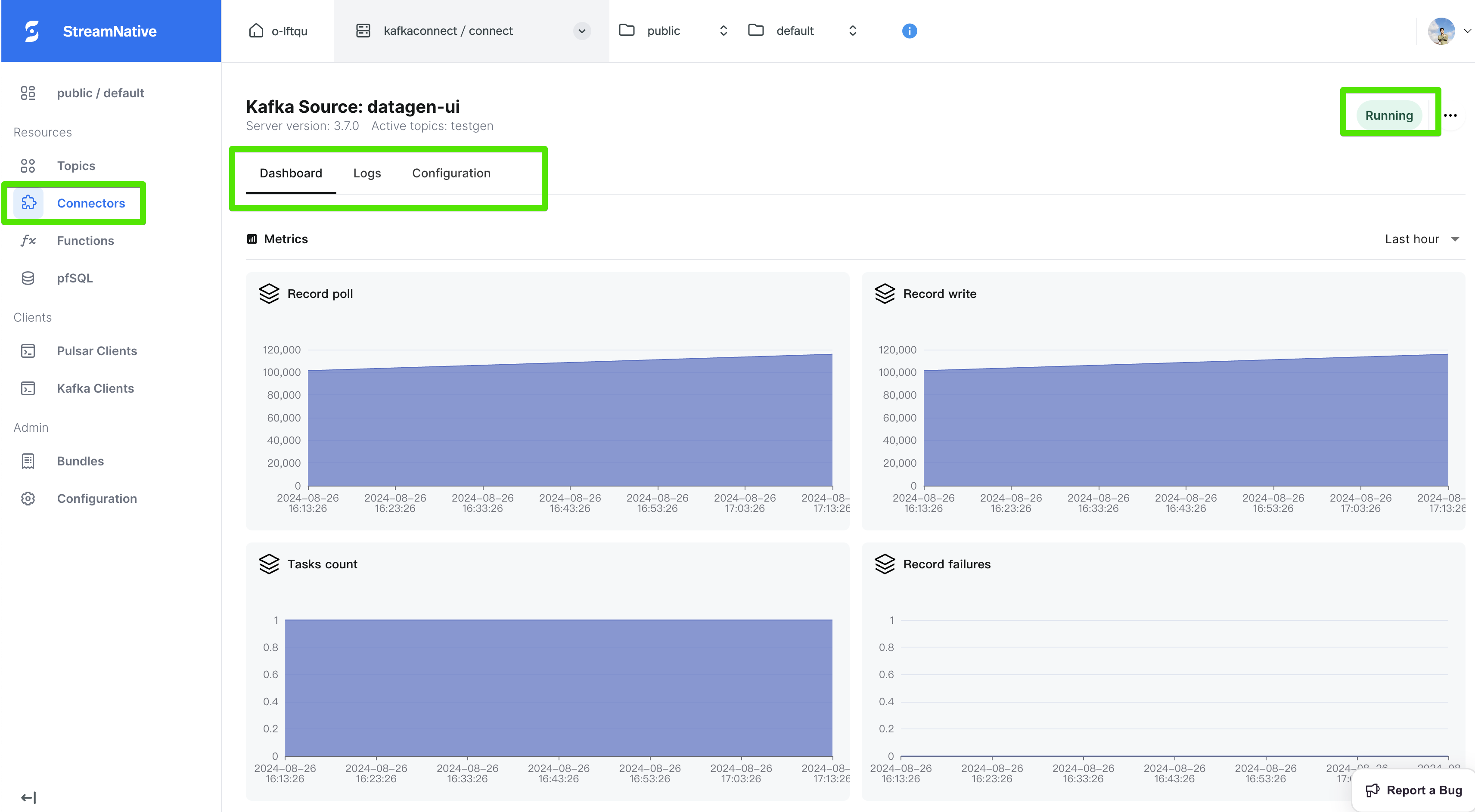
- From the left navigation pane, under Resources, click Connectors.
-
Select the Kafka Sources or Kafka Sinks tab and click the connector you want to check, you will see the status of this connector and its tasks, and also the logs and metrics.
View connector logs
View the connector logs using snctl
This section describes how to view connector logs using snctl.
This example assumes you have installed snctl and initialized snctl configurations.
snctl logs command to view logs for a specific connector. This table outlines the configuration options that are used for viewing connector logs. For details about all supported fields, you can use the snctl logs -h command to list more information.
| Option | Descriptions |
|---|---|
-c or --cluster | The name of your Pulsar cluster where the connector is created. |
-p or --component | The type of component to monitor. Available options are function, sink, source and kafka-connect. |
-f or --follow | Continuously list the connector log history. |
-h or --help | Show usage information about the snctl logs command. |
-i or --instance | The name of your Pulsar instance where the connector is created. |
--name | The name of your connector. |
-o or --organization | The name of your organization where the connector is created. |
--previous | Print the logs that are generated before the configured timestamp. |
--pulsar-tenant | The name of your Pulsar tenant where the connector is created. |
--pulsar-namespace | The name of your Pulsar namespace where the connector is created. |
--since | List logs more recent than the specific time. Available units are second, minute, and hour, such as 24h. |
-s or --size | Specify how many lines of recent logs to display. |
--timestamp | Include timestamps on each line in the log output. |
data1 sink connector’s logs within the last 5 hours.
snctl logs --since 5h --organization sndev --instance aws --cluster aws --name data1 --pulsar-tenant public --pulsar-namespace default -p kafka-connect -f -s 60
2024-08-26T04:37:21,290+0000 [SourceTaskOffsetCommitter-1] INFO  org.apache.kafka.connect.runtime.WorkerSourceTask - WorkerSourceTask{id=datagen-ui-0} Committing offsets for 241 acknowledged messages
2024-08-26T04:38:21,306+0000 [SourceTaskOffsetCommitter-1] INFO  org.apache.kafka.connect.runtime.WorkerSourceTask - WorkerSourceTask{id=datagen-ui-0} Committing offsets for 229 acknowledged messages
2024-08-26T04:39:13,572+0000 [kafka-admin-client-thread | datagen-ui-73c8b112-mesh-admin] INFO  org.apache.kafka.clients.NetworkClient - [AdminClient clientId=datagen-ui-73c8b112-mesh-admin] Node 1753251735 disconnected.
2024-08-26T04:39:21,320+0000 [SourceTaskOffsetCommitter-1] INFO  org.apache.kafka.connect.runtime.WorkerSourceTask - WorkerSourceTask{id=datagen-ui-0} Committing offsets for 233 acknowledged messages
2024-08-26T04:40:18,606+0000 [kafka-producer-network-thread | connector-producer-datagen-ui-0] INFO  org.apache.kafka.clients.NetworkClient - [Producer clientId=connector-producer-datagen-ui-0] Node 1261922880 disconnected.
2024-08-26T04:40:21,334+0000 [SourceTaskOffsetCommitter-1] INFO  org.apache.kafka.connect.runtime.WorkerSourceTask - WorkerSourceTask{id=datagen-ui-0} Committing offsets for 261 acknowledged messages
2024-08-26T04:41:21,349+0000 [SourceTaskOffsetCommitter-1] INFO  org.apache.kafka.connect.runtime.WorkerSourceTask - WorkerSourceTask{id=datagen-ui-0} Committing offsets for 235 acknowledged messages
2024-08-26T04:42:21,362+0000 [SourceTaskOffsetCommitter-1] INFO  org.apache.kafka.connect.runtime.WorkerSourceTask - WorkerSourceTask{id=datagen-ui-0} Committing offsets for 270 acknowledged messages
2024-08-26T04:43:21,381+0000 [SourceTaskOffsetCommitter-1] INFO  org.apache.kafka.connect.runtime.WorkerSourceTask - WorkerSourceTask{id=datagen-ui-0} Committing offsets for 235 acknowledged messages
2024-08-26T04:44:13,738+0000 [kafka-admin-client-thread | datagen-ui-73c8b112-mesh-admin] INFO  org.apache.kafka.clients.NetworkClient - [AdminClient clientId=datagen-ui-73c8b112-mesh-admin] Node 1261922880 disconnected.
2024-08-26T04:44:21,393+0000 [SourceTaskOffsetCommitter-1] INFO  org.apache.kafka.connect.runtime.WorkerSourceTask - WorkerSourceTask{id=datagen-ui-0} Committing offsets for 240 acknowledged messages
2024-08-26T04:45:21,407+0000 [SourceTaskOffsetCommitter-1] INFO  org.apache.kafka.connect.runtime.WorkerSourceTask - WorkerSourceTask{id=datagen-ui-0} Committing offsets for 227 acknowledged messages
2024-08-26T04:46:21,421+0000 [SourceTaskOffsetCommitter-1] INFO  org.apache.kafka.connect.runtime.WorkerSourceTask - WorkerSourceTask{id=datagen-ui-0} Committing offsets for 234 acknowledged messages
2024-08-26T04:47:21,436+0000 [SourceTaskOffsetCommitter-1] INFO  org.apache.kafka.connect.runtime.WorkerSourceTask - WorkerSourceTask{id=datagen-ui-0} Committing offsets for 226 acknowledged messages
2024-08-26T04:48:21,449+0000 [SourceTaskOffsetCommitter-1] INFO  org.apache.kafka.connect.runtime.WorkerSourceTask - WorkerSourceTask{id=datagen-ui-0} Committing offsets for 248 acknowledged messages
2024-08-26T04:49:13,883+0000 [kafka-admin-client-thread | datagen-ui-73c8b112-mesh-admin] INFO  org.apache.kafka.clients.NetworkClient - [AdminClient clientId=datagen-ui-73c8b112-mesh-admin] Node 1753251735 disconnected.
2024-08-26T04:49:21,462+0000 [SourceTaskOffsetCommitter-1] INFO  org.apache.kafka.connect.runtime.WorkerSourceTask - WorkerSourceTask{id=datagen-ui-0} Committing offsets for 231 acknowledged messages
2024-08-26T04:50:21,479+0000 [SourceTaskOffsetCommitter-1] INFO  org.apache.kafka.connect.runtime.WorkerSourceTask - WorkerSourceTask{id=datagen-ui-0} Committing offsets for 218 acknowledged messages
2024-08-26T04:51:21,492+0000 [SourceTaskOffsetCommitter-1] INFO  org.apache.kafka.connect.runtime.WorkerSourceTask - WorkerSourceTask{id=datagen-ui-0} Committing offsets for 241 acknowledged messages
2024-08-26T04:52:21,509+0000 [SourceTaskOffsetCommitter-1] INFO  org.apache.kafka.connect.runtime.WorkerSourceTask - WorkerSourceTask{id=datagen-ui-0} Committing offsets for 247 acknowledged messages
2024-08-26T04:53:21,530+0000 [SourceTaskOffsetCommitter-1] INFO  org.apache.kafka.connect.runtime.WorkerSourceTask - WorkerSourceTask{id=datagen-ui-0} Committing offsets for 230 acknowledged messages
2024-08-26T04:54:14,033+0000 [kafka-admin-client-thread | datagen-ui-73c8b112-mesh-admin] INFO  org.apache.kafka.clients.NetworkClient - [AdminClient clientId=datagen-ui-73c8b112-mesh-admin] Node 1261922880 disconnected.
2024-08-26T04:54:18,658+0000 [kafka-producer-network-thread | connector-producer-datagen-ui-0] INFO  org.apache.kafka.clients.NetworkClient - [Producer clientId=connector-producer-datagen-ui-0] Node 1261922880 disconnected.
2024-08-26T04:54:21,559+0000 [SourceTaskOffsetCommitter-1] INFO  org.apache.kafka.connect.runtime.WorkerSourceTask - WorkerSourceTask{id=datagen-ui-0} Committing offsets for 221 acknowledged messages
2024-08-26T04:55:21,585+0000 [SourceTaskOffsetCommitter-1] INFO  org.apache.kafka.connect.runtime.WorkerSourceTask - WorkerSourceTask{id=datagen-ui-0} Committing offsets for 238 acknowledged messages
2024-08-26T04:56:21,614+0000 [SourceTaskOffsetCommitter-1] INFO  org.apache.kafka.connect.runtime.WorkerSourceTask - WorkerSourceTask{id=datagen-ui-0} Committing offsets for 224 acknowledged messages
2024-08-26T04:57:21,643+0000 [SourceTaskOffsetCommitter-1] INFO  org.apache.kafka.connect.runtime.WorkerSourceTask - WorkerSourceTask{id=datagen-ui-0} Committing offsets for 226 acknowledged messages
2024-08-26T04:58:21,655+0000 [SourceTaskOffsetCommitter-1] INFO  org.apache.kafka.connect.runtime.WorkerSourceTask - WorkerSourceTask{id=datagen-ui-0} Committing offsets for 236 acknowledged messages
2024-08-26T04:59:14,185+0000 [kafka-admin-client-thread | datagen-ui-73c8b112-mesh-admin] INFO  org.apache.kafka.clients.NetworkClient - [AdminClient clientId=datagen-ui-73c8b112-mesh-admin] Node 1753251735 disconnected.
2024-08-26T04:59:21,673+0000 [SourceTaskOffsetCommitter-1] INFO  org.apache.kafka.connect.runtime.WorkerSourceTask - WorkerSourceTask{id=datagen-ui-0} Committing offsets for 242 acknowledged messages
2024-08-26T05:00:21,690+0000 [SourceTaskOffsetCommitter-1] INFO  org.apache.kafka.connect.runtime.WorkerSourceTask - WorkerSourceTask{id=datagen-ui-0} Committing offsets for 233 acknowledged messages
2024-08-26T05:01:21,715+0000 [SourceTaskOffsetCommitter-1] INFO  org.apache.kafka.connect.runtime.WorkerSourceTask - WorkerSourceTask{id=datagen-ui-0} Committing offsets for 244 acknowledged messages
2024-08-26T05:02:21,728+0000 [SourceTaskOffsetCommitter-1] INFO  org.apache.kafka.connect.runtime.WorkerSourceTask - WorkerSourceTask{id=datagen-ui-0} Committing offsets for 242 acknowledged messages
2024-08-26T05:03:21,743+0000 [SourceTaskOffsetCommitter-1] INFO  org.apache.kafka.connect.runtime.WorkerSourceTask - WorkerSourceTask{id=datagen-ui-0} Committing offsets for 249 acknowledged messages
2024-08-26T05:04:14,338+0000 [kafka-admin-client-thread | datagen-ui-73c8b112-mesh-admin] INFO  org.apache.kafka.clients.NetworkClient - [AdminClient clientId=datagen-ui-73c8b112-mesh-admin] Node 1261922880 disconnected.
2024-08-26T05:04:21,758+0000 [SourceTaskOffsetCommitter-1] INFO  org.apache.kafka.connect.runtime.WorkerSourceTask - WorkerSourceTask{id=datagen-ui-0} Committing offsets for 226 acknowledged messages
2024-08-26T05:05:21,779+0000 [SourceTaskOffsetCommitter-1] INFO  org.apache.kafka.connect.runtime.WorkerSourceTask - WorkerSourceTask{id=datagen-ui-0} Committing offsets for 249 acknowledged messages
2024-08-26T05:06:21,800+0000 [SourceTaskOffsetCommitter-1] INFO  org.apache.kafka.connect.runtime.WorkerSourceTask - WorkerSourceTask{id=datagen-ui-0} Committing offsets for 234 acknowledged messages
2024-08-26T05:07:21,812+0000 [SourceTaskOffsetCommitter-1] INFO  org.apache.kafka.connect.runtime.WorkerSourceTask - WorkerSourceTask{id=datagen-ui-0} Committing offsets for 249 acknowledged messages
2024-08-26T05:08:21,827+0000 [SourceTaskOffsetCommitter-1] INFO  org.apache.kafka.connect.runtime.WorkerSourceTask - WorkerSourceTask{id=datagen-ui-0} Committing offsets for 239 acknowledged messages
2024-08-26T05:09:14,476+0000 [kafka-admin-client-thread | datagen-ui-73c8b112-mesh-admin] INFO  org.apache.kafka.clients.NetworkClient - [AdminClient clientId=datagen-ui-73c8b112-mesh-admin] Node 1753251735 disconnected.
2024-08-26T05:09:21,841+0000 [SourceTaskOffsetCommitter-1] INFO  org.apache.kafka.connect.runtime.WorkerSourceTask - WorkerSourceTask{id=datagen-ui-0} Committing offsets for 232 acknowledged messages
2024-08-26T05:10:21,855+0000 [SourceTaskOffsetCommitter-1] INFO  org.apache.kafka.connect.runtime.WorkerSourceTask - WorkerSourceTask{id=datagen-ui-0} Committing offsets for 252 acknowledged messages
2024-08-26T05:11:21,870+0000 [SourceTaskOffsetCommitter-1] INFO  org.apache.kafka.connect.runtime.WorkerSourceTask - WorkerSourceTask{id=datagen-ui-0} Committing offsets for 242 acknowledged messages
2024-08-26T05:12:21,884+0000 [SourceTaskOffsetCommitter-1] INFO  org.apache.kafka.connect.runtime.WorkerSourceTask - WorkerSourceTask{id=datagen-ui-0} Committing offsets for 234 acknowledged messages
2024-08-26T05:13:21,897+0000 [SourceTaskOffsetCommitter-1] INFO  org.apache.kafka.connect.runtime.WorkerSourceTask - WorkerSourceTask{id=datagen-ui-0} Committing offsets for 237 acknowledged messages
2024-08-26T05:14:14,648+0000 [kafka-admin-client-thread | datagen-ui-73c8b112-mesh-admin] INFO  org.apache.kafka.clients.NetworkClient - [AdminClient clientId=datagen-ui-73c8b112-mesh-admin] Node 1261922880 disconnected.
2024-08-26T05:14:21,909+0000 [SourceTaskOffsetCommitter-1] INFO  org.apache.kafka.connect.runtime.WorkerSourceTask - WorkerSourceTask{id=datagen-ui-0} Committing offsets for 237 acknowledged messages
2024-08-26T05:15:21,920+0000 [SourceTaskOffsetCommitter-1] INFO  org.apache.kafka.connect.runtime.WorkerSourceTask - WorkerSourceTask{id=datagen-ui-0} Committing offsets for 234 acknowledged messages
2024-08-26T05:16:21,934+0000 [SourceTaskOffsetCommitter-1] INFO  org.apache.kafka.connect.runtime.WorkerSourceTask - WorkerSourceTask{id=datagen-ui-0} Committing offsets for 248 acknowledged messages
2024-08-26T05:17:21,953+0000 [SourceTaskOffsetCommitter-1] INFO  org.apache.kafka.connect.runtime.WorkerSourceTask - WorkerSourceTask{id=datagen-ui-0} Committing offsets for 232 acknowledged messages
2024-08-26T05:18:21,972+0000 [SourceTaskOffsetCommitter-1] INFO  org.apache.kafka.connect.runtime.WorkerSourceTask - WorkerSourceTask{id=datagen-ui-0} Committing offsets for 238 acknowledged messages
2024-08-26T05:19:14,802+0000 [kafka-admin-client-thread | datagen-ui-73c8b112-mesh-admin] INFO  org.apache.kafka.clients.NetworkClient - [AdminClient clientId=datagen-ui-73c8b112-mesh-admin] Node 1753251735 disconnected.
2024-08-26T05:19:21,991+0000 [SourceTaskOffsetCommitter-1] INFO  org.apache.kafka.connect.runtime.WorkerSourceTask - WorkerSourceTask{id=datagen-ui-0} Committing offsets for 226 acknowledged messages
2024-08-26T05:20:22,004+0000 [SourceTaskOffsetCommitter-1] INFO  org.apache.kafka.connect.runtime.WorkerSourceTask - WorkerSourceTask{id=datagen-ui-0} Committing offsets for 235 acknowledged messages
2024-08-26T05:21:22,018+0000 [SourceTaskOffsetCommitter-1] INFO  org.apache.kafka.connect.runtime.WorkerSourceTask - WorkerSourceTask{id=datagen-ui-0} Committing offsets for 251 acknowledged messages
2024-08-26T05:22:22,033+0000 [SourceTaskOffsetCommitter-1] INFO  org.apache.kafka.connect.runtime.WorkerSourceTask - WorkerSourceTask{id=datagen-ui-0} Committing offsets for 238 acknowledged messages
2024-08-26T05:23:22,047+0000 [SourceTaskOffsetCommitter-1] INFO  org.apache.kafka.connect.runtime.WorkerSourceTask - WorkerSourceTask{id=datagen-ui-0} Committing offsets for 227 acknowledged messages
2024-08-26T05:24:14,938+0000 [kafka-admin-client-thread | datagen-ui-73c8b112-mesh-admin] INFO  org.apache.kafka.clients.NetworkClient - [AdminClient clientId=datagen-ui-73c8b112-mesh-admin] Node 1261922880 disconnected.
2024-08-26T05:24:22,061+0000 [SourceTaskOffsetCommitter-1] INFO  org.apache.kafka.connect.runtime.WorkerSourceTask - WorkerSourceTask{id=datagen-ui-0} Committing offsets for 236 acknowledged messages
View the connector logs from log topics
StreamNative Cloud provide a way to send your logs to a Pulsar topic, you can just use configsn.log.topic to set it.
Once the connector is deployed with this config, you can configure consumers to consume messages from the log topic.
What’s next?
- SMTs(Single Message Transformations)
- Discover kafka Connect Ecosystem on StreamNative Hub.