

- Local mode will store the Private Cloud cluster usage data in the local Pulsar’s topic and supports exporting usage data into CSV format.
- Remote mode is a more automated solution since the Private Cloud cluster will send the telemetry data into StreamNative Cloud without user engagement.
Telemetry data
The usage data for the Pulsar cluster includes the CPU and memory usage for thePulsarBroker, BookkeeperCluster, PulsarProxy, ZookeeperCluster, Sink, Source, and Function components.
Telemetry local mode
Private Cloud users can access to the Pulsar cluster usage data through the cli toolsnctl which support to display the cluster usage data in terminal or export the usage data in CSV format.
Prerequisites
- Install the latest
snctlv0.19.1 or above. Install snctl - Upgrade to the
sn-operatorhelm chart v0.1.6 or above. - Enable the
PulsarCoordinatorobject for your Pulsar cluster.
View the usage data
- Get the Private Cloud Proxy external service endpoint:
- View the usage data through the
usage-data get localcommands, probably you will need authentication data with permission to accesssn/system/__usage.
Export the usage data
- Export the usage data through the extra
-o, --csv-file-pathflag with CSV format:
Telemetry remote mode
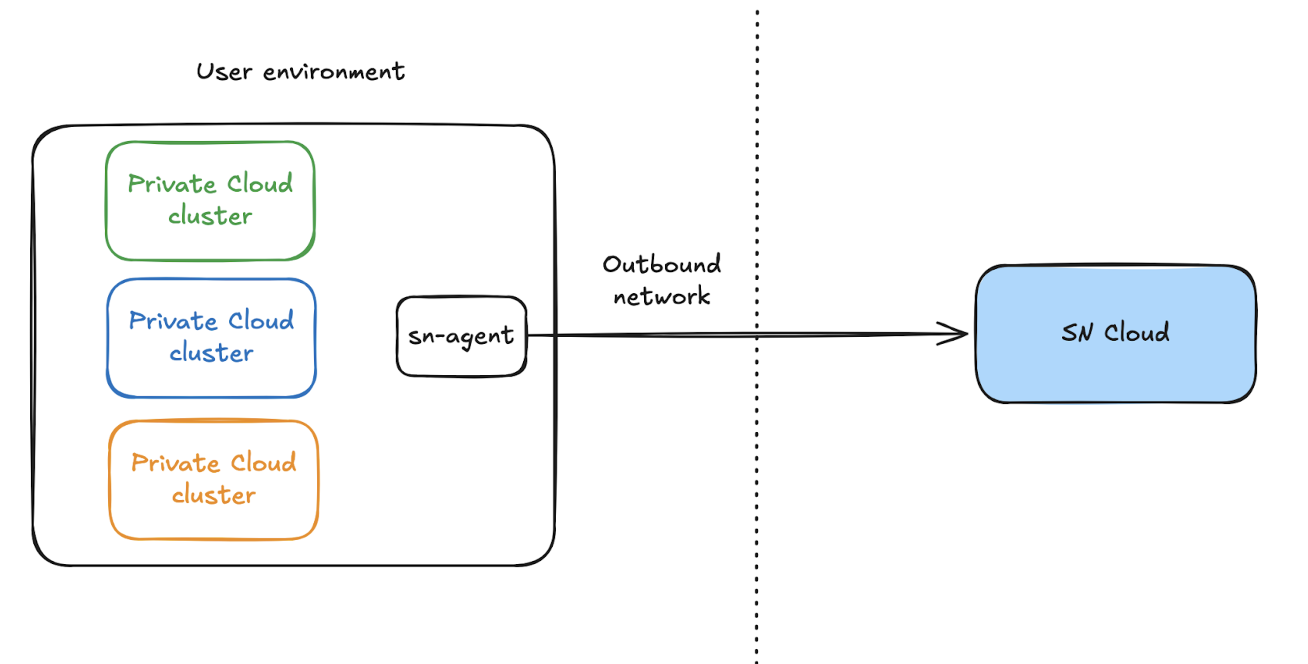
StreamNative Operator has an inside agentsn-agent which works for usage data collection and telemetry sending. Under the remote mode, sn-agent will collect the usage data for Private Cloud clusters and send these usage data to the StreamNative Cloud, StreamNative will process these received usage data.
Prerequisites
Remote mode has two prerequisites to enable:- Open the outbound network access:
sn-agentwill require the Internet connection to access to the SN Cloud public endpoint access: - License token with telemetry: remote mode needs specific license to enable, StreamNative will provide a new license to users and users can follow the Update license how to update the license.