> ## Documentation Index
> Fetch the complete documentation index at: https://docs.streamnative.io/llms.txt
> Use this file to discover all available pages before exploring further.
# Manage Kafka Clusters
> Create, configure, and manage Kafka clusters on StreamNative Cloud with the Ursa Engine.
StreamNative Kafka Service runs on the Ursa Engine, a lakehouse-native stream storage engine that delivers native Kafka API with lakehouse-native storage. You can use standard Kafka clients, tools, and ecosystems to produce and consume data without modifying application code.
This guide walks you through choosing a cluster profile, selecting a deployment option, creating a Kafka cluster, and configuring it for production workloads.
## Cluster profiles
StreamNative provides two cluster profiles for Kafka clusters. Choose a profile based on your workload's latency requirements and cost sensitivity.
The Cost-Optimized profile uses the Ursa Engine with object storage (Amazon S3, Google Cloud Storage, or Azure Blob Storage) as the primary data persistence layer. This profile is ideal for workloads where throughput and cost efficiency matter more than ultra-low latency.
**Best for:**
* Event streaming and data pipelines
* Log aggregation and analytics
* Change data capture (CDC)
* Long-term data retention
**Performance characteristics:**
* Sub-second end-to-end latency (typically above 200 ms)
* Up to 95% lower storage cost compared to disk-based clusters
* Unlimited, elastic storage capacity
The Cost-Optimized profile uses Oxia for metadata management and leverages cloud-native object storage, making it well-suited for workloads with large data volumes and longer retention periods.
The Latency-Optimized profile keeps the classic Kafka disk-based architecture, using KRaft for controller management and ISR (In-Sync Replicas) for data replication. This profile is designed for real-time, interactive, and mission-critical workloads that require consistently fast data access.
**Best for:**
* Real-time trading and financial systems
* Gaming and interactive applications
* Fraud detection and event processing
* User activity tracking with strict latency requirements
**Performance characteristics:**
* Sub-10 ms end-to-end latency (typically 5-200 ms)
* Predictable, low-latency performance under high throughput
* Disk-based storage for fast reads and writes
For a detailed comparison of profile features by deployment type, see [Cluster Profiles](/cloud/clusters/cluster-profiles-overview).
## Deployment options
StreamNative offers Kafka clusters in Dedicated and BYOC deployment options on AWS and Google Cloud, and BYOC deployment options on Microsoft Azure.
Fully managed clusters on StreamNative infrastructure with dedicated resources on AWS or Google Cloud. Supports multi-AZ high availability.
Deploy clusters in your own cloud account on AWS, Google Cloud, or Microsoft Azure while StreamNative manages operations. Provides private networking and data sovereignty.
Kafka Clusters are not available in Serverless deployment yet. Serverless support for Kafka Clusters is coming soon.
For a full feature comparison across deployment options, see [Cluster Types and Regions](/cloud/clusters/cluster-types).
## Create a Kafka cluster
Follow these steps to create a Kafka cluster using the StreamNative Console.
### Prerequisites
* A StreamNative Cloud account. If you do not have one, [sign up](https://console.streamnative.cloud/).
* An organization in StreamNative Cloud. For details, see [Organizations](/cloud/security/access/resource-hierarchy/organizations).
### Steps
1. **Log in and create an organization** (if you have not already). Log in to the [StreamNative Console](https://console.streamnative.cloud/) and create or select your organization.
2. **Create an instance.** Navigate to **Instances** and click **New**. Select your deployment type (**Dedicated** or **BYOC**). Enter a name for your instance, select your preferred cloud provider and region, and then proceed.
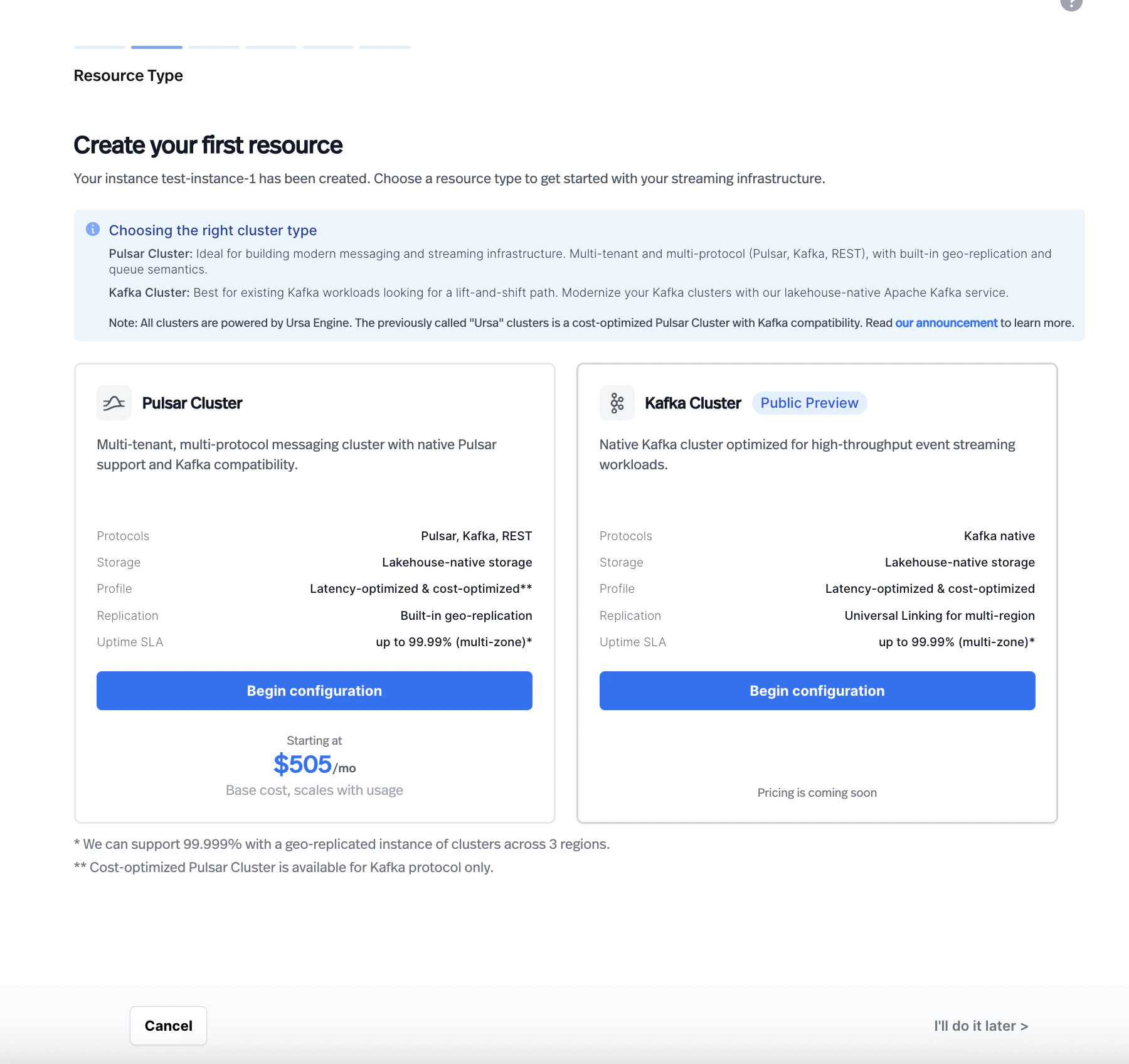
3. **Choose a resource type.** On the **Resource Type** page, select **Kafka Cluster**. The page displays a comparison between Pulsar Cluster and Kafka Cluster with their supported features.
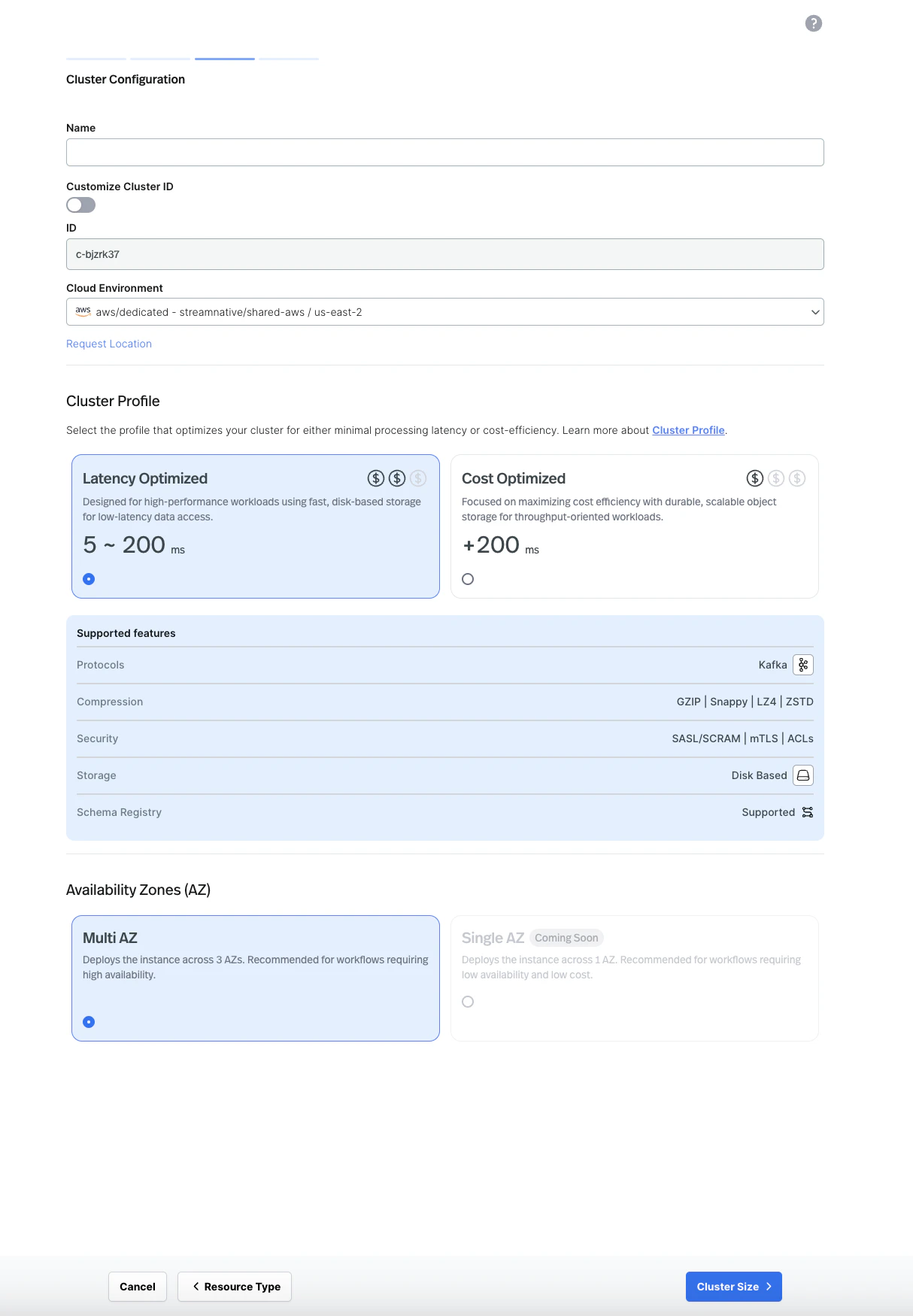
 4. **Configure the cluster.** Enter a cluster name, select your cloud environment, and choose a cluster profile (**Latency Optimized** or **Cost Optimized**). Select your preferred availability zone configuration (Multi AZ is recommended for production workloads).
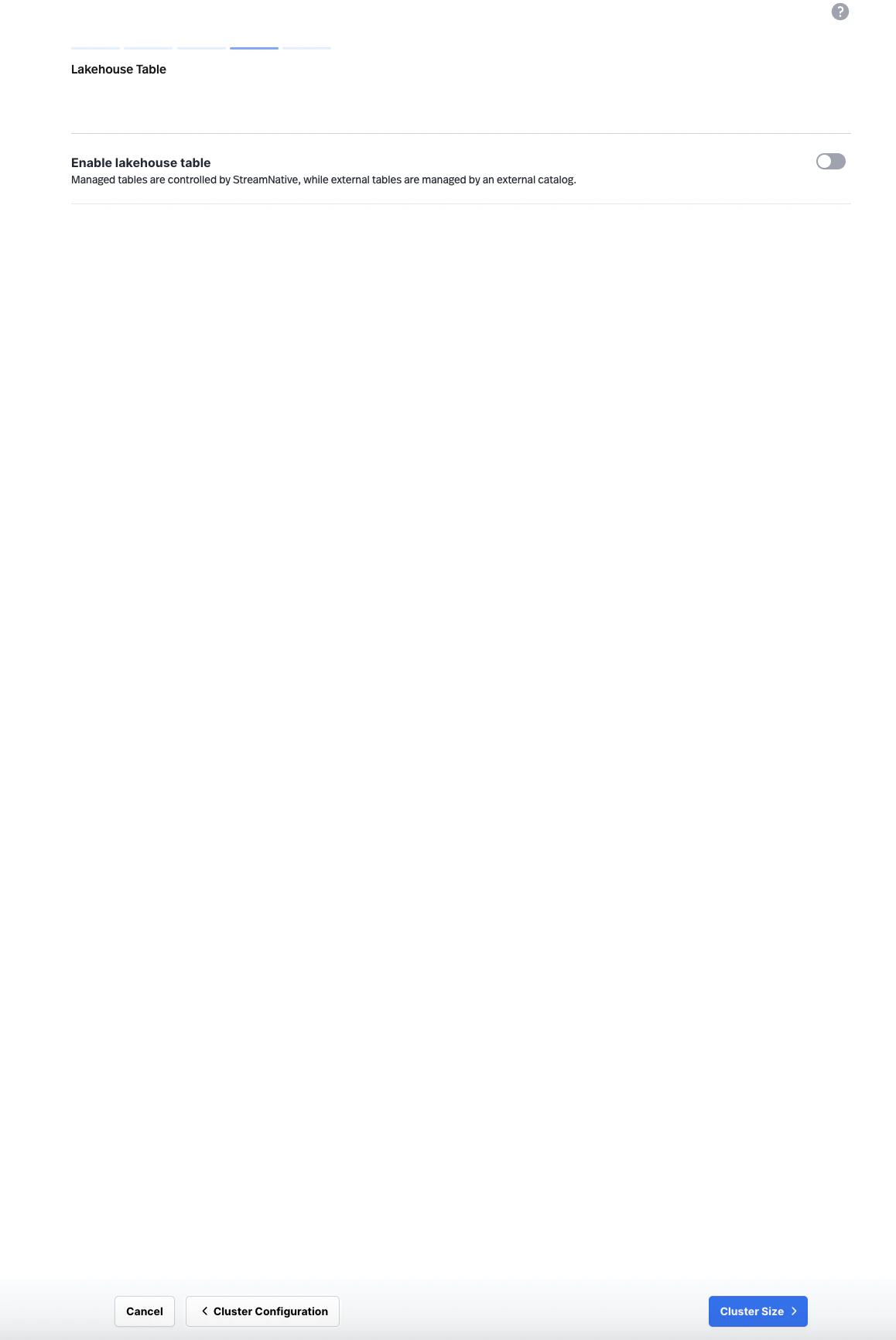
 5. **Configure lakehouse table (optional).** On the **Lakehouse Table** page, optionally enable lakehouse table support for your cluster.
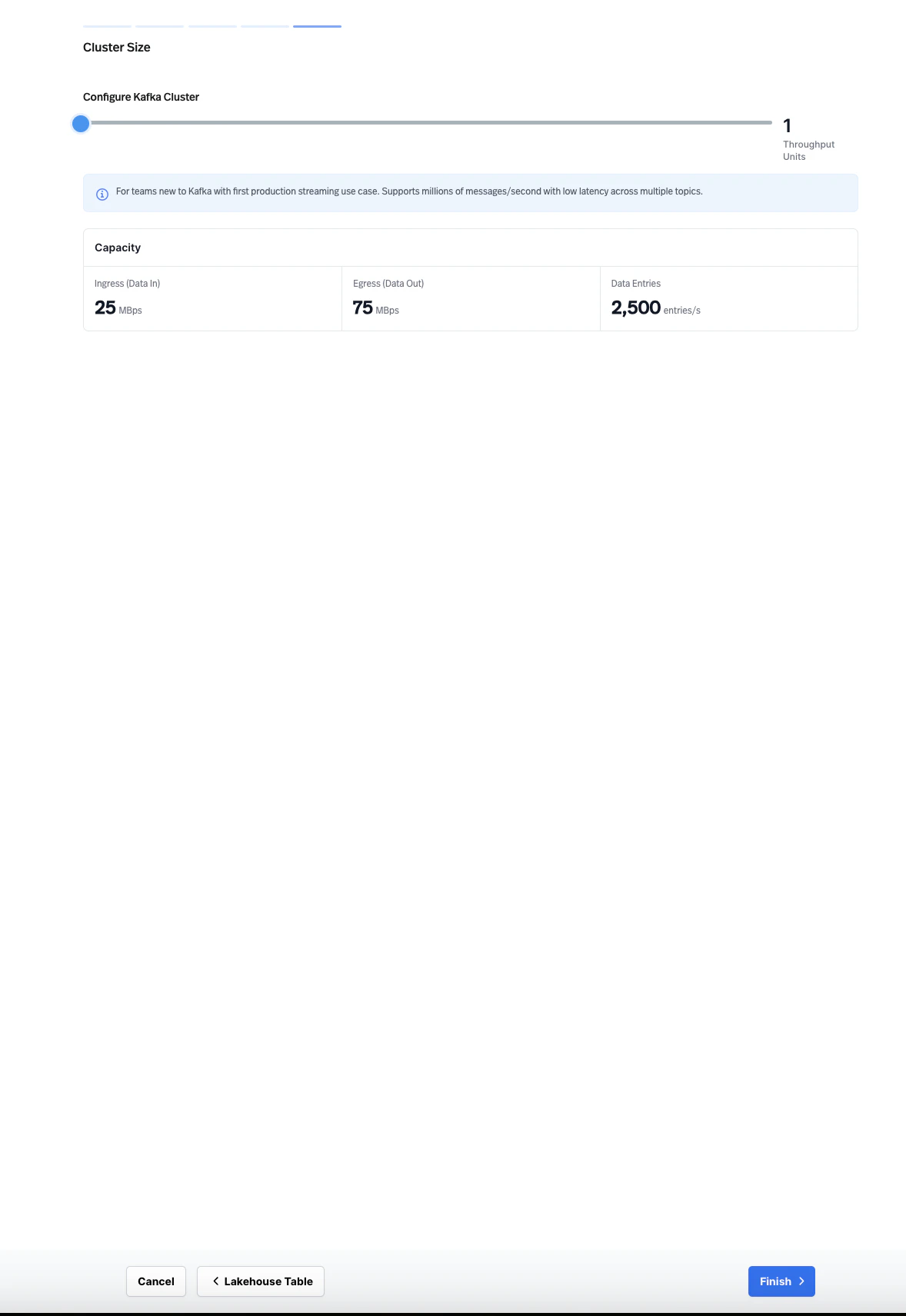
 6. **Set the cluster size.** Configure the cluster size using **Throughput Units**. Each Throughput Unit provides a defined capacity for ingress (data in), egress (data out), and data entries per second. Adjust the slider to match your expected workload.
 7. **Finish.** Review and confirm your configuration to create the cluster.
Wait for the cluster to finish provisioning. The cluster is ready when all components show a healthy status.
Each StreamNative instance can support multiple clusters. However, Pulsar Clusters and Kafka Clusters cannot currently co-exist in the same instance.
For step-by-step instructions for each deployment type, see:
* [Manage Dedicated Clusters](/cloud/clusters/manage-clusters/manage-dedicated-clusters)
* [Manage BYOC Clusters](/cloud/clusters/manage-clusters/manage-byoc-clusters)
## Topic management
You can create and manage Kafka topics through the StreamNative Console, the Kafka CLI, or any Kafka AdminClient-compatible tool. You can use standard Kafka APIs to configure topics, partitions, and retention policies.
When configuring topics, consider the following settings:
* **Partitions**: Set the number of partitions based on your target parallelism and throughput. You can increase partitions after creation, but you cannot decrease them.
* **Retention**: Configure time-based or size-based retention policies to control how long messages are stored. On the Cost-Optimized profile, object storage provides cost-efficient long-term retention.
* **Replication**: StreamNative manages replication based on your cluster profile and availability zone configuration.
### Consumer group management
StreamNative supports standard Kafka consumer groups. You can monitor and manage consumer groups through the StreamNative Console or Kafka CLI tools.
Key operations include:
* Viewing active consumer groups and their members
* Monitoring consumer lag per partition
* Resetting consumer group offsets
For details on connecting Kafka consumers, see [Build Kafka Client Applications](/cloud/build/kafka-clients/kafka-on-cloud).
### Kafka Queues with share groups
StreamNative Kafka Service supports Kafka Queues across both Latency-Optimized and Cost-Optimized profiles. Kafka Queues use the share groups consumption model, which lets multiple consumers cooperatively read records from the same partition instead of enforcing a strict 1:1 partition-to-consumer mapping. This unlocks queue-style task distribution, individual message acknowledgment and retry, and elastic consumer scaling beyond the partition count—useful for AI agent task orchestration, notification fan-out, image and document processing, job scheduling, and bursty async workers. To enable queue semantics, configure your Kafka client consumer with a share group ID; see [Build Kafka Client Applications](/cloud/build/kafka-clients/kafka-on-cloud) for client setup details.
## Scaling
StreamNative Kafka clusters use **Throughput Units** for scaling. Each Throughput Unit provides a defined amount of ingress, egress, and data entry throughput. Adjust the number of Throughput Units to match your workload requirements.
For Cost-Optimized clusters, storage scales automatically with object storage. For Latency-Optimized clusters, disk capacity scales with Throughput Units.
## Related topics
* [Kafka Cluster vs. KSN on Pulsar Clusters](/kafka/kafka-cluster-vs-ksn)
* [Kafka Client Applications on StreamNative Cloud](/cloud/build/kafka-clients/kafka-on-cloud)
* [Kafka Compatibility](/cloud/build/kafka-clients/compatibility/kafka-compatibility)
* [Kafka Schema Registry](/cloud/governance/kafka-schemas/kafka-schema-registry)
7. **Finish.** Review and confirm your configuration to create the cluster.
Wait for the cluster to finish provisioning. The cluster is ready when all components show a healthy status.
Each StreamNative instance can support multiple clusters. However, Pulsar Clusters and Kafka Clusters cannot currently co-exist in the same instance.
For step-by-step instructions for each deployment type, see:
* [Manage Dedicated Clusters](/cloud/clusters/manage-clusters/manage-dedicated-clusters)
* [Manage BYOC Clusters](/cloud/clusters/manage-clusters/manage-byoc-clusters)
## Topic management
You can create and manage Kafka topics through the StreamNative Console, the Kafka CLI, or any Kafka AdminClient-compatible tool. You can use standard Kafka APIs to configure topics, partitions, and retention policies.
When configuring topics, consider the following settings:
* **Partitions**: Set the number of partitions based on your target parallelism and throughput. You can increase partitions after creation, but you cannot decrease them.
* **Retention**: Configure time-based or size-based retention policies to control how long messages are stored. On the Cost-Optimized profile, object storage provides cost-efficient long-term retention.
* **Replication**: StreamNative manages replication based on your cluster profile and availability zone configuration.
### Consumer group management
StreamNative supports standard Kafka consumer groups. You can monitor and manage consumer groups through the StreamNative Console or Kafka CLI tools.
Key operations include:
* Viewing active consumer groups and their members
* Monitoring consumer lag per partition
* Resetting consumer group offsets
For details on connecting Kafka consumers, see [Build Kafka Client Applications](/cloud/build/kafka-clients/kafka-on-cloud).
### Kafka Queues with share groups
StreamNative Kafka Service supports Kafka Queues across both Latency-Optimized and Cost-Optimized profiles. Kafka Queues use the share groups consumption model, which lets multiple consumers cooperatively read records from the same partition instead of enforcing a strict 1:1 partition-to-consumer mapping. This unlocks queue-style task distribution, individual message acknowledgment and retry, and elastic consumer scaling beyond the partition count—useful for AI agent task orchestration, notification fan-out, image and document processing, job scheduling, and bursty async workers. To enable queue semantics, configure your Kafka client consumer with a share group ID; see [Build Kafka Client Applications](/cloud/build/kafka-clients/kafka-on-cloud) for client setup details.
## Scaling
StreamNative Kafka clusters use **Throughput Units** for scaling. Each Throughput Unit provides a defined amount of ingress, egress, and data entry throughput. Adjust the number of Throughput Units to match your workload requirements.
For Cost-Optimized clusters, storage scales automatically with object storage. For Latency-Optimized clusters, disk capacity scales with Throughput Units.
## Related topics
* [Kafka Cluster vs. KSN on Pulsar Clusters](/kafka/kafka-cluster-vs-ksn)
* [Kafka Client Applications on StreamNative Cloud](/cloud/build/kafka-clients/kafka-on-cloud)
* [Kafka Compatibility](/cloud/build/kafka-clients/compatibility/kafka-compatibility)
* [Kafka Schema Registry](/cloud/governance/kafka-schemas/kafka-schema-registry)