> ## Documentation Index
> Fetch the complete documentation index at: https://docs.streamnative.io/llms.txt
> Use this file to discover all available pages before exploring further.
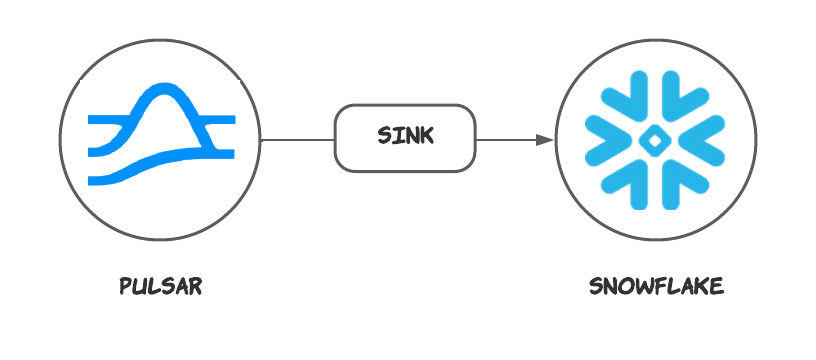
> The Snowflake sink connector is used to write messages from Apache Pulsar topics to Snowflake tables.
# Snowflake sink
This connector is available as a built-in connector on StreamNative Cloud.
The [Snowflake](https://www.snowflake.com/) sink connector pulls data from Pulsar topics and persists data to Snowflake. For more information about connectors, see [Connector Overview](https://docs.streamnative.io/docs/connector-overview).
This document introduces how to get started with creating a Snowflake sink connector and get it up and running.
 ## Quick start
### Prerequisites
The prerequisites for connecting a Snowflake sink connector to external systems include:
1. Prepare a snowflake account
2. Get the account URL from the `Admin - Accounts` page and click the link. It should be the format like `https://.snowflakecomputing.com`.
3. Generate the public key and private key for the authentication. For more details, please check [this guide](https://docs.snowflake.com/en/user-guide/key-pair-auth#step-1-generate-the-private-key)
```sh theme={null}
openssl genrsa 2048 | openssl pkcs8 -topk8 -inform PEM -out rsa_key.p8 -nocrypt
openssl rsa -in rsa_key.p8 -pubout -out rsa_key.pub
```
It will generate `rsa_key.p8` (the private key) and `rsa_key.pub` (the public key) locally.
4. Log in and configure the public key.
See [Installing SnowSQL](https://docs.snowflake.com/en/user-guide/snowsql-install-config) to install the SnowSQL.
```sh theme={null}
snowsql -a ${account_identifier} -u ${user_name}
```
The `-a` is followed by an account identifier, which is a substring of the account URL before. The `-u` is followed by your user name. After logging in, set the public key passphrase:
```sh theme={null}
ALTER USER ${user_name} SET RSA_PUBLIC_KEY='MIIBIjA...';
```
You can get the public key passphrase `(MIIBIjA…)` by running the following command:
```sh theme={null}
grep -v "\-\-\-" rsa_key.pub | tr -d '\n'
```
### 1. Create Snowflake objects and grant permission
Before creating the connector, you need to grant the permissions in Snowflake. Write the following content into a file, e.g. name it with `grant.sql`. The script creates a user `snservice` that will be used in the sink config later and associate it with a role `snrole` that is only used in Snowflake internally. Then it grants the necessary permissions.
```sql theme={null}
CREATE DATABASE st_tuts;
CREATE SCHEMA st_tuts.demo;
CREATE ROLE snrole;
CREATE USER snservice;
GRANT ROLE snrole TO USER snservice;
ALTER USER snservice SET DEFAULT_ROLE = snrole;
GRANT USAGE ON DATABASE st_tuts TO ROLE snrole;
GRANT USAGE ON SCHEMA st_tuts.demo TO ROLE snrole;
GRANT USAGE ON WAREHOUSE compute_wh TO ROLE snrole;
GRANT CREATE TABLE ON SCHEMA st_tuts.demo TO ROLE snrole;
GRANT CREATE STAGE ON SCHEMA st_tuts.demo TO ROLE snrole;
GRANT CREATE PIPE ON SCHEMA st_tuts.demo TO ROLE snrole;
ALTER USER snservice SET RSA_PUBLIC_KEY='MIIBI...';
```
Then run the following command to execute the SQL script above.
```sh theme={null}
snowsql -a ${account_identifier} -u ${user_name} -f grant.sql
```
### 2. Create a connector
The following command shows how to use [pulsarctl](https://github.com/streamnative/pulsarctl) to create a `builtin` connector. If you want to create a `non-builtin` connector,
you need to replace `--sink-type snowflake` with `--archive /path/to/pulsar-io-snowflake.nar`. You can find the button to download the `nar` package at the beginning of the document.
If you are a StreamNative Cloud user, you need [set up your environment](https://docs.streamnative.io/docs/connector-setup) first.
```bash theme={null}
pulsarctl sinks create \
--sink-type snowflake \
--name snowflake \
--tenant public \
--namespace default \
--inputs "Your topic name" \
--parallelism 1 \
--sink-config \
'{
"user": "SNSERVICE",
"host": "https://.snowflakecomputing.com",
"schema": "demo",
"database": "st_tuts",
"privateKey": "...",
"warehouse": "compute_wh"
}'
```
The `--sink-config` is the minimum necessary configuration for starting this connector, and it is a JSON string. You need to substitute the relevant parameters with your own.
You can get the private key passphrase `(MIIBIjA…)` by running the following command:
```sh theme={null}
grep -v '\-\-\-' rsa_key.p8 | tr -d '\n'
```
If you want to configure more parameters, see [Configuration Properties](#configuration-properties) for reference.
You can also choose to use a variety of other tools to create a connector:
* [pulsar-admin](https://pulsar.apache.org/docs/3.1.x/io-use/): The command arguments for `pulsar-admin` are similar to those of `pulsarctl`. You can find an example for [StreamNative Cloud Doc](https://docs.streamnative.io/docs/connector-create#create-a-built-in-connector).
* [RestAPI](https://pulsar.apache.org/sink-rest-api/?version=3.1.1): You can find an example for [StreamNative Cloud Doc](https://docs.streamnative.io/docs/connector-create#create-a-built-in-connector).
* [Terraform](https://github.com/hashicorp/terraform): You can find an example for [StreamNative Cloud Doc](https://docs.streamnative.io/docs/connector-create#create-a-built-in-connector).
* [Function Mesh](https://functionmesh.io/docs/connectors/run-connector): The docker image can be found at the beginning of the document.
### 3. Send messages to he topic
If your connector is created on StreamNative Cloud, you need to authenticate your clients. See [Build applications using Pulsar clients](https://docs.streamnative.io/docs/qs-connect#jumpstart-for-beginners) for more information.
```java theme={null}
PulsarClient client = PulsarClient.builder()
.serviceUrl("{{Your Pulsar URL}}")
.build();
Producer producer = client.newProducer(Schema.STRING)
.topic("{{Your topic name}}")
.create();
String message = "hello world";
MessageId msgID = producer.send(message);
System.out.println("Publish " + message + " and message ID " + msgID);
producer.flush();
producer.close();
client.close();
```
You can also send the message using the command line:
```sh theme={null}
$ bin/pulsar-client produce pulsar-topic-name --messages "hello world"
```
### 4. Check the data on Snowflake table
First, you need to execute the following SQL command to grant the role `SNROLE` to the user you logged in.
```sh theme={null}
GRANT ROLE SNROLE TO USER ${account_name};
```
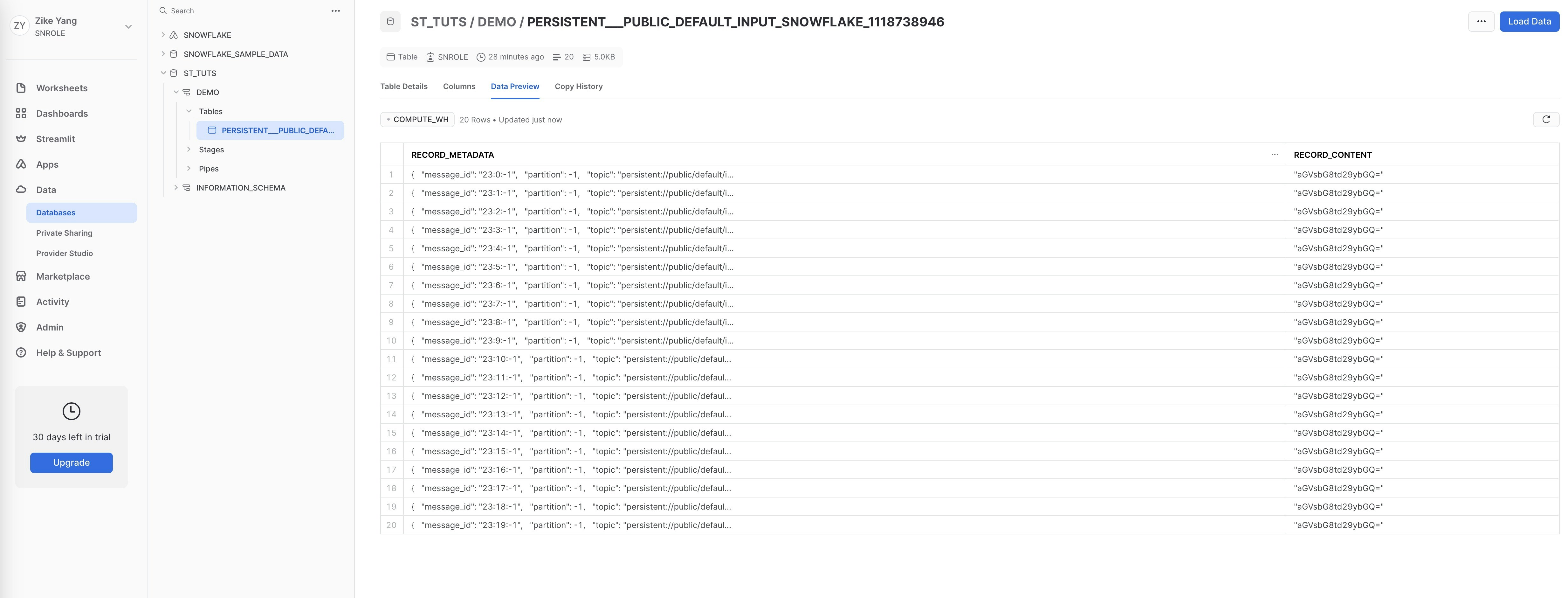
Then, switch the role to `SNROLE`, under `Data - Database - ST_TUTS - DEMO - Tables` you will find table `PERSISTENT___PUBLIC_DEFAULT_INPUT_SNOWFLAKE_1118738946` is created and records the messages produced above.
## Quick start
### Prerequisites
The prerequisites for connecting a Snowflake sink connector to external systems include:
1. Prepare a snowflake account
2. Get the account URL from the `Admin - Accounts` page and click the link. It should be the format like `https://.snowflakecomputing.com`.
3. Generate the public key and private key for the authentication. For more details, please check [this guide](https://docs.snowflake.com/en/user-guide/key-pair-auth#step-1-generate-the-private-key)
```sh theme={null}
openssl genrsa 2048 | openssl pkcs8 -topk8 -inform PEM -out rsa_key.p8 -nocrypt
openssl rsa -in rsa_key.p8 -pubout -out rsa_key.pub
```
It will generate `rsa_key.p8` (the private key) and `rsa_key.pub` (the public key) locally.
4. Log in and configure the public key.
See [Installing SnowSQL](https://docs.snowflake.com/en/user-guide/snowsql-install-config) to install the SnowSQL.
```sh theme={null}
snowsql -a ${account_identifier} -u ${user_name}
```
The `-a` is followed by an account identifier, which is a substring of the account URL before. The `-u` is followed by your user name. After logging in, set the public key passphrase:
```sh theme={null}
ALTER USER ${user_name} SET RSA_PUBLIC_KEY='MIIBIjA...';
```
You can get the public key passphrase `(MIIBIjA…)` by running the following command:
```sh theme={null}
grep -v "\-\-\-" rsa_key.pub | tr -d '\n'
```
### 1. Create Snowflake objects and grant permission
Before creating the connector, you need to grant the permissions in Snowflake. Write the following content into a file, e.g. name it with `grant.sql`. The script creates a user `snservice` that will be used in the sink config later and associate it with a role `snrole` that is only used in Snowflake internally. Then it grants the necessary permissions.
```sql theme={null}
CREATE DATABASE st_tuts;
CREATE SCHEMA st_tuts.demo;
CREATE ROLE snrole;
CREATE USER snservice;
GRANT ROLE snrole TO USER snservice;
ALTER USER snservice SET DEFAULT_ROLE = snrole;
GRANT USAGE ON DATABASE st_tuts TO ROLE snrole;
GRANT USAGE ON SCHEMA st_tuts.demo TO ROLE snrole;
GRANT USAGE ON WAREHOUSE compute_wh TO ROLE snrole;
GRANT CREATE TABLE ON SCHEMA st_tuts.demo TO ROLE snrole;
GRANT CREATE STAGE ON SCHEMA st_tuts.demo TO ROLE snrole;
GRANT CREATE PIPE ON SCHEMA st_tuts.demo TO ROLE snrole;
ALTER USER snservice SET RSA_PUBLIC_KEY='MIIBI...';
```
Then run the following command to execute the SQL script above.
```sh theme={null}
snowsql -a ${account_identifier} -u ${user_name} -f grant.sql
```
### 2. Create a connector
The following command shows how to use [pulsarctl](https://github.com/streamnative/pulsarctl) to create a `builtin` connector. If you want to create a `non-builtin` connector,
you need to replace `--sink-type snowflake` with `--archive /path/to/pulsar-io-snowflake.nar`. You can find the button to download the `nar` package at the beginning of the document.
If you are a StreamNative Cloud user, you need [set up your environment](https://docs.streamnative.io/docs/connector-setup) first.
```bash theme={null}
pulsarctl sinks create \
--sink-type snowflake \
--name snowflake \
--tenant public \
--namespace default \
--inputs "Your topic name" \
--parallelism 1 \
--sink-config \
'{
"user": "SNSERVICE",
"host": "https://.snowflakecomputing.com",
"schema": "demo",
"database": "st_tuts",
"privateKey": "...",
"warehouse": "compute_wh"
}'
```
The `--sink-config` is the minimum necessary configuration for starting this connector, and it is a JSON string. You need to substitute the relevant parameters with your own.
You can get the private key passphrase `(MIIBIjA…)` by running the following command:
```sh theme={null}
grep -v '\-\-\-' rsa_key.p8 | tr -d '\n'
```
If you want to configure more parameters, see [Configuration Properties](#configuration-properties) for reference.
You can also choose to use a variety of other tools to create a connector:
* [pulsar-admin](https://pulsar.apache.org/docs/3.1.x/io-use/): The command arguments for `pulsar-admin` are similar to those of `pulsarctl`. You can find an example for [StreamNative Cloud Doc](https://docs.streamnative.io/docs/connector-create#create-a-built-in-connector).
* [RestAPI](https://pulsar.apache.org/sink-rest-api/?version=3.1.1): You can find an example for [StreamNative Cloud Doc](https://docs.streamnative.io/docs/connector-create#create-a-built-in-connector).
* [Terraform](https://github.com/hashicorp/terraform): You can find an example for [StreamNative Cloud Doc](https://docs.streamnative.io/docs/connector-create#create-a-built-in-connector).
* [Function Mesh](https://functionmesh.io/docs/connectors/run-connector): The docker image can be found at the beginning of the document.
### 3. Send messages to he topic
If your connector is created on StreamNative Cloud, you need to authenticate your clients. See [Build applications using Pulsar clients](https://docs.streamnative.io/docs/qs-connect#jumpstart-for-beginners) for more information.
```java theme={null}
PulsarClient client = PulsarClient.builder()
.serviceUrl("{{Your Pulsar URL}}")
.build();
Producer producer = client.newProducer(Schema.STRING)
.topic("{{Your topic name}}")
.create();
String message = "hello world";
MessageId msgID = producer.send(message);
System.out.println("Publish " + message + " and message ID " + msgID);
producer.flush();
producer.close();
client.close();
```
You can also send the message using the command line:
```sh theme={null}
$ bin/pulsar-client produce pulsar-topic-name --messages "hello world"
```
### 4. Check the data on Snowflake table
First, you need to execute the following SQL command to grant the role `SNROLE` to the user you logged in.
```sh theme={null}
GRANT ROLE SNROLE TO USER ${account_name};
```
Then, switch the role to `SNROLE`, under `Data - Database - ST_TUTS - DEMO - Tables` you will find table `PERSISTENT___PUBLIC_DEFAULT_INPUT_SNOWFLAKE_1118738946` is created and records the messages produced above.
 ## Configuration Properties
This table outlines the properties and the descriptions.
| Name | Type | Required | Sensitive | Default | Description |
| -------------------------- | ------- | -------- | --------- | --------------------------------------------------------- | -------------------------------------------------------------------------------------------------------------------------------------------------------------------------------------------------------------------------------------------------------------------------------------------------------------------------------------------------------------------- |
| `user` | String | Yes | false | ""(empty string) | The user account name of the Snowflake service. |
| `privateKey` | String | Yes | true | ""(empty string) | The private key of the user. |
| `host` | String | Yes | false | ""(empty string) | The host URL of the snowflake service. |
| `database` | String | Yes | false | ""(empty string) | The Snowflake database where the connector will sink data. |
| `schema` | String | Yes | false | ""(empty string) | The Snowflake schema belongs to the level below the Snowflake database and consists of a set of tables. |
| `tableName` | String | No | false | ""(empty string) | If the `autoCreateTable` option is set to `false`, the Snowflake connector will persist messages to this table. |
| `warehouse` | String | No | false | ""(empty string) | The warehouse name in the snowflake. By default, no warehouse name is set. |
| `bufferCountRecords` | int | No | false | 10\_000 | The number of records that are buffered in the memory before they are ingested to Snowflake. By default, it is set to `10_000`. |
| `bufferSizeBytes` | int | No | false | 5\_000\_000 | The cumulative size (in units of bytes) of the records that are buffered in the memory before they are ingested in Snowflake as data files. By default, it is set to `5_000_000` (5 MB). |
| `bufferFlushTimeInSeconds` | int | No | false | 60 | The number of seconds between buffer flushes, where the flush is from the Pulsar’s memory cache to the internal stage. By default, it is set to `60` seconds. |
| `autoCreateTable` | boolean | No | false | false | Automatically create a table when the table does not exist. |
| `processingGuarantees` | String | No | false | "ATLEAST\_ONCE" | Specify the processing guarantee semantics. Currently, the Snowflake connector only supports `ATLEAST_ONCE` processing guarantee semantics. |
| `topic2table` | String | No | false | ""(empty string) | Specify the mapping relationship between topics and tables. The topic name should be its complete name. Each topic and the mapped table name should be separated by a colon, such as `persistent://public/default/topic1:table1,persistent://public/default/topic2:table2`. |
| `metadataField` | String | No | false | "**message\_id**,**partition**,**topic**,**event\_time**" | The metadata fields for each snowflake record. You can separate multiple fields with commas. The supported metadata fields are: **schema\_version** , **partition** , **event\_time** , **publish\_time** , **message\_id** , **sequence\_id** , **producer\_name** , **topic**. Currently, the Snowflake sink connector currently does not support custom metadata. |
## Advanced features
This section describes the advanced features of the Snowflake sink connector. For details about how to configure these features, see [how to configure](#how-to-configure).
## Delivery guarantees
The Pulsar IO connector framework provides three [delivery guarantees](https://pulsar.apache.org/docs/next/functions-concepts#processing-guarantees-and-subscription-types): `at-most-once`, `at-least-once`, and `effectively-once`.
Currently, the Snowflake sink connector only supports the `at-least-once` delivery guarantee semantic.
## Table name mapping
The Snowflake sink connector supports automatically creating a table when the table does not exist. You can configure the following options:
```
autoCreateTable=true
```
The Snowflake sink connector allows you to specify the mapping relationship between topics and tables. Each topic and its mapped table name should be separated by a colon.
And please note that the topic name should be its complete name.
The parameter `topic2table` see example below:
```
topic2table=persistent://public/default/topic1:table1,persistent://public/default/topic2:table2
```
## Metadata Fields
There are two fields in the table: metadata and content. Metadata is ancillary information in content, such as `topic`, `messageId`, `publishTime`, and so on.
By default, the following metadata fields of Pulsar will be created as the metadata:
```
metadataField=__message_id__,__partition__,__topic__,__event_time__
```
> **Note**
>
> Currently, the Snowflake sink connector does not support custom metadata.
## Data format types
The snowflake connector supports converting some Pulsar schemas, as listed in the following table.
| Pulsar Schema | Supported |
| ---------------- | --------- |
| AVRO | Yes |
| PRIMITIVE | Yes |
| JSON | Yes |
| KEY\_VALUE | No |
| PROTOBUF | No |
| PROTOBUF\_NATIVE | No |
Here are the supported field types for the Avro/JSON schema: INT, LONG, DOUBLE, FLOAT, BOOLEAN, ENUM, STRING, and UNION.
The following field types are not supported: ARRAY, BYTES, FIXED, RECORD, and MAP. Nested field types are also not
supported.
All data will be converted and written in JSON format under the "content" column. Below is a table showing the
conversion for each Schema Type:
| Schema Type | Converted Content | Example |
| ---------------------------------------- | ----------------------------------------------------------- | ------------------------------------- |
| BYTES | Base64-encoded String | "SGVsbG8=" (Hello in base64) |
| Boolean | Boolean | true |
| INT8, INT16, INT32, INT64, FLOAT, DOUBLE | Number | 1234 |
| STRING | String | "Hello" |
| JSON | JSON Object | `{"name": "John", "age": 30}` |
| AVRO | JSON Object | `{"name": "John", "age": 30}` |
| DATE, TIME, TIMESTAMP | Number (milliseconds since Jan 1, 1970, GMT) | 1654849667447 |
| INSTANT | Number (seconds since 1970-01-01T00:00:00Z) | 1654826254.091 |
| LOCAL\_DATE | Array \[Year, Month, Day] | \[2022, 12, 1] |
| LOCAL\_TIME | Array \[Hour, Minute, Second, Nanosecond] | \[16, 30, 28, 150000000] |
| LOCAL\_DATE\_TIME | Array \[Year, Month, Day, Hour, Minute, Second, Nanosecond] | \[2022, 12, 1, 16, 30, 28, 150000000] |
## Batch progress
To increase write throughput, you can configure the buffer size and latency for the Snowflake sink connector.
```
bufferCountRecords = 10_000
bufferSizeBytes = 5_000_000
bufferFlushTimeInSeconds = 120
```
## Configuration Properties
This table outlines the properties and the descriptions.
| Name | Type | Required | Sensitive | Default | Description |
| -------------------------- | ------- | -------- | --------- | --------------------------------------------------------- | -------------------------------------------------------------------------------------------------------------------------------------------------------------------------------------------------------------------------------------------------------------------------------------------------------------------------------------------------------------------- |
| `user` | String | Yes | false | ""(empty string) | The user account name of the Snowflake service. |
| `privateKey` | String | Yes | true | ""(empty string) | The private key of the user. |
| `host` | String | Yes | false | ""(empty string) | The host URL of the snowflake service. |
| `database` | String | Yes | false | ""(empty string) | The Snowflake database where the connector will sink data. |
| `schema` | String | Yes | false | ""(empty string) | The Snowflake schema belongs to the level below the Snowflake database and consists of a set of tables. |
| `tableName` | String | No | false | ""(empty string) | If the `autoCreateTable` option is set to `false`, the Snowflake connector will persist messages to this table. |
| `warehouse` | String | No | false | ""(empty string) | The warehouse name in the snowflake. By default, no warehouse name is set. |
| `bufferCountRecords` | int | No | false | 10\_000 | The number of records that are buffered in the memory before they are ingested to Snowflake. By default, it is set to `10_000`. |
| `bufferSizeBytes` | int | No | false | 5\_000\_000 | The cumulative size (in units of bytes) of the records that are buffered in the memory before they are ingested in Snowflake as data files. By default, it is set to `5_000_000` (5 MB). |
| `bufferFlushTimeInSeconds` | int | No | false | 60 | The number of seconds between buffer flushes, where the flush is from the Pulsar’s memory cache to the internal stage. By default, it is set to `60` seconds. |
| `autoCreateTable` | boolean | No | false | false | Automatically create a table when the table does not exist. |
| `processingGuarantees` | String | No | false | "ATLEAST\_ONCE" | Specify the processing guarantee semantics. Currently, the Snowflake connector only supports `ATLEAST_ONCE` processing guarantee semantics. |
| `topic2table` | String | No | false | ""(empty string) | Specify the mapping relationship between topics and tables. The topic name should be its complete name. Each topic and the mapped table name should be separated by a colon, such as `persistent://public/default/topic1:table1,persistent://public/default/topic2:table2`. |
| `metadataField` | String | No | false | "**message\_id**,**partition**,**topic**,**event\_time**" | The metadata fields for each snowflake record. You can separate multiple fields with commas. The supported metadata fields are: **schema\_version** , **partition** , **event\_time** , **publish\_time** , **message\_id** , **sequence\_id** , **producer\_name** , **topic**. Currently, the Snowflake sink connector currently does not support custom metadata. |
## Advanced features
This section describes the advanced features of the Snowflake sink connector. For details about how to configure these features, see [how to configure](#how-to-configure).
## Delivery guarantees
The Pulsar IO connector framework provides three [delivery guarantees](https://pulsar.apache.org/docs/next/functions-concepts#processing-guarantees-and-subscription-types): `at-most-once`, `at-least-once`, and `effectively-once`.
Currently, the Snowflake sink connector only supports the `at-least-once` delivery guarantee semantic.
## Table name mapping
The Snowflake sink connector supports automatically creating a table when the table does not exist. You can configure the following options:
```
autoCreateTable=true
```
The Snowflake sink connector allows you to specify the mapping relationship between topics and tables. Each topic and its mapped table name should be separated by a colon.
And please note that the topic name should be its complete name.
The parameter `topic2table` see example below:
```
topic2table=persistent://public/default/topic1:table1,persistent://public/default/topic2:table2
```
## Metadata Fields
There are two fields in the table: metadata and content. Metadata is ancillary information in content, such as `topic`, `messageId`, `publishTime`, and so on.
By default, the following metadata fields of Pulsar will be created as the metadata:
```
metadataField=__message_id__,__partition__,__topic__,__event_time__
```
> **Note**
>
> Currently, the Snowflake sink connector does not support custom metadata.
## Data format types
The snowflake connector supports converting some Pulsar schemas, as listed in the following table.
| Pulsar Schema | Supported |
| ---------------- | --------- |
| AVRO | Yes |
| PRIMITIVE | Yes |
| JSON | Yes |
| KEY\_VALUE | No |
| PROTOBUF | No |
| PROTOBUF\_NATIVE | No |
Here are the supported field types for the Avro/JSON schema: INT, LONG, DOUBLE, FLOAT, BOOLEAN, ENUM, STRING, and UNION.
The following field types are not supported: ARRAY, BYTES, FIXED, RECORD, and MAP. Nested field types are also not
supported.
All data will be converted and written in JSON format under the "content" column. Below is a table showing the
conversion for each Schema Type:
| Schema Type | Converted Content | Example |
| ---------------------------------------- | ----------------------------------------------------------- | ------------------------------------- |
| BYTES | Base64-encoded String | "SGVsbG8=" (Hello in base64) |
| Boolean | Boolean | true |
| INT8, INT16, INT32, INT64, FLOAT, DOUBLE | Number | 1234 |
| STRING | String | "Hello" |
| JSON | JSON Object | `{"name": "John", "age": 30}` |
| AVRO | JSON Object | `{"name": "John", "age": 30}` |
| DATE, TIME, TIMESTAMP | Number (milliseconds since Jan 1, 1970, GMT) | 1654849667447 |
| INSTANT | Number (seconds since 1970-01-01T00:00:00Z) | 1654826254.091 |
| LOCAL\_DATE | Array \[Year, Month, Day] | \[2022, 12, 1] |
| LOCAL\_TIME | Array \[Hour, Minute, Second, Nanosecond] | \[16, 30, 28, 150000000] |
| LOCAL\_DATE\_TIME | Array \[Year, Month, Day, Hour, Minute, Second, Nanosecond] | \[2022, 12, 1, 16, 30, 28, 150000000] |
## Batch progress
To increase write throughput, you can configure the buffer size and latency for the Snowflake sink connector.
```
bufferCountRecords = 10_000
bufferSizeBytes = 5_000_000
bufferFlushTimeInSeconds = 120
```