> ## Documentation Index
> Fetch the complete documentation index at: https://docs.streamnative.io/llms.txt
> Use this file to discover all available pages before exploring further.
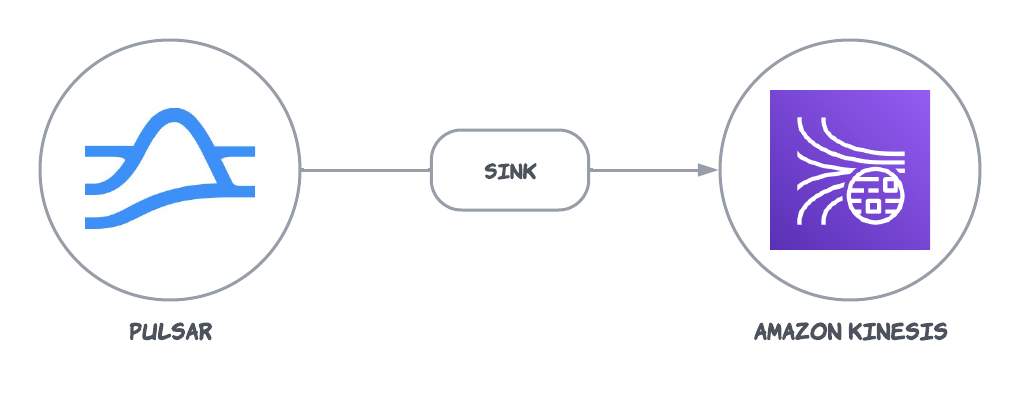
> The Kinesis sink connector pulls data from Pulsar and persists data into Amazon Kinesis.
# Kinesis sink
The AWS Kinesis sink connector pulls data from Pulsar and persists data into Amazon Kinesis. For more information about connectors, see [Connector Overview](https://docs.streamnative.io/docs/connector-overview).
This connector is available as a built-in connector on StreamNative Cloud.
 This document introduces how to get started with creating an AWS Kinesis sink connector and get it up and running.
## Quick start
### Prerequisites
The prerequisites for connecting an AWS Kinesis sink connector to external systems include:
1. Create a Kinesis data stream in AWS.
2. Create an [AWS User](https://docs.aws.amazon.com/IAM/latest/UserGuide/id_users_create.html) and an `AccessKey`(Please record the value of `AccessKey` and its `SecretKey`).
3. Assign the following permissions to the AWS User:
* [AmazonKinesisFullAccess](https://docs.aws.amazon.com/aws-managed-policy/latest/reference/AmazonKinesisFullAccess.html)
* [CloudWatch:PutMetricData](https://docs.aws.amazon.com/AmazonCloudWatch/latest/APIReference/API_PutMetricData.html): it is required because AWS Kinesis producer will periodically [send metrics to CloudWatch](https://docs.aws.amazon.com/streams/latest/dev/monitoring-with-cloudwatch.html).
### 1. Create a connector
The following command shows how to use [pulsarctl](https://github.com/streamnative/pulsarctl) to create a `builtin` connector. If you want to create a `non-builtin` connector,
you need to replace `--sink-type kinesis` with `--archive /path/to/pulsar-io-kinesis.nar`. You can find the button to download the `nar` package at the beginning of the document.
If you are a StreamNative Cloud user, you need [set up your environment](https://docs.streamnative.io/docs/connector-setup) first.
```bash theme={null}
pulsarctl sinks create \
--sink-type kinesis \
--name kinesis-sink \
--tenant public \
--namespace default \
--inputs "Your topic name" \
--parallelism 1 \
--sink-config \
'{
"awsRegion": "Your aws kinesis region",
"awsKinesisStreamName": "Your kinesis stream name",
"awsCredentialPluginParam": "{\"accessKey\":\"Your AWS access key\",\"secretKey\":\"Your AWS secret access key\"}"
}'
```
The `--sink-config` is the minimum necessary configuration for starting this connector, and it is a JSON string. You need to substitute the relevant parameters with your own.
If you want to configure more parameters, see [Configuration Properties](#configuration-properties) for reference.
You can also choose to use a variety of other tools to create a connector:
* [pulsar-admin](https://pulsar.apache.org/docs/3.1.x/io-use/): The command arguments for `pulsar-admin` are similar to those of `pulsarctl`. You can find an example for [StreamNative Cloud Doc](https://docs.streamnative.io/docs/connector-create#create-a-built-in-connector).
* [RestAPI](https://pulsar.apache.org/sink-rest-api/?version=3.1.1): You can find an example for [StreamNative Cloud Doc](https://docs.streamnative.io/docs/connector-create#create-a-built-in-connector).
* [Terraform](https://github.com/hashicorp/terraform): You can find an example for [StreamNative Cloud Doc](https://docs.streamnative.io/docs/connector-create#create-a-built-in-connector).
* [Function Mesh](https://functionmesh.io/docs/connectors/run-connector): The docker image can be found at the beginning of the document.
### 2. Send messages to the topic
If your connector is created on StreamNative Cloud, you need to authenticate your clients. See [Build applications using Pulsar clients](https://docs.streamnative.io/docs/qs-connect#jumpstart-for-beginners) for more information.
```java theme={null}
PulsarClient client = PulsarClient.builder()
.serviceUrl("{{Your Pulsar URL}}")
.build();
Producer producer = client.newProducer(Schema.STRING)
.topic("{{Your topic name}}")
.create();
String message = "test-message";
MessageId msgID = producer.send(message);
System.out.println("Publish " + message + " and message ID " + msgID);
producer.flush();
producer.close();
client.close();
```
### 3. Show data on AWS Kinesis console
You can use the AWS Kinesis `Data Viewer` to view the data.
This document introduces how to get started with creating an AWS Kinesis sink connector and get it up and running.
## Quick start
### Prerequisites
The prerequisites for connecting an AWS Kinesis sink connector to external systems include:
1. Create a Kinesis data stream in AWS.
2. Create an [AWS User](https://docs.aws.amazon.com/IAM/latest/UserGuide/id_users_create.html) and an `AccessKey`(Please record the value of `AccessKey` and its `SecretKey`).
3. Assign the following permissions to the AWS User:
* [AmazonKinesisFullAccess](https://docs.aws.amazon.com/aws-managed-policy/latest/reference/AmazonKinesisFullAccess.html)
* [CloudWatch:PutMetricData](https://docs.aws.amazon.com/AmazonCloudWatch/latest/APIReference/API_PutMetricData.html): it is required because AWS Kinesis producer will periodically [send metrics to CloudWatch](https://docs.aws.amazon.com/streams/latest/dev/monitoring-with-cloudwatch.html).
### 1. Create a connector
The following command shows how to use [pulsarctl](https://github.com/streamnative/pulsarctl) to create a `builtin` connector. If you want to create a `non-builtin` connector,
you need to replace `--sink-type kinesis` with `--archive /path/to/pulsar-io-kinesis.nar`. You can find the button to download the `nar` package at the beginning of the document.
If you are a StreamNative Cloud user, you need [set up your environment](https://docs.streamnative.io/docs/connector-setup) first.
```bash theme={null}
pulsarctl sinks create \
--sink-type kinesis \
--name kinesis-sink \
--tenant public \
--namespace default \
--inputs "Your topic name" \
--parallelism 1 \
--sink-config \
'{
"awsRegion": "Your aws kinesis region",
"awsKinesisStreamName": "Your kinesis stream name",
"awsCredentialPluginParam": "{\"accessKey\":\"Your AWS access key\",\"secretKey\":\"Your AWS secret access key\"}"
}'
```
The `--sink-config` is the minimum necessary configuration for starting this connector, and it is a JSON string. You need to substitute the relevant parameters with your own.
If you want to configure more parameters, see [Configuration Properties](#configuration-properties) for reference.
You can also choose to use a variety of other tools to create a connector:
* [pulsar-admin](https://pulsar.apache.org/docs/3.1.x/io-use/): The command arguments for `pulsar-admin` are similar to those of `pulsarctl`. You can find an example for [StreamNative Cloud Doc](https://docs.streamnative.io/docs/connector-create#create-a-built-in-connector).
* [RestAPI](https://pulsar.apache.org/sink-rest-api/?version=3.1.1): You can find an example for [StreamNative Cloud Doc](https://docs.streamnative.io/docs/connector-create#create-a-built-in-connector).
* [Terraform](https://github.com/hashicorp/terraform): You can find an example for [StreamNative Cloud Doc](https://docs.streamnative.io/docs/connector-create#create-a-built-in-connector).
* [Function Mesh](https://functionmesh.io/docs/connectors/run-connector): The docker image can be found at the beginning of the document.
### 2. Send messages to the topic
If your connector is created on StreamNative Cloud, you need to authenticate your clients. See [Build applications using Pulsar clients](https://docs.streamnative.io/docs/qs-connect#jumpstart-for-beginners) for more information.
```java theme={null}
PulsarClient client = PulsarClient.builder()
.serviceUrl("{{Your Pulsar URL}}")
.build();
Producer producer = client.newProducer(Schema.STRING)
.topic("{{Your topic name}}")
.create();
String message = "test-message";
MessageId msgID = producer.send(message);
System.out.println("Publish " + message + " and message ID " + msgID);
producer.flush();
producer.close();
client.close();
```
### 3. Show data on AWS Kinesis console
You can use the AWS Kinesis `Data Viewer` to view the data. 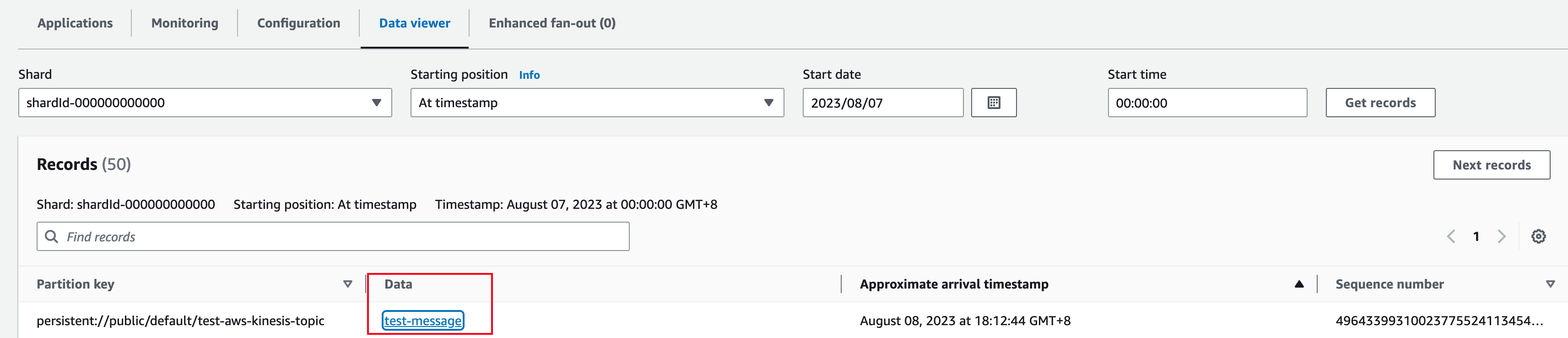 ## Configuration Properties
This table outlines the properties of an AWS Kinesis sink connector.
| Name | Type | Required | Sensitive | Default | Description |
| --------------------------- | ------------- | -------- | --------- | ------------------ | ---------------------------------------------------------------------------------------------------------------------------------------------------------------------------------------------------------------------------------------------------------------------------------------------------------------------------------------------------------------------------------------------------------------------------------------------------------------------------------------------------------------------------------------------------------------------------------------------------------------------------------------------------------------------------------------------------------------------------------------------------------------------------------------------------------------------------------------------------------------------------------------------------------------------------------------------------------- |
| `awsKinesisStreamName` | String | true | false | " " (empty string) | The Kinesis stream name. |
| `awsRegion` | String | true | false | " " (empty string) | The AWS Kinesis [region](https://www.aws-services.info/regions.html).
## Configuration Properties
This table outlines the properties of an AWS Kinesis sink connector.
| Name | Type | Required | Sensitive | Default | Description |
| --------------------------- | ------------- | -------- | --------- | ------------------ | ---------------------------------------------------------------------------------------------------------------------------------------------------------------------------------------------------------------------------------------------------------------------------------------------------------------------------------------------------------------------------------------------------------------------------------------------------------------------------------------------------------------------------------------------------------------------------------------------------------------------------------------------------------------------------------------------------------------------------------------------------------------------------------------------------------------------------------------------------------------------------------------------------------------------------------------------------------- |
| `awsKinesisStreamName` | String | true | false | " " (empty string) | The Kinesis stream name. |
| `awsRegion` | String | true | false | " " (empty string) | The AWS Kinesis [region](https://www.aws-services.info/regions.html).
**Example:**
us-west-1, us-west-2. |
| `awsCredentialPluginName` | String | false | false | " " (empty string) | The fully-qualified class name of implementation of [AwsCredentialProviderPlugin](https://github.com/apache/pulsar/blob/master/pulsar-io/aws/src/main/java/org/apache/pulsar/io/aws/AwsCredentialProviderPlugin.java). Please refer to \[Configure AwsCredentialProviderPlugin]\(###Configure AwsCredentialProviderPlugin) |
| `awsCredentialPluginParam` | String | false | true | " " (empty string) | The JSON parameter to initialize `awsCredentialsProviderPlugin`. Please refer to \[Configure AwsCredentialProviderPlugin]\(###Configure AwsCredentialProviderPlugin) |
| `awsEndpoint` | String | false | false | " " (empty string) | A custom Kinesis endpoint. For more information, see [AWS documentation](https://docs.aws.amazon.com/general/latest/gr/rande.html). |
| `retainOrdering` | Boolean | false | false | false | Whether Pulsar connectors retain the ordering when moving messages from Pulsar to Kinesis. |
| `messageFormat` | MessageFormat | false | false | ONLY\_RAW\_PAYLOAD | Message format in which Kinesis sink converts Pulsar messages and publishes them to Kinesis streams.
Available options include:
`ONLY_RAW_PAYLOAD`: Kinesis sink directly publishes Pulsar message payload as a message into the configured Kinesis stream.
`FULL_MESSAGE_IN_JSON`: Kinesis sink creates a JSON payload with Pulsar message payload, properties, and encryptionCtx, and publishes JSON payload into the configured Kinesis stream.
`FULL_MESSAGE_IN_FB`: Kinesis sink creates a flatbuffers serialized payload with Pulsar message payload, properties, and encryptionCtx, and publishes flatbuffers payload into the configured Kinesis stream.
`FULL_MESSAGE_IN_JSON_EXPAND_VALUE`: Kinesis sink sends a JSON structure containing the record topic name, key, payload, properties, and event time. The record schema is used to convert the value to JSON. |
| `jsonIncludeNonNulls` | Boolean | false | false | true | Only the properties with non-null values are included when the message format is `FULL_MESSAGE_IN_JSON_EXPAND_VALUE`. |
| `jsonFlatten` | Boolean | false | false | false | When it is set to `true` and the message format is `FULL_MESSAGE_IN_JSON_EXPAND_VALUE`, the output JSON is flattened. |
| `retryInitialDelayInMillis` | Long | false | false | 100 | The initial delay (in milliseconds) between retries. |
| `retryMaxDelayInMillis` | Long | false | false | 60000 | The maximum delay(in milliseconds) between retries. |
### Configure AwsCredentialProviderPlugin
AWS Kinesis sink connector allows you to use three ways to connect to AWS Kinesis by configuring `awsCredentialPluginName`.
* Leave `awsCredentialPluginName` empty to get the connector authenticated by passing `accessKey` and `secretKey` in `awsCredentialPluginParam`.
```json theme={null}
{"accessKey":"Your access key","secretKey":"Your secret key"}
```
* Set `awsCredentialPluginName` to `org.apache.pulsar.io.aws.AwsDefaultProviderChainPlugin` to use the default AWS provider chain. With this option, you don’t need to configure `awsCredentialPluginParam`. For more information, see [AWS documentation](https://docs.aws.amazon.com/sdk-for-java/v1/developer-guide/credentials.html#credentials-default).
* Set `awsCredentialPluginName`to `org.apache.pulsar.io.aws.STSAssumeRoleProviderPlugin` to use the [default AWS provider chain](https://docs.aws.amazon.com/sdk-for-java/v1/developer-guide/credentials.html#credentials-default), and you need to configure `roleArn` and `roleSessionNmae` in `awsCredentialPluginParam`. For more information, see [AWS documentation](https://docs.aws.amazon.com/STS/latest/APIReference/API_AssumeRole.html)
```json theme={null}
{"roleArn": "arn...", "roleSessionName": "name"}
```