> ## Documentation Index
> Fetch the complete documentation index at: https://docs.streamnative.io/llms.txt
> Use this file to discover all available pages before exploring further.
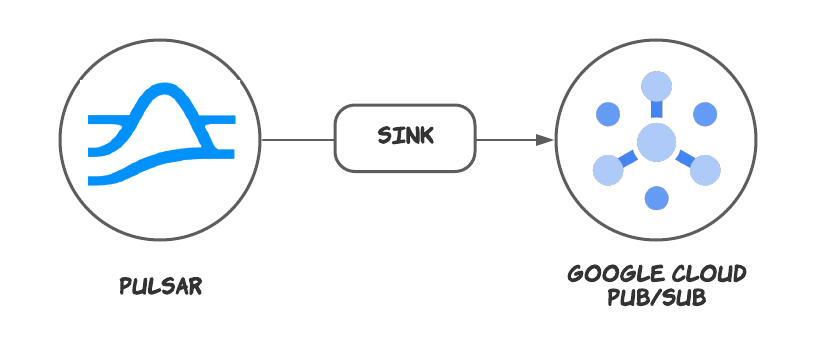
> The Google Pub/Sub sink connector is used to write messages from Apache Pulsar topics to Google Cloud Pub/Sub.
# Google pubsub sink
This connector is available as a built-in connector on StreamNative Cloud.
The [Google Cloud PubSub](https://cloud.google.com/pubsub) sink connector pulls data from Pulsar topics and persists data to Google Cloud PubSub tables.
 ## Quick start
### Prerequisites
The prerequisites for connecting an Google PubSub sink connector to external systems include:
1. Create Google PubSub Topic in Google Cloud.
2. Create the [Gcloud ServiceAccount](https://cloud.google.com/iam/docs/service-accounts-create) and create a public key certificate.
3. Create the [Gcloud Role](https://cloud.google.com/iam/docs/creating-custom-roles), ensure the Google Cloud role have the following permissions:
```text theme={null}
- pubsub.topics.create
- pubsub.topics.get
- pubsub.topics.publish
```
4. Grant the service account the above role permissions.
### 1. Create a connector
The following command shows how to use [pulsarctl](https://github.com/streamnative/pulsarctl) to create a `builtin` connector. If you want to create a `non-builtin` connector,
you need to replace `--sink-type google-pubsub` with `--archive /path/to/pulsar-io-google-pubsub.nar`. You can find the button to download the `nar` package at the beginning of the document.
If you are a StreamNative Cloud user, you need [set up your environment](https://docs.streamnative.io/docs/connector-setup) first.
```bash theme={null}
pulsarctl sinks create \
--sink-type google-pubsub \
--name pubsub-sink \
--tenant public \
--namespace default \
--inputs "Your topic name" \
--parallelism 1 \
--sink-config \
'{
"pubsubProjectId": "Your google pubsub project Id",
"pubsubTopicId": "Your google pubsub Topic name",
"pubsubCredential": "The escaped and compressed public key certificate you created above"
}'
```
The `--sink-config` is the minimum necessary configuration for starting this connector, and it is a JSON string. You need to substitute the relevant parameters with your own.
If you want to configure more parameters, see [Configuration Properties](#configuration-properties) for reference.
You can also choose to use a variety of other tools to create a connector:
* [pulsar-admin](https://pulsar.apache.org/docs/3.1.x/io-use/): The command arguments for `pulsar-admin` are similar to those of `pulsarctl`. You can find an example for [StreamNative Cloud Doc](https://docs.streamnative.io/docs/connector-create#create-a-built-in-connector).
* [RestAPI](https://pulsar.apache.org/sink-rest-api/?version=3.1.1): You can find an example for [StreamNative Cloud Doc](https://docs.streamnative.io/docs/connector-create#create-a-built-in-connector).
* [Terraform](https://github.com/hashicorp/terraform): You can find an example for [StreamNative Cloud Doc](https://docs.streamnative.io/docs/connector-create#create-a-built-in-connector).
* [Function Mesh](https://functionmesh.io/docs/connectors/run-connector): The docker image can be found at the beginning of the document.
### 2. Send messages to the topic
If your connector is created on StreamNative Cloud, you need to authenticate your clients. See [Build applications using Pulsar clients](https://docs.streamnative.io/docs/qs-connect#jumpstart-for-beginners) for more information.
```java theme={null}
public class TestProduce {
public static void main(String[] args) {
PulsarClient client = PulsarClient.builder()
.serviceUrl("{{Your Pulsar URL}}")
.build();
Producer producer = client.newProducer()
.topic("{{Your topic name}}")
.create();
for (int i = 0; i < 10; i++) {
String message = "my-message-" + i;
MessageId msgID = producer.send(message.getBytes());
System.out.println("Publish " + "my-message-" + i
+ " and message ID " + msgID);
}
producer.close();
client.close();
}
}
```
### 3. Show data on Google PubSub
You can create a subscription and pull data from the Google Pub/Sub console.
```text theme={null}
+---------------------------+-----------------+------------------|
| Publish time | Attribute keys | Message body |
+---------------------------+-----------------+------------------|
| Feb 19, 2024, 4:17:42 PM | - | my-message-0 |
| Feb 19, 2024, 4:17:42 PM | - | my-message-1 |
| Feb 19, 2024, 4:17:42 PM | - | my-message-2 |
| Feb 19, 2024, 4:17:42 PM | - | my-message-3 |
| Feb 19, 2024, 4:17:43 PM | - | my-message-4 |
| Feb 19, 2024, 4:17:43 PM | - | my-message-5 |
| Feb 19, 2024, 4:17:43 PM | - | my-message-6 |
| Feb 19, 2024, 4:17:43 PM | - | my-message-7 |
| Feb 19, 2024, 4:17:44 PM | - | my-message-8 |
| Feb 19, 2024, 4:17:44 PM | - | my-message-9 |
+---------------------------+-----------------+------------------|
```
## Configuration Properties
Before using the Google Cloud PubSub sink connector, you need to configure it. This table outlines the properties and the descriptions.
| Name | Type | Required | Sensitive | Default | Description |
| ------------------------ | ------ | -------- | --------- | ------------------ | -------------------------------------------------------------------------------------------------------------------------------------------------------------------------------------------------------------- |
| `pubsubCredential` | String | true | true | "" (empty string) | The credential (JSON string) for accessing the Google Cloud. It needs to be compressed and escaping before use. |
| `pubsubProjectId` | String | true | false | "" (empty string) | The Google Cloud project ID. |
| `pubsubTopicId` | String | true | false | " " (empty string) | The topic ID. It is used to read messages from or write messages to Google Cloud Pub/Sub topics. |
| `pubsubSchemaId` | String | false | false | "" (empty string) | The schema ID. You must set the schema ID when creating a schema for Google Cloud Pub/Sub topics. |
| `pubsubSchemaType` | String | false | false | "" (empty string) | The schema type. You must set the schema type when creating a schema for Google Cloud Pub/Sub topics. Currently, only the AVRO format is supported. |
| `pubsubSchemaEncoding` | String | false | false | "" (empty string) | The encoding of the schema. You must set the schema encoding when creating a schema for Google Cloud Pub/Sub topics. Currently, only the JSON format is supported. |
| `pubsubSchemaDefinition` | String | false | false | "" (empty string) | The definition of the schema. It is used to create a schema to or parse messages from Google Cloud Pub/Sub topics. |
| `subscriptionName` | String | false | false | "" (empty string) | The fully-qualified subscription name to read from (e.g., projects/my-sub-project/subscriptions/my-sub). If not set, a subscription is created in the pubsubProjectId with the same name as the pubsubTopicId. |
## Quick start
### Prerequisites
The prerequisites for connecting an Google PubSub sink connector to external systems include:
1. Create Google PubSub Topic in Google Cloud.
2. Create the [Gcloud ServiceAccount](https://cloud.google.com/iam/docs/service-accounts-create) and create a public key certificate.
3. Create the [Gcloud Role](https://cloud.google.com/iam/docs/creating-custom-roles), ensure the Google Cloud role have the following permissions:
```text theme={null}
- pubsub.topics.create
- pubsub.topics.get
- pubsub.topics.publish
```
4. Grant the service account the above role permissions.
### 1. Create a connector
The following command shows how to use [pulsarctl](https://github.com/streamnative/pulsarctl) to create a `builtin` connector. If you want to create a `non-builtin` connector,
you need to replace `--sink-type google-pubsub` with `--archive /path/to/pulsar-io-google-pubsub.nar`. You can find the button to download the `nar` package at the beginning of the document.
If you are a StreamNative Cloud user, you need [set up your environment](https://docs.streamnative.io/docs/connector-setup) first.
```bash theme={null}
pulsarctl sinks create \
--sink-type google-pubsub \
--name pubsub-sink \
--tenant public \
--namespace default \
--inputs "Your topic name" \
--parallelism 1 \
--sink-config \
'{
"pubsubProjectId": "Your google pubsub project Id",
"pubsubTopicId": "Your google pubsub Topic name",
"pubsubCredential": "The escaped and compressed public key certificate you created above"
}'
```
The `--sink-config` is the minimum necessary configuration for starting this connector, and it is a JSON string. You need to substitute the relevant parameters with your own.
If you want to configure more parameters, see [Configuration Properties](#configuration-properties) for reference.
You can also choose to use a variety of other tools to create a connector:
* [pulsar-admin](https://pulsar.apache.org/docs/3.1.x/io-use/): The command arguments for `pulsar-admin` are similar to those of `pulsarctl`. You can find an example for [StreamNative Cloud Doc](https://docs.streamnative.io/docs/connector-create#create-a-built-in-connector).
* [RestAPI](https://pulsar.apache.org/sink-rest-api/?version=3.1.1): You can find an example for [StreamNative Cloud Doc](https://docs.streamnative.io/docs/connector-create#create-a-built-in-connector).
* [Terraform](https://github.com/hashicorp/terraform): You can find an example for [StreamNative Cloud Doc](https://docs.streamnative.io/docs/connector-create#create-a-built-in-connector).
* [Function Mesh](https://functionmesh.io/docs/connectors/run-connector): The docker image can be found at the beginning of the document.
### 2. Send messages to the topic
If your connector is created on StreamNative Cloud, you need to authenticate your clients. See [Build applications using Pulsar clients](https://docs.streamnative.io/docs/qs-connect#jumpstart-for-beginners) for more information.
```java theme={null}
public class TestProduce {
public static void main(String[] args) {
PulsarClient client = PulsarClient.builder()
.serviceUrl("{{Your Pulsar URL}}")
.build();
Producer producer = client.newProducer()
.topic("{{Your topic name}}")
.create();
for (int i = 0; i < 10; i++) {
String message = "my-message-" + i;
MessageId msgID = producer.send(message.getBytes());
System.out.println("Publish " + "my-message-" + i
+ " and message ID " + msgID);
}
producer.close();
client.close();
}
}
```
### 3. Show data on Google PubSub
You can create a subscription and pull data from the Google Pub/Sub console.
```text theme={null}
+---------------------------+-----------------+------------------|
| Publish time | Attribute keys | Message body |
+---------------------------+-----------------+------------------|
| Feb 19, 2024, 4:17:42 PM | - | my-message-0 |
| Feb 19, 2024, 4:17:42 PM | - | my-message-1 |
| Feb 19, 2024, 4:17:42 PM | - | my-message-2 |
| Feb 19, 2024, 4:17:42 PM | - | my-message-3 |
| Feb 19, 2024, 4:17:43 PM | - | my-message-4 |
| Feb 19, 2024, 4:17:43 PM | - | my-message-5 |
| Feb 19, 2024, 4:17:43 PM | - | my-message-6 |
| Feb 19, 2024, 4:17:43 PM | - | my-message-7 |
| Feb 19, 2024, 4:17:44 PM | - | my-message-8 |
| Feb 19, 2024, 4:17:44 PM | - | my-message-9 |
+---------------------------+-----------------+------------------|
```
## Configuration Properties
Before using the Google Cloud PubSub sink connector, you need to configure it. This table outlines the properties and the descriptions.
| Name | Type | Required | Sensitive | Default | Description |
| ------------------------ | ------ | -------- | --------- | ------------------ | -------------------------------------------------------------------------------------------------------------------------------------------------------------------------------------------------------------- |
| `pubsubCredential` | String | true | true | "" (empty string) | The credential (JSON string) for accessing the Google Cloud. It needs to be compressed and escaping before use. |
| `pubsubProjectId` | String | true | false | "" (empty string) | The Google Cloud project ID. |
| `pubsubTopicId` | String | true | false | " " (empty string) | The topic ID. It is used to read messages from or write messages to Google Cloud Pub/Sub topics. |
| `pubsubSchemaId` | String | false | false | "" (empty string) | The schema ID. You must set the schema ID when creating a schema for Google Cloud Pub/Sub topics. |
| `pubsubSchemaType` | String | false | false | "" (empty string) | The schema type. You must set the schema type when creating a schema for Google Cloud Pub/Sub topics. Currently, only the AVRO format is supported. |
| `pubsubSchemaEncoding` | String | false | false | "" (empty string) | The encoding of the schema. You must set the schema encoding when creating a schema for Google Cloud Pub/Sub topics. Currently, only the JSON format is supported. |
| `pubsubSchemaDefinition` | String | false | false | "" (empty string) | The definition of the schema. It is used to create a schema to or parse messages from Google Cloud Pub/Sub topics. |
| `subscriptionName` | String | false | false | "" (empty string) | The fully-qualified subscription name to read from (e.g., projects/my-sub-project/subscriptions/my-sub). If not set, a subscription is created in the pubsubProjectId with the same name as the pubsubTopicId. |