> ## Documentation Index
> Fetch the complete documentation index at: https://docs.streamnative.io/llms.txt
> Use this file to discover all available pages before exploring further.
# Monitor and Troubleshoot Functions
StreamNative Cloud allows you to monitor functions status, logs, and exceptions that are thrown when a function fails to be created, updated, or cannot work.
## View function status
This section describes how to view function status using `snctl`, `pulsarctl`, `pulsar-admin`, and console.
If you want to monitor functions using `snctl`, `pulsarctl` or `pulsar-admin`, make sure you have set up your client tool. For more information, see [set up client tools](/cloud/process/pulsar-functions/function-setup#set-up-client-tools).
The following example introduces how to view the status of the Java exclamation function named `exclamation`.
To check the status of the function `exclamation`, run the following command:
```bash theme={null}
snctl pulsar admin functions status --tenant public --namespace default --name exclamation
```
```bash theme={null}
{
"numInstances": 1,
"numRunning": 1,
"instances": [
{
"instanceId": 0,
"status": {
"running": true,
"error": "",
"numRestarts": 0,
"numReceivedFromSource": 2622,
"numSystemExceptions": 0,
"latestSystemExceptions": [],
"numSourceExceptions": 0,
"latestSourceExceptions": [],
"numWritten": 2622,
"lastReceivedTime": 1691532145625,
"workerId": "test"
}
]
}
```
To check the status of the function `exclamation`, run the following command:
```bash theme={null}
pulsarctl functions status --tenant public --namespace default --name exclamation
```
```bash theme={null}
{
"numInstances": 1,
"numRunning": 1,
"instances": [
{
"instanceId": 0,
"status": {
"running": true,
"error": "",
"numRestarts": 0,
"numReceivedFromSource": 2622,
"numSystemExceptions": 0,
"latestSystemExceptions": [],
"numSourceExceptions": 0,
"latestSourceExceptions": [],
"numWritten": 2622,
"lastReceivedTime": 1691532145625,
"workerId": "test"
}
]
}
```
To check the status of the function `exclamation`, run the following command:
```bash theme={null}
./bin/pulsar-admin functions status --tenant public --namespace default --name exclamation
```
You should see the following output:
```bash theme={null}
{
"numInstances" : 1,
"numRunning" : 1,
"instances" : [ {
"instanceId" : 0,
"status" : {
"running" : true,
"error" : "",
"numRestarts" : 0,
"numReceivedFromSource" : 433,
"numSystemExceptions" : 0,
"latestSystemExceptions" : [ ],
"numSourceExceptions" : 0,
"latestSourceExceptions" : [ ],
"numWritten" : 433,
"lastReceivedTime" : 1691452485845,
"workerId" : "test"
}
} ]
}
```
1. From the left navigation pane, under **Resources**, click **Functions**.
2. Select the function item to view the status and exceptions of the function, as well as the system exceptions.
## View function logs
### View the function logs using `snctl`
This section describes how to view function logs using `snctl`.
This example assumes you have [installed snctl](/tools/cli/snctl/snctl-overview#install-snctl) and [initialized snctl configurations](/tools/cli/snctl/snctl-overview#initialize-snctl-configurationn).
You can run the `snctl logs` command to view logs for a specific function. This table outlines the configuration options that are used for viewing function logs. For details about all supported fields, you can use the `snctl logs -h` command to list more information.
| Option | Descriptions |
| ------------------------ | ---------------------------------------------------------------------------------------------------------------- |
| `-c` or `--cluster` | The name of your Pulsar cluster where the function is created. |
| `-p` or `--component` | The type of component to monitor. Available options are `function`, `sink`, and `source`. |
| `-f` or `--follow` | Continuously list the function log history. |
| `-h` or `--help` | Show usage information about the `snctl logs` command. |
| `-i` or `--instance` | The name of your Pulsar instance where the function is created. |
| `--name` | The name of your function. |
| `-o` or `--organization` | The name of your organization where the function is created. |
| `--previous` | Print the logs that are generated before the configured timestamp. |
| `--pulsar-tenant` | The name of your Pulsar tenant where the function is created. |
| `--pulsar-namespace` | The name of your Pulsar namespace where the function is created. |
| `--since` | List logs more recent than the specific time. Available units are `second`, `minute`, and `hour`, such as `24h`. |
| `-s` or `--size` | Specify how many lines of recent logs to display. |
| `--timestamp` | Include timestamps on each line in the log output. |
The following command example shows how to view up to 60 lines of the `exclamation` function’s logs within the last 5 hours.
```bash theme={null}
snctl logs --since 5h --organization sndev --instance aws --cluster aws --name exclamation --pulsar-tenant public --pulsar-namespace default -p function -f -s 60
```
You should see the following output:
```bash theme={null}
The package 'function://public/default/exclamation@v0.1' downloaded to path 'download/pulsar_functions/api-examples.jar' successfully
shardId=0
Using function root classloader: jdk.internal.loader.ClassLoaders$AppClassLoader@14dad5dc
Using function instance classloader: java.net.URLClassLoader@42dafa95
SLF4J: Class path contains multiple SLF4J bindings.
SLF4J: Found binding in [jar:file:/pulsar/lib/org.apache.logging.log4j-log4j-slf4j-impl-2.18.0.jar!/org/slf4j/impl/StaticLoggerBinder.class]
SLF4J: Found binding in [jar:file:/pulsar/instances/java-instance.jar!/org/slf4j/impl/StaticLoggerBinder.class]
SLF4J: See http://www.slf4j.org/codes.html#multiple_bindings for an explanation.
SLF4J: Actual binding is of type [org.apache.logging.slf4j.Log4jLoggerFactory]
WARNING: sun.reflect.Reflection.getCallerClass is not supported. This will impact performance.
Starting function instance...
2023-10-20T07:19:34,786+0000 [main] INFO org.apache.pulsar.common.nar.FileUtils - Jar file download/pulsar_functions/api-examples.jar does not contain META-INF/bundled-dependencies, it is not a NAR file
2023-10-20T07:19:34,789+0000 [main] INFO org.apache.pulsar.functions.runtime.thread.ThreadRuntime - Load file as simple JAR file: download/pulsar_functions/api-examples.jar
2023-10-20T07:19:34,791+0000 [main] INFO org.apache.pulsar.functions.runtime.thread.ThreadRuntime - Initialize function class loader for function exclamation-2598d0c3 at function cache manager, functionClassLoader: org.apache.pulsar.functions.utils.functioncache.FunctionClassLoaders$ParentFirstClassLoader@2eced48b
WARNING: Illegal reflective access by org.apache.pulsar.common.util.netty.DnsResolverUtil (file:/pulsar/lib/io.streamnative-pulsar-common-2.10.5.5.jar) to method sun.net.InetAddressCachePolicy.get()
WARNING: Please consider reporting this to the maintainers of org.apache.pulsar.common.util.netty.DnsResolverUtil
WARNING: All illegal access operations will be denied in a future release
WARNING: Use --illegal-access=warn to enable warnings of further illegal reflective access operations
WARNING: An illegal reflective access operation has occurred
2023-10-20T07:19:37,463+0000 [main] INFO org.apache.pulsar.functions.runtime.JavaInstanceStarter - Starting runtimeSpawner
2023-10-20T07:19:37,462+0000 [main] INFO org.apache.pulsar.functions.runtime.JavaInstanceStarter - JavaInstance Server started, listening on 9093
2023-10-20T07:19:37,463+0000 [main] INFO org.apache.pulsar.functions.runtime.RuntimeSpawner - public/default/exclamation-2598d0c3-0 RuntimeSpawner starting function
2023-10-20T07:19:37,466+0000 [main] INFO org.apache.pulsar.functions.runtime.thread.ThreadRuntime - Load file as simple JAR file: download/pulsar_functions/api-examples.jar
2023-10-20T07:19:37,466+0000 [main] INFO org.apache.pulsar.common.nar.FileUtils - Jar file download/pulsar_functions/api-examples.jar does not contain META-INF/bundled-dependencies, it is not a NAR file
2023-10-20T07:19:37,466+0000 [main] INFO org.apache.pulsar.functions.runtime.thread.ThreadRuntime - Initialize function class loader for function exclamation-2598d0c3 at function cache manager, functionClassLoader: org.apache.pulsar.functions.utils.functioncache.FunctionClassLoaders$ParentFirstClassLoader@2eced48b
2023-10-20T07:19:37,473+0000 [main] INFO org.apache.pulsar.functions.runtime.thread.ThreadRuntime - ThreadContainer starting function with instanceId 0 functionId 0-28d06ebd-df24-4503-8d28-f573034ac7f8 namespace default
2023-10-20T07:19:37,474+0000 [main] INFO org.apache.pulsar.functions.runtime.JavaInstanceStarter - Starting metrics server on port 9094
userConfig: "{}"
parallelism: 1
inputSpecs {
typeClassName: "java.lang.String"
ram: 1073741824
sink {
forwardSourceMessageProperty: true
}
cpu: 1.0
2023-10-20T07:19:37,489+0000 [public/default/exclamation-2598d0c3-0] INFO org.apache.pulsar.functions.instance.JavaInstanceRunnable - Starting Java Instance exclamation-2598d0c3 :
namespace: "default"
className: "org.apache.pulsar.functions.api.examples.ExclamationFunction"
}
}
}
producerSpec {
}
Details = tenant: "public"
typeClassName: "java.lang.String"
key: "persistent://public/default/test-java-input"
cleanupSubscription: true
topic: "persistent://public/default/test-java-output"
}
componentType: FUNCTION
name: "exclamation-2598d0c3"
autoAck: true
source {
value {
resources {
2023-10-20T07:19:37,967+0000 [public/default/exclamation-2598d0c3-0] INFO org.apache.pulsar.functions.sink.PulsarSink - Opening pulsar sink with config: PulsarSinkConfig(processingGuarantees=ATLEAST_ONCE, topic=persistent://public/default/test-java-output, serdeClassName=null, schemaType=null, schemaProperties={}, typeClassName=java.lang.String, forwardSourceMessageProperty=true, producerConfig=ProducerConfig(maxPendingMessages=0, maxPendingMessagesAcrossPartitions=0, useThreadLocalProducers=false, cryptoConfig=null, batchBuilder=))
2023-10-20T07:19:38,177+0000 [pulsar-client-io-1-1] INFO org.apache.pulsar.client.impl.ConnectionPool - [[id: 0x030c5cc3, L:/10.44.3.121:51444 - R:func-on-cloud-test-broker.NAMESPACE.svc.cluster.local.NAMESPACE.svc.cluster.local/10.39.176.165:6650]] Connected to server
2023-10-20T07:19:38,577+0000 [public/default/exclamation-2598d0c3-0] INFO org.apache.pulsar.functions.sink.PulsarSink - crypto key reader is not provided, not enabling end to end encryption
2023-10-20T07:19:38,682+0000 [pulsar-client-io-1-1] INFO org.apache.pulsar.client.impl.ProducerStatsRecorderImpl - Starting Pulsar producer perf with config: {"topicName":"persistent://public/default/test-java-output","producerName":null,"sendTimeoutMs":0,"blockIfQueueFull":true,"maxPendingMessages":1000,"maxPendingMessagesAcrossPartitions":50000,"messageRoutingMode":"CustomPartition","hashingScheme":"Murmur3_32Hash","cryptoFailureAction":"FAIL","batchingMaxPublishDelayMicros":10000,"batchingPartitionSwitchFrequencyByPublishDelay":10,"batchingMaxMessages":1000,"batchingMaxBytes":131072,"batchingEnabled":true,"chunkingEnabled":false,"compressionType":"LZ4","initialSequenceId":null,"autoUpdatePartitions":true,"autoUpdatePartitionsIntervalSeconds":60,"multiSchema":true,"accessMode":"Shared","lazyStartPartitionedProducers":false,"properties":{"application":"pulsar-function","id":"public/default/exclamation-2598d0c3","instance_hostname":"exclamation-2598d0c3-function-0","instance_id":"0"},"initialSubscriptionName":null}
2023-10-20T07:19:38,705+0000 [pulsar-client-io-1-1] INFO org.apache.pulsar.client.impl.ProducerStatsRecorderImpl - Pulsar client config: {"serviceUrl":"pulsar://func-on-cloud-test-broker.NAMESPACE.svc.cluster.local:6650","authPluginClassName":"org.apache.pulsar.client.impl.auth.oauth2.AuthenticationOAuth2","authParams":"*****","authParamMap":null,"operationTimeoutMs":30000,"lookupTimeoutMs":30000,"statsIntervalSeconds":60,"numIoThreads":1,"numListenerThreads":1,"connectionsPerBroker":1,"useTcpNoDelay":true,"useTls":false,"tlsTrustCertsFilePath":null,"tlsAllowInsecureConnection":true,"tlsHostnameVerificationEnable":false,"concurrentLookupRequest":5000,"maxLookupRequest":50000,"maxLookupRedirects":20,"maxNumberOfRejectedRequestPerConnection":50,"keepAliveIntervalSeconds":30,"connectionTimeoutMs":10000,"requestTimeoutMs":60000,"initialBackoffIntervalNanos":100000000,"maxBackoffIntervalNanos":60000000000,"enableBusyWait":false,"listenerName":null,"useKeyStoreTls":false,"sslProvider":null,"tlsTrustStoreType":"JKS","tlsTrustStorePath":null,"tlsTrustStorePassword":null,"tlsCiphers":[],"tlsProtocols":[],"memoryLimitBytes":0,"proxyServiceUrl":null,"proxyProtocol":null,"enableTransaction":false,"dnsLookupBindAddress":null,"dnsLookupBindPort":0,"socks5ProxyAddress":null,"socks5ProxyUsername":null,"socks5ProxyPassword":null}
2023-10-20T07:19:38,810+0000 [pulsar-client-io-1-1] INFO org.apache.pulsar.client.impl.ConnectionPool - [[id: 0xda231b5b, L:/10.44.3.121:58592 - R:func-on-cloud-test-broker-0.func-on-cloud-test-broker-headless.NAMESPACE.svc.cluster.local/240.240.0.86:6650]] Connected to server
2023-10-20T07:19:39,400+0000 [pulsar-client-io-1-1] INFO org.apache.pulsar.client.impl.ProducerImpl - [persistent://public/default/test-java-output-partition-0] [null] Creating producer on cnx [id: 0xda231b5b, L:/10.44.3.121:58592 - R:func-on-cloud-test-broker-0.func-on-cloud-test-broker-headless.NAMESPACE.svc.cluster.local/240.240.0.86:6650]
2023-10-20T07:19:41,808+0000 [pulsar-client-io-1-1] INFO org.apache.pulsar.client.impl.ProducerImpl - [persistent://public/default/test-java-output-partition-0] [func-on-cloud-test-5-0] Created producer on cnx [id: 0xda231b5b, L:/10.44.3.121:58592 - R:func-on-cloud-test-broker-0.func-on-cloud-test-broker-headless.NAMESPACE.svc.cluster.local/240.240.0.86:6650]
2023-10-20T07:19:41,811+0000 [pulsar-client-io-1-1] INFO org.apache.pulsar.client.impl.PartitionedProducerImpl - [persistent://public/default/test-java-output] Created partitioned producer
2023-10-20T07:19:41,818+0000 [public/default/exclamation-2598d0c3-0] INFO org.apache.pulsar.functions.source.SingleConsumerPulsarSource - Opening pulsar source with config: SingleConsumerPulsarSourceConfig(topic=persistent://public/default/test-java-input, consumerConfig=ConsumerConfig(schemaType=null, serdeClassName=null, isRegexPattern=false, schemaProperties={}, consumerProperties={}, receiverQueueSize=null, cryptoConfig=null, poolMessages=false))
"properties": {}
}
"timestamp": 0,
"type": "STRING",
"name": "String",
2023-10-20T07:19:41,824+0000 [public/default/exclamation-2598d0c3-0] INFO org.apache.pulsar.functions.source.SingleConsumerPulsarSource - Creating consumer for topic : persistent://public/default/test-java-input, schema : org.apache.pulsar.client.impl.schema.StringSchema@38ebab52, schemaInfo: {
"schema": "",
2023-10-20T07:19:41,922+0000 [pulsar-client-io-1-1] INFO org.apache.pulsar.client.impl.ConsumerStatsRecorderImpl - Starting Pulsar consumer status recorder with config: {"topicNames":[],"topicsPattern":null,"subscriptionName":"public/default/exclamation-2598d0c3","subscriptionType":"Shared","subscriptionProperties":null,"subscriptionMode":"Durable","receiverQueueSize":1000,"acknowledgementsGroupTimeMicros":100000,"negativeAckRedeliveryDelayMicros":60000000,"maxTotalReceiverQueueSizeAcrossPartitions":50000,"consumerName":"7330b","ackTimeoutMillis":0,"tickDurationMillis":1000,"priorityLevel":0,"maxPendingChunkedMessage":10,"autoAckOldestChunkedMessageOnQueueFull":false,"expireTimeOfIncompleteChunkedMessageMillis":60000,"cryptoFailureAction":"FAIL","properties":{"application":"pulsar-function","id":"public/default/exclamation-2598d0c3","instance_hostname":"exclamation-2598d0c3-function-0","instance_id":"0"},"readCompacted":false,"subscriptionInitialPosition":"Latest","patternAutoDiscoveryPeriod":60,"regexSubscriptionMode":"PersistentOnly","deadLetterPolicy":null,"retryEnable":false,"autoUpdatePartitions":true,"autoUpdatePartitionsIntervalSeconds":60,"replicateSubscriptionState":false,"resetIncludeHead":false,"batchIndexAckEnabled":false,"ackReceiptEnabled":false,"poolMessages":false,"startPaused":false,"maxPendingChuckedMessage":10}
2023-10-20T07:19:41,961+0000 [pulsar-client-io-1-1] INFO org.apache.pulsar.client.impl.ConsumerStatsRecorderImpl - Pulsar client config: {"serviceUrl":"pulsar://func-on-cloud-test-broker.NAMESPACE.svc.cluster.local:6650","authPluginClassName":"org.apache.pulsar.client.impl.auth.oauth2.AuthenticationOAuth2","authParams":"*****","authParamMap":null,"operationTimeoutMs":30000,"lookupTimeoutMs":30000,"statsIntervalSeconds":60,"numIoThreads":1,"numListenerThreads":1,"connectionsPerBroker":1,"useTcpNoDelay":true,"useTls":false,"tlsTrustCertsFilePath":null,"tlsAllowInsecureConnection":true,"tlsHostnameVerificationEnable":false,"concurrentLookupRequest":5000,"maxLookupRequest":50000,"maxLookupRedirects":20,"maxNumberOfRejectedRequestPerConnection":50,"keepAliveIntervalSeconds":30,"connectionTimeoutMs":10000,"requestTimeoutMs":60000,"initialBackoffIntervalNanos":100000000,"maxBackoffIntervalNanos":60000000000,"enableBusyWait":false,"listenerName":null,"useKeyStoreTls":false,"sslProvider":null,"tlsTrustStoreType":"JKS","tlsTrustStorePath":null,"tlsTrustStorePassword":null,"tlsCiphers":[],"tlsProtocols":[],"memoryLimitBytes":0,"proxyServiceUrl":null,"proxyProtocol":null,"enableTransaction":false,"dnsLookupBindAddress":null,"dnsLookupBindPort":0,"socks5ProxyAddress":null,"socks5ProxyUsername":null,"socks5ProxyPassword":null}
2023-10-20T07:19:41,961+0000 [pulsar-client-io-1-1] INFO org.apache.pulsar.client.impl.ConsumerStatsRecorderImpl - Pulsar client config: {"serviceUrl":"pulsar://func-on-cloud-test-broker.NAMESPACE.svc.cluster.local:6650","authPluginClassName":"org.apache.pulsar.client.impl.auth.oauth2.AuthenticationOAuth2","authParams":"*****","authParamMap":null,"operationTimeoutMs":30000,"lookupTimeoutMs":30000,"statsIntervalSeconds":60,"numIoThreads":1,"numListenerThreads":1,"connectionsPerBroker":1,"useTcpNoDelay":true,"useTls":false,"tlsTrustCertsFilePath":null,"tlsAllowInsecureConnection":true,"tlsHostnameVerificationEnable":false,"concurrentLookupRequest":5000,"maxLookupRequest":50000,"maxLookupRedirects":20,"maxNumberOfRejectedRequestPerConnection":50,"keepAliveIntervalSeconds":30,"connectionTimeoutMs":10000,"requestTimeoutMs":60000,"initialBackoffIntervalNanos":100000000,"maxBackoffIntervalNanos":60000000000,"enableBusyWait":false,"listenerName":null,"useKeyStoreTls":false,"sslProvider":null,"tlsTrustStoreType":"JKS","tlsTrustStorePath":null,"tlsTrustStorePassword":null,"tlsCiphers":[],"tlsProtocols":[],"memoryLimitBytes":0,"proxyServiceUrl":null,"proxyProtocol":null,"enableTransaction":false,"dnsLookupBindAddress":null,"dnsLookupBindPort":0,"socks5ProxyAddress":null,"socks5ProxyUsername":null,"socks5ProxyPassword":null}
2023-10-20T07:19:42,007+0000 [pulsar-client-io-1-1] INFO org.apache.pulsar.client.impl.ConsumerImpl - [persistent://public/default/test-java-input-partition-0][public/default/exclamation-2598d0c3] Subscribing to topic on cnx [id: 0xda231b5b, L:/10.44.3.121:58592 - R:func-on-cloud-test-broker-0.func-on-cloud-test-broker-headless.NAMESPACE.svc.cluster.local/240.240.0.86:6650], consumerId 0
2023-10-20T07:19:42,974+0000 [pulsar-client-io-1-1] INFO org.apache.pulsar.client.impl.ConsumerImpl - [persistent://public/default/test-java-input-partition-0][public/default/exclamation-2598d0c3] Subscribed to topic on func-on-cloud-test-broker-0.func-on-cloud-test-broker-headless.NAMESPACE.svc.cluster.local/240.240.0.86:6650 -- consumer: 0
2023-10-20T07:19:42,977+0000 [pulsar-client-io-1-1] INFO org.apache.pulsar.client.impl.MultiTopicsConsumerImpl - [persistent://public/default/test-java-input] [public/default/exclamation-2598d0c3] Success subscribe new topic persistent://public/default/test-java-input in topics consumer, partitions: 1, allTopicPartitionsNumber: 1
2023-10-20T07:21:47,466+0000 [pulsar-client-io-1-1] INFO org.apache.pulsar.client.impl.ClientCnx - [id: 0xda231b5b, L:/10.44.3.121:58592 ! R:func-on-cloud-test-broker-0.func-on-cloud-test-broker-headless.NAMESPACE.svc.cluster.local/240.240.0.86:6650] Disconnected
2023-10-20T07:21:47,470+0000 [pulsar-client-io-1-1] INFO org.apache.pulsar.client.impl.ConnectionHandler - [persistent://public/default/test-java-output-partition-0] [func-on-cloud-test-5-0] Closed connection [id: 0xda231b5b, L:/10.44.3.121:58592 ! R:func-on-cloud-test-broker-0.func-on-cloud-test-broker-headless.NAMESPACE.svc.cluster.local/240.240.0.86:6650] -- Will try again in 0.1 s
2023-10-20T07:21:47,471+0000 [pulsar-client-io-1-1] INFO org.apache.pulsar.client.impl.ConnectionHandler - [persistent://public/default/test-java-input-partition-0] [public/default/exclamation-2598d0c3] Closed connection [id: 0xda231b5b, L:/10.44.3.121:58592 ! R:func-on-cloud-test-broker-0.func-on-cloud-test-broker-headless.NAMESPACE.svc.cluster.local/240.240.0.86:6650] -- Will try again in 0.1 s
2023-10-20T07:21:47,571+0000 [pulsar-timer-8-1] INFO org.apache.pulsar.client.impl.ConnectionHandler - [persistent://public/default/test-java-output-partition-0] [func-on-cloud-test-5-0] Reconnecting after timeout
2023-10-20T07:21:47,572+0000 [pulsar-timer-8-1] INFO org.apache.pulsar.client.impl.ConnectionHandler - [persistent://public/default/test-java-input-partition-0] [public/default/exclamation-2598d0c3] Reconnecting after timeout
2023-10-20T07:21:47,576+0000 [pulsar-client-io-1-1] INFO org.apache.pulsar.client.impl.ConnectionPool - [[id: 0x218f058a, L:/10.44.3.121:39488 - R:func-on-cloud-test-broker-0.func-on-cloud-test-broker-headless.NAMESPACE.svc.cluster.local/240.240.0.85:6650]] Connected to server
2023-10-20T07:21:47,580+0000 [pulsar-client-io-1-1] INFO org.apache.pulsar.client.impl.ConsumerImpl - [persistent://public/default/test-java-input-partition-0][public/default/exclamation-2598d0c3] Subscribing to topic on cnx [id: 0x218f058a, L:/10.44.3.121:39488 - R:func-on-cloud-test-broker-0.func-on-cloud-test-broker-headless.NAMESPACE.svc.cluster.local/240.240.0.85:6650], consumerId 0
2023-10-20T07:21:47,580+0000 [pulsar-client-io-1-1] INFO org.apache.pulsar.client.impl.ProducerImpl - [persistent://public/default/test-java-output-partition-0] [func-on-cloud-test-5-0] Creating producer on cnx [id: 0x218f058a, L:/10.44.3.121:39488 - R:func-on-cloud-test-broker-0.func-on-cloud-test-broker-headless.NAMESPACE.svc.cluster.local/240.240.0.85:6650]
2023-10-20T07:21:47,751+0000 [pulsar-client-io-1-1] INFO org.apache.pulsar.client.impl.ProducerImpl - [persistent://public/default/test-java-output-partition-0] [func-on-cloud-test-5-0] Created producer on cnx [id: 0x218f058a, L:/10.44.3.121:39488 - R:func-on-cloud-test-broker-0.func-on-cloud-test-broker-headless.NAMESPACE.svc.cluster.local/240.240.0.85:6650]
2023-10-20T07:21:47,756+0000 [pulsar-client-io-1-1] INFO org.apache.pulsar.client.impl.ConsumerImpl - [persistent://public/default/test-java-input-partition-0][public/default/exclamation-2598d0c3] Subscribed to topic on func-on-cloud-test-broker-0.func-on-cloud-test-broker-headless.NAMESPACE.svc.cluster.local/240.240.0.85:6650 -- consumer: 0
```
### View the function logs on StreamNative Cloud Console
After you have successfully deployed a function, you can check its status, logs, and any exceptions through StreamNative Cloud Console.
The **Functions** option in the **Resources** area is only available if you have configured your environment and deployed at least one function.
1. [Log in to StreamNative Cloud Console](https://console.streamnative.cloud/?defaultMethod=signup).
2. On the left navigation pane, in the **Resources** section, click **Functions**.
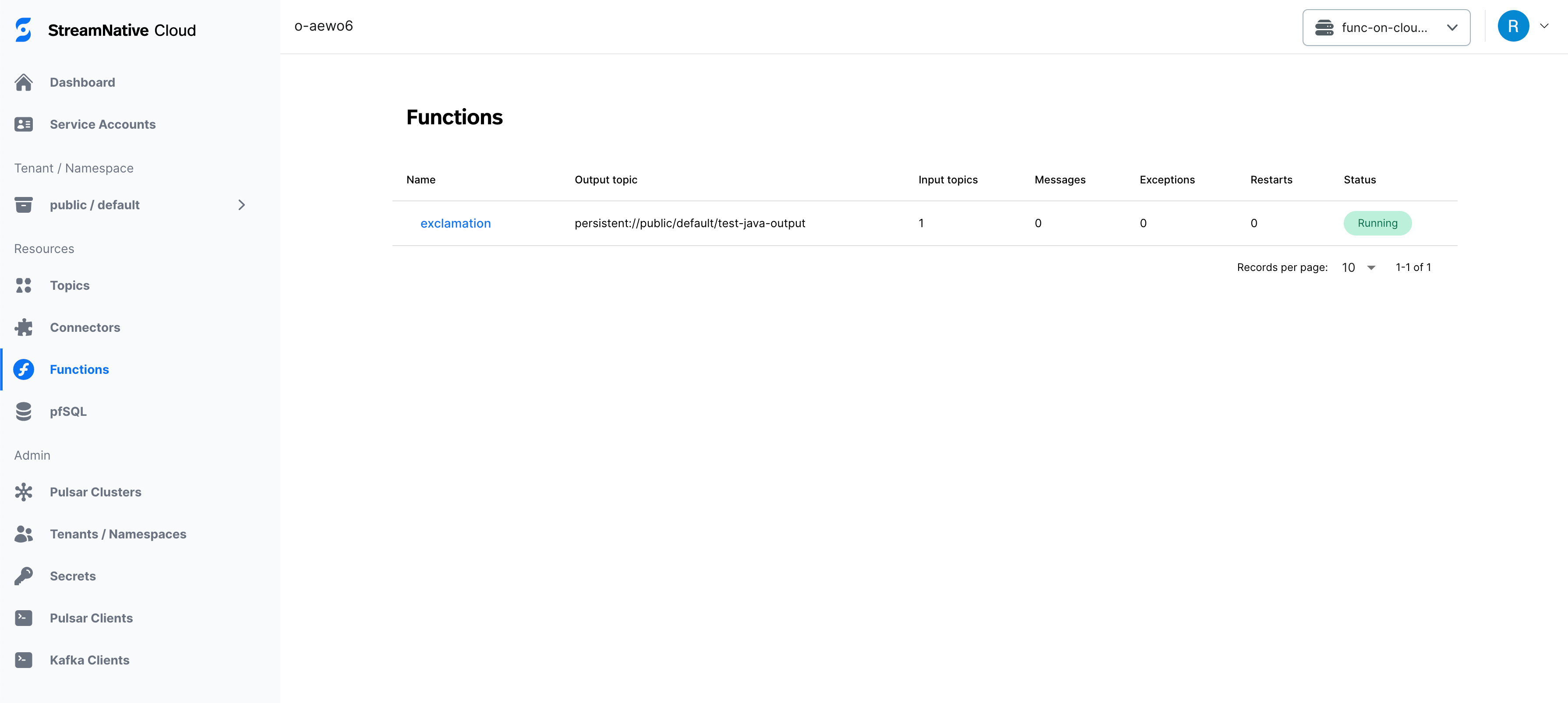
3. Click the status of the function you just deployed to view the details page. In the figure below, the status is **Running**.
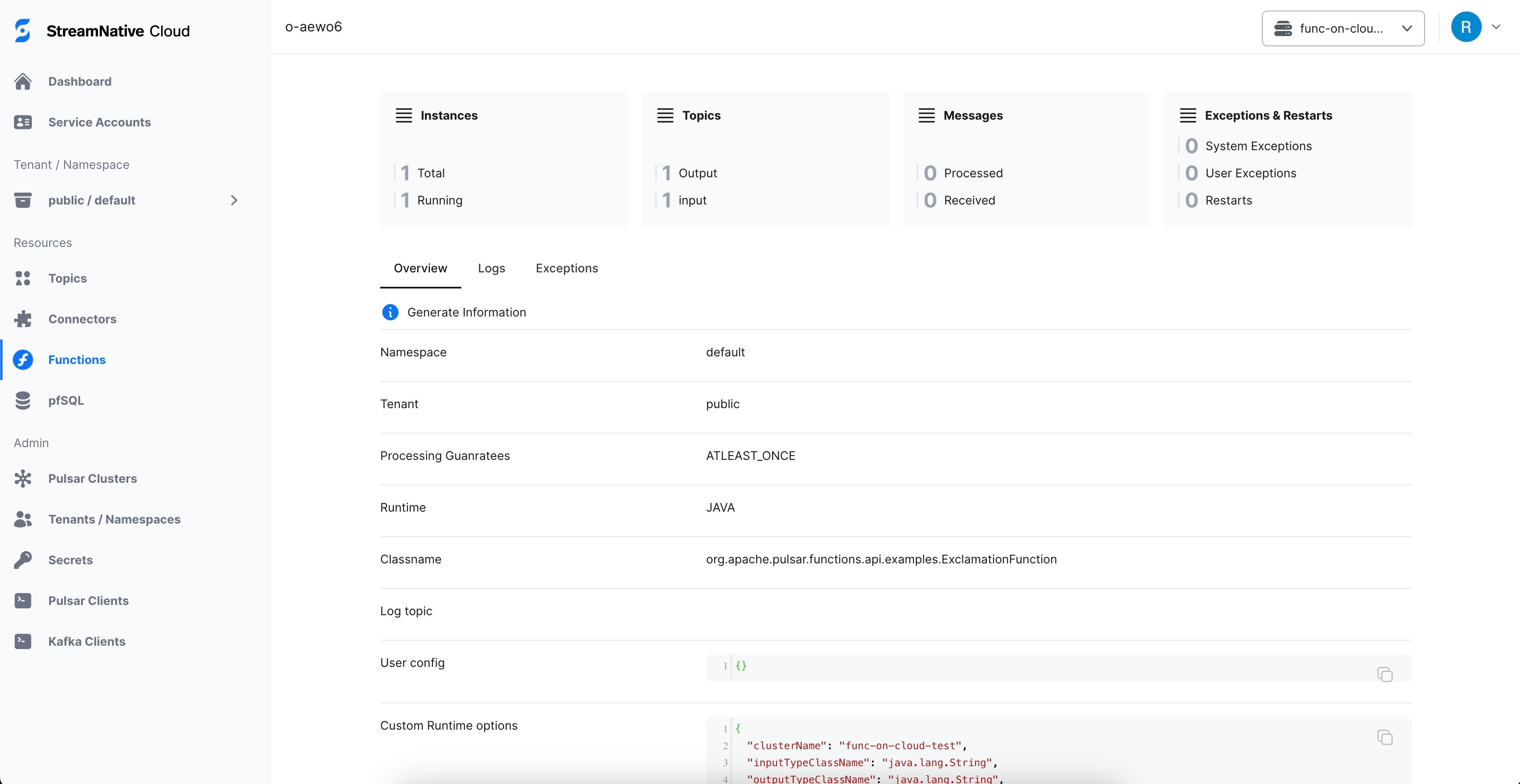
 4. On the functions detail page, click **Logs** to view a real-time log of the running function you selected. Click **Exceptions** to view any exceptions.
 ### View the function logs from log topics
You can use Pulsar Functions log topic feature to view the function logs. For more information, see [Pulsar Functions log topic](https://pulsar.apache.org/docs/en/functions-debug-log-topic).
Functions on StreamNative provide an alternative implementation of the Pulsar Functions log topic feature called `sidecar` mode, so you can use the feature in production environments with less performance impact.
To enable the `sidecar` mode, user should provide the following configurations when deploying the function:
```yaml theme={null}
pulsarctl functions create --custom-runtime-options '{"logTopicAgent":"sidecar"}' --log-topic log-topic ...
```
For more details about the `custom-runtime-options`, see [Custom runtime options](/cloud/process/pulsar-functions/function-config#stream-native-cloud-custom-runtime-options).
Once the function is deployed with the `sidecar` mode, you can configure consumers to consume messages from the log topic.
### View the function logs from log topics
You can use Pulsar Functions log topic feature to view the function logs. For more information, see [Pulsar Functions log topic](https://pulsar.apache.org/docs/en/functions-debug-log-topic).
Functions on StreamNative provide an alternative implementation of the Pulsar Functions log topic feature called `sidecar` mode, so you can use the feature in production environments with less performance impact.
To enable the `sidecar` mode, user should provide the following configurations when deploying the function:
```yaml theme={null}
pulsarctl functions create --custom-runtime-options '{"logTopicAgent":"sidecar"}' --log-topic log-topic ...
```
For more details about the `custom-runtime-options`, see [Custom runtime options](/cloud/process/pulsar-functions/function-config#stream-native-cloud-custom-runtime-options).
Once the function is deployed with the `sidecar` mode, you can configure consumers to consume messages from the log topic.