> ## Documentation Index
> Fetch the complete documentation index at: https://docs.streamnative.io/llms.txt
> Use this file to discover all available pages before exploring further.
# Manage Notifications
StreamNative Cloud Notifications let you proactively monitor the health and status of your critical resources. You can create alert rules from a set of built-in templates, each based on operational best practices. When a rule's condition is met, StreamNative Cloud automatically sends a detailed email notification to the designated recipients.
## How notifications work
The notification system is built on the following concepts:
* **Template-based rules**: StreamNative provides a set of built-in alert templates. Each template defines the alert condition, severity, and configurable parameters. You create one or more rules from a template and specify the exact scope and recipients for each.
* **Fine-grained scope**: When creating a rule, you choose the scope at which the alert applies—organization-wide, or narrowed down to a specific instance, cluster, tenant, namespace, or function. This lets you route different alerts to different teams.
* **Configurable recipients**: Each rule can have its own list of recipient email addresses. If no recipients are specified, the alert falls back to your organization's **Technical Contact Email**. You can configure the Technical Contact in your [Organization Profile](https://docs.streamnative.io/cloud/security/access/resource-hierarchy/organizations#organization-profile).
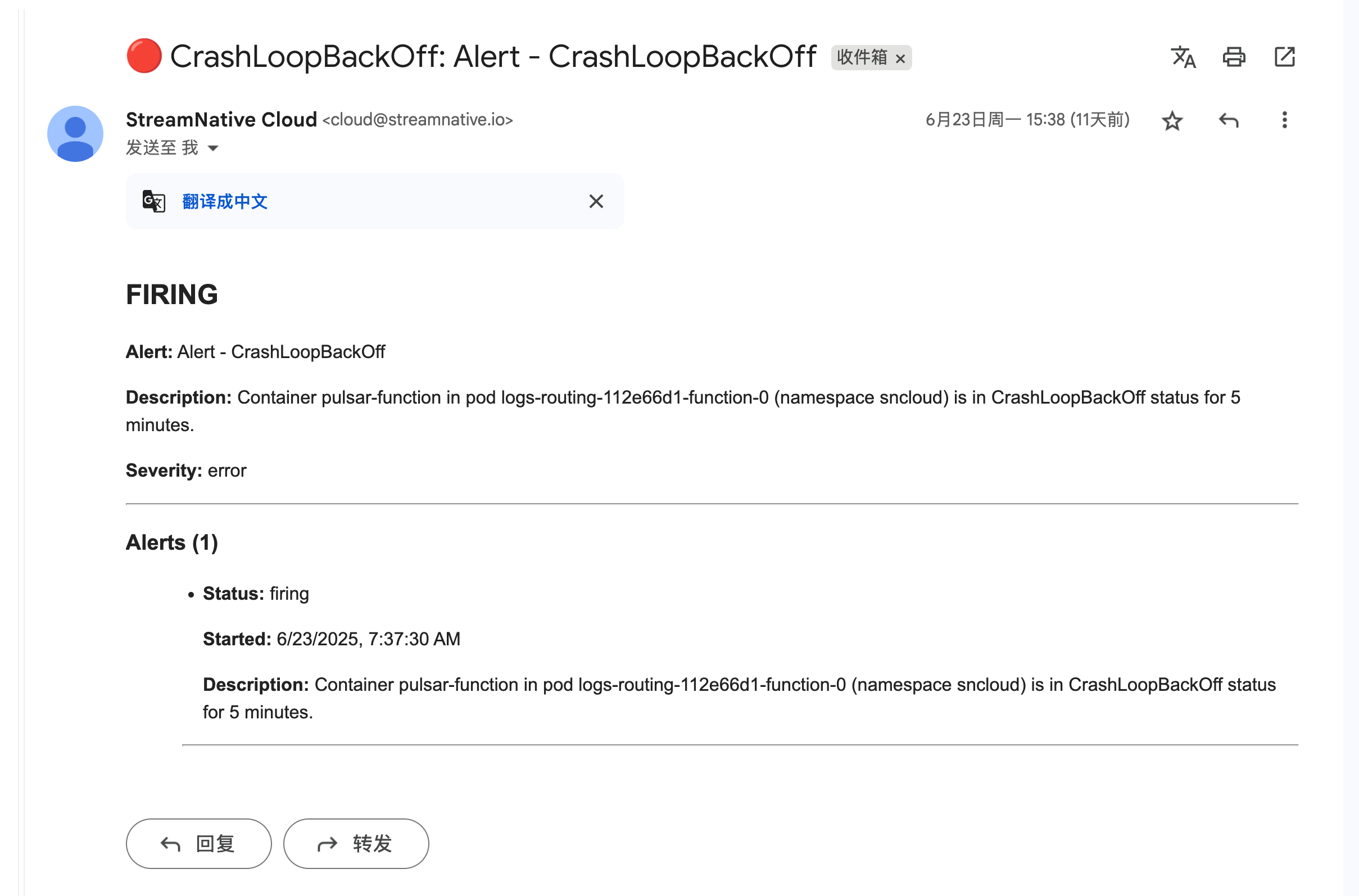
* **Automatic email lifecycle**: When a rule is triggered, an email is sent immediately. A follow-up email is sent once the issue is resolved.
Below is an example of the notification email you receive when an alert is triggered.
 ## Available alert templates
The following built-in templates are available. You can create multiple rules from the same template with different scopes or recipients.
| Template | Service | Condition | Severity |
| :---------------------------- | :--------------------- | :--------------------------------------------------------------------------------------------- | :-------- |
| **Function OOMKilled** | Functions / Connectors | A function or connector container has been `OOMKilled` 2 or more times in the last 15 minutes. | `error` |
| **Function CrashLoopBackOff** | Functions / Connectors | A function or connector pod has been in `CrashLoopBackOff` status for 5 minutes. | `error` |
| **API Key Expiration** | API Key | An API key is about to expire within 7 days. You can filter by service account. | `warning` |
| **BookKeeper Disk Usage** | BookKeeper | Cluster disk is projected to be full within 2 days. | `warning` |
Alert conditions and severity levels are defined by StreamNative based on operational best practices and cannot be modified.
## Navigate to Notifications
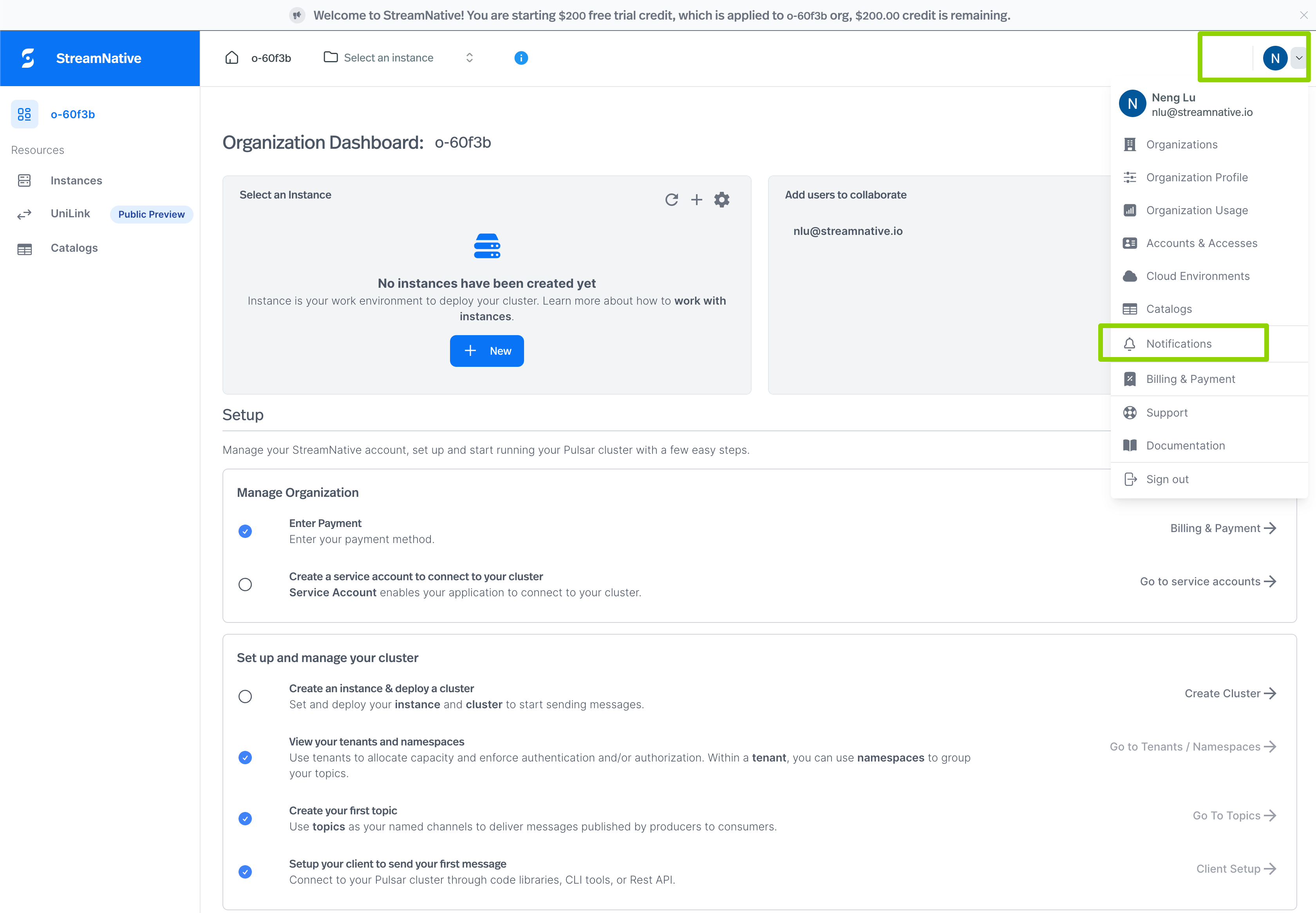
1. Click the **user icon** in the top-right corner of the StreamNative Cloud Console.
2. Select **Notifications** from the menu.
## Available alert templates
The following built-in templates are available. You can create multiple rules from the same template with different scopes or recipients.
| Template | Service | Condition | Severity |
| :---------------------------- | :--------------------- | :--------------------------------------------------------------------------------------------- | :-------- |
| **Function OOMKilled** | Functions / Connectors | A function or connector container has been `OOMKilled` 2 or more times in the last 15 minutes. | `error` |
| **Function CrashLoopBackOff** | Functions / Connectors | A function or connector pod has been in `CrashLoopBackOff` status for 5 minutes. | `error` |
| **API Key Expiration** | API Key | An API key is about to expire within 7 days. You can filter by service account. | `warning` |
| **BookKeeper Disk Usage** | BookKeeper | Cluster disk is projected to be full within 2 days. | `warning` |
Alert conditions and severity levels are defined by StreamNative based on operational best practices and cannot be modified.
## Navigate to Notifications
1. Click the **user icon** in the top-right corner of the StreamNative Cloud Console.
2. Select **Notifications** from the menu.
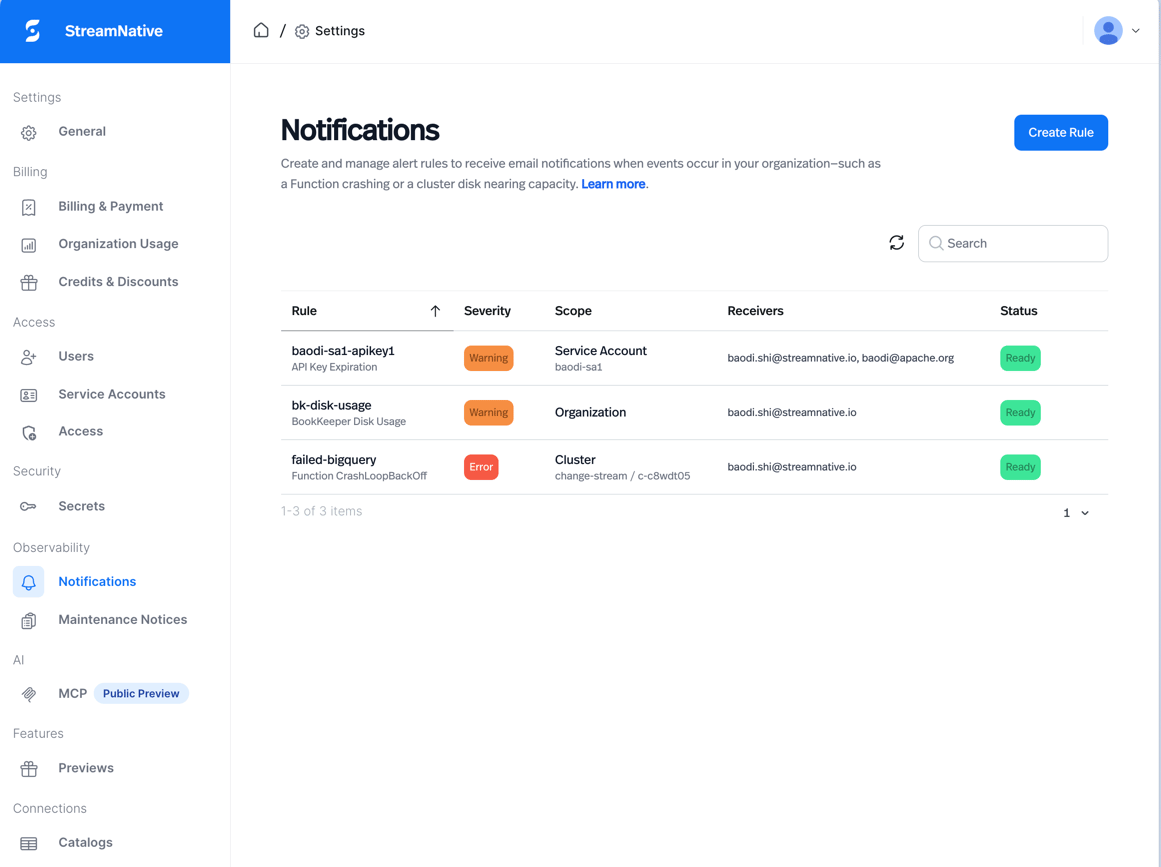
 The Notifications page lists all alert rules you have created, along with their severity, scope, receivers, and current status.
 ## Create an alert rule
1. On the **Notifications** page, click **Create Rule**.
2. In the **Create Alert Rule** dialog, fill in the following fields:
* **Rule Name**: A unique, lowercase identifier for this rule (for example, `oom-killed-prod-cluster`). Must contain only lowercase letters, numbers, and hyphens.
* **Alert Template**: Select the condition type from the dropdown. A short description of the template appears below the selector.
## Create an alert rule
1. On the **Notifications** page, click **Create Rule**.
2. In the **Create Alert Rule** dialog, fill in the following fields:
* **Rule Name**: A unique, lowercase identifier for this rule (for example, `oom-killed-prod-cluster`). Must contain only lowercase letters, numbers, and hyphens.
* **Alert Template**: Select the condition type from the dropdown. A short description of the template appears below the selector.
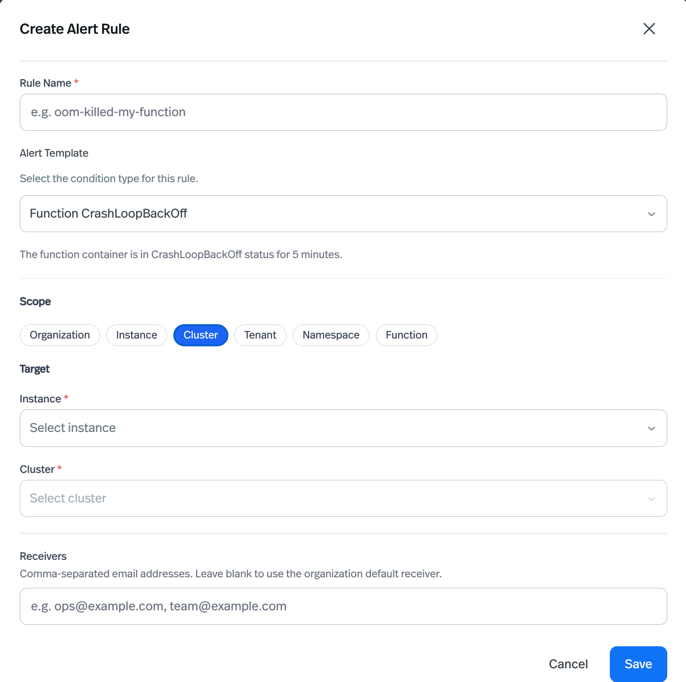 3. **(Optional) Set the scope**: By default, a rule applies to your entire organization. To narrow the scope, click a scope pill (for example, **Instance**, **Cluster**, **Function**) and fill in the target value(s). Leaving the scope at **Organization** means the rule monitors all matching resources in your organization.
4. **(Optional) Set recipients**: Enter one or more email addresses (comma-separated) in the **Receivers** field.
For the **BookKeeper Disk Usage** template, the receiver is fixed to your organization's Technical Contact Email and cannot be overridden here. To change that email, update your [Organization Profile](https://docs.streamnative.io/cloud/security/access/resource-hierarchy/organizations#organization-profile).
5. Click **Save**. The new rule appears in the list with status **Reconciling** while it is being set up, and transitions to **Ready** once active.
## View rule details
Click any row in the Notifications list to open the rule detail panel. The detail view shows:
* **Basic Info**: Rule name, alert template, description, scope, and severity.
* **Delivery**: The configured recipient email addresses (or a note indicating the organization default is used).
## Delete an alert rule
1. Hover over the rule row in the list to reveal the **Delete** icon on the right.
2. Click the **Delete** icon.
3. In the confirmation dialog, type the rule name to confirm deletion, then click **Delete**.
Deleting a rule stops all future notifications for that rule. Historical alert data is not affected.
## Rule status reference
| Status | Description |
| :-------------- | :----------------------------------------------------------------------------------------- |
| **Ready** | The rule is active and monitoring. |
| **Reconciling** | The rule was just created or updated and is being applied. |
| **Not Ready** | The rule encountered an error during setup. Contact StreamNative support if this persists. |
3. **(Optional) Set the scope**: By default, a rule applies to your entire organization. To narrow the scope, click a scope pill (for example, **Instance**, **Cluster**, **Function**) and fill in the target value(s). Leaving the scope at **Organization** means the rule monitors all matching resources in your organization.
4. **(Optional) Set recipients**: Enter one or more email addresses (comma-separated) in the **Receivers** field.
For the **BookKeeper Disk Usage** template, the receiver is fixed to your organization's Technical Contact Email and cannot be overridden here. To change that email, update your [Organization Profile](https://docs.streamnative.io/cloud/security/access/resource-hierarchy/organizations#organization-profile).
5. Click **Save**. The new rule appears in the list with status **Reconciling** while it is being set up, and transitions to **Ready** once active.
## View rule details
Click any row in the Notifications list to open the rule detail panel. The detail view shows:
* **Basic Info**: Rule name, alert template, description, scope, and severity.
* **Delivery**: The configured recipient email addresses (or a note indicating the organization default is used).
## Delete an alert rule
1. Hover over the rule row in the list to reveal the **Delete** icon on the right.
2. Click the **Delete** icon.
3. In the confirmation dialog, type the rule name to confirm deletion, then click **Delete**.
Deleting a rule stops all future notifications for that rule. Historical alert data is not affected.
## Rule status reference
| Status | Description |
| :-------------- | :----------------------------------------------------------------------------------------- |
| **Ready** | The rule is active and monitoring. |
| **Reconciling** | The rule was just created or updated and is being applied. |
| **Not Ready** | The rule encountered an error during setup. Contact StreamNative support if this persists. |