> ## Documentation Index
> Fetch the complete documentation index at: https://docs.streamnative.io/llms.txt
> Use this file to discover all available pages before exploring further.
# Advanced Observability Integration
The advanced observability features, including the Local Metrics Endpoint and Remote Write Integration, are only available for [**BYOC Pro**](/cloud/clusters/cluster-types#byoc-pro-clusters) clusters. Use the [Metrics API](/cloud/log-and-monitor/cloud-metrics-api) for other clusters, including [Serverless](/cloud/clusters/cluster-types#serverless-clusters), [Dedicated](/cloud/clusters/cluster-types#dedicated-clusters), and [BYOC](/cloud/clusters/cluster-types#byoc-clusters).
If you want to access these advanced observability features, you can [contact StreamNative sales](https://www.streamnative.io/contact) to get a quote for BYOC Pro clusters.
In addition to the [Metrics API](/cloud/log-and-monitor/cloud-metrics-api), StreamNative Cloud offers advanced observability features to help you gain deeper insights into your Pulsar clusters and applications. This document covers two key aspects of advanced observability:
1. Local Metrics Endpoint: A local Prometheus endpoint that is deployed with your BYOC Pro cluster. It provides access to all available metrics from your Pulsar clusters including both resource-related metrics and system-level metrics.
2. Remote Write Integration: Capabilities for seamlessly forwarding metrics to external monitoring and analytics platforms.
## Local Metrics Endpoint
The [Metrics API](/cloud/log-and-monitor/cloud-metrics-api) can be used for monitoring and troubleshooting your business applications. You can get the metrics from your Pulsar clusters, including tenants/namespaces/topics, connectors, functions, and so on. These metrics focus on the Pulsar resources inside your cluster. Metrics API excludes system-level metrics, such as the broker, bookie, and Pulsar Functions worker metrics. StreamNative manages these system-level metrics for you to ensure the stability and reliability of your Pulsar clusters.
If you need to access these system-level metrics, you can use the Local Metrics Endpoint. The Local Metrics Endpoint provides access to all available metrics from your Pulsar clusters, including the system-level metrics.
The Local Metrics Endpoint is only available for **BYOC Pro** clusters.
### Enable the Local Metrics Endpoint
The Local Metrics Endpoint can be enabled on a per-cluster basis. Submit a **Change Request** in our [support portal](https://support.streamnative.cloud/) to enable the Local Metrics Endpoint for your cluster.
After the request is approved and the Local Metrics Endpoint is enabled, you will be provided with a Local Metrics Endpoint URL. Use this URL to access the metrics data, similar to the existing [Metrics API](/cloud/log-and-monitor/cloud-metrics-api).
## Metrics Remote Write Integration
For some reasons your observability stack can't pull from the [Metrics API](/cloud/log-and-monitor/cloud-metrics-api), StreamNative Cloud supports pushing metrics data with Remote Write to Prometheus-compatible systems and Datadog platform.
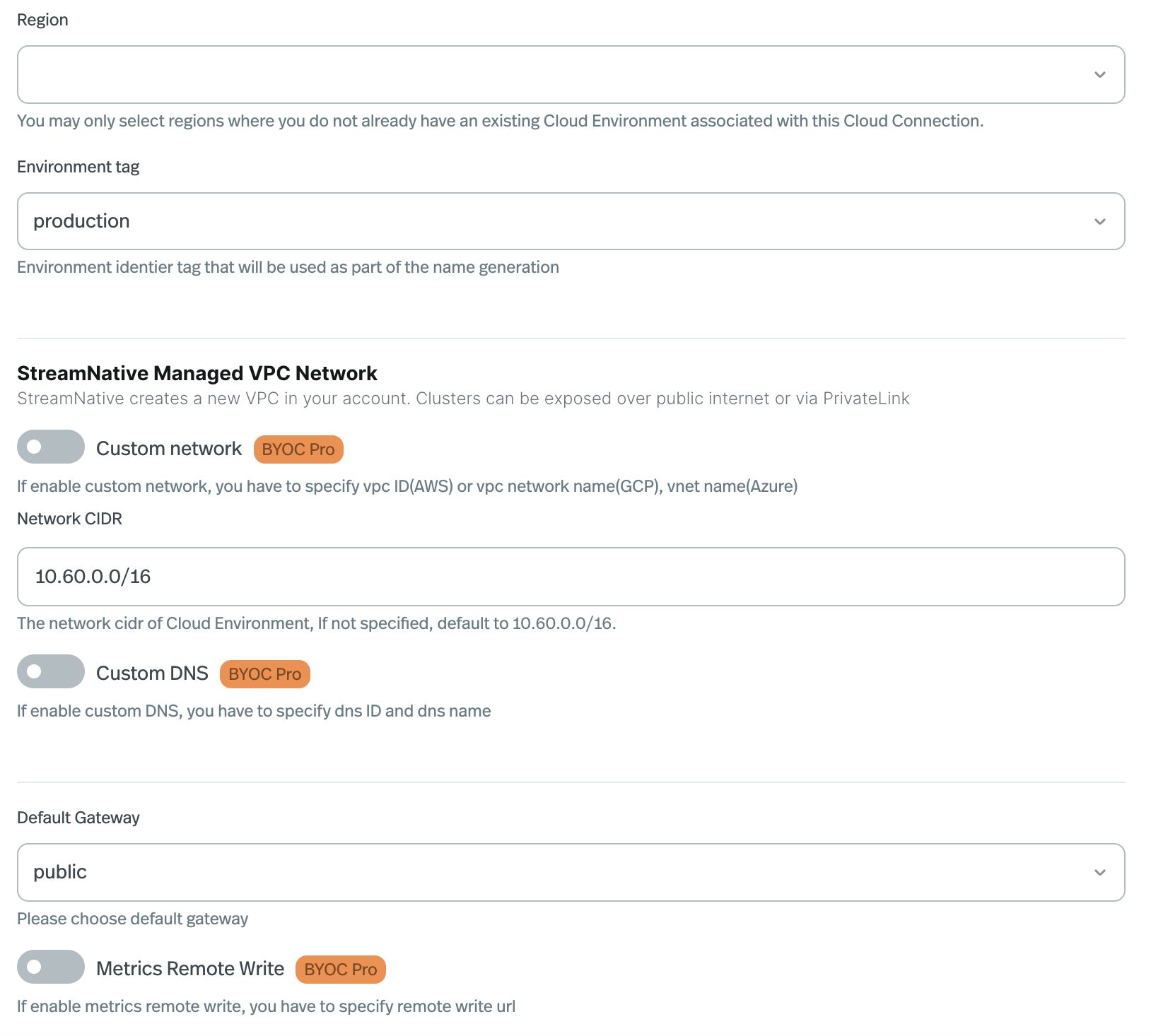
The Metrics Remote Write is enabled on the [Cloud Environment](/cloud/clusters/byoc/create-cloud-environment):
StreamNative Cloud does not yet support enabling the Metrics Remote Write on existing Cloud Environment through StreamNative Cloud Console.
 ### Remote Write to Prometheus
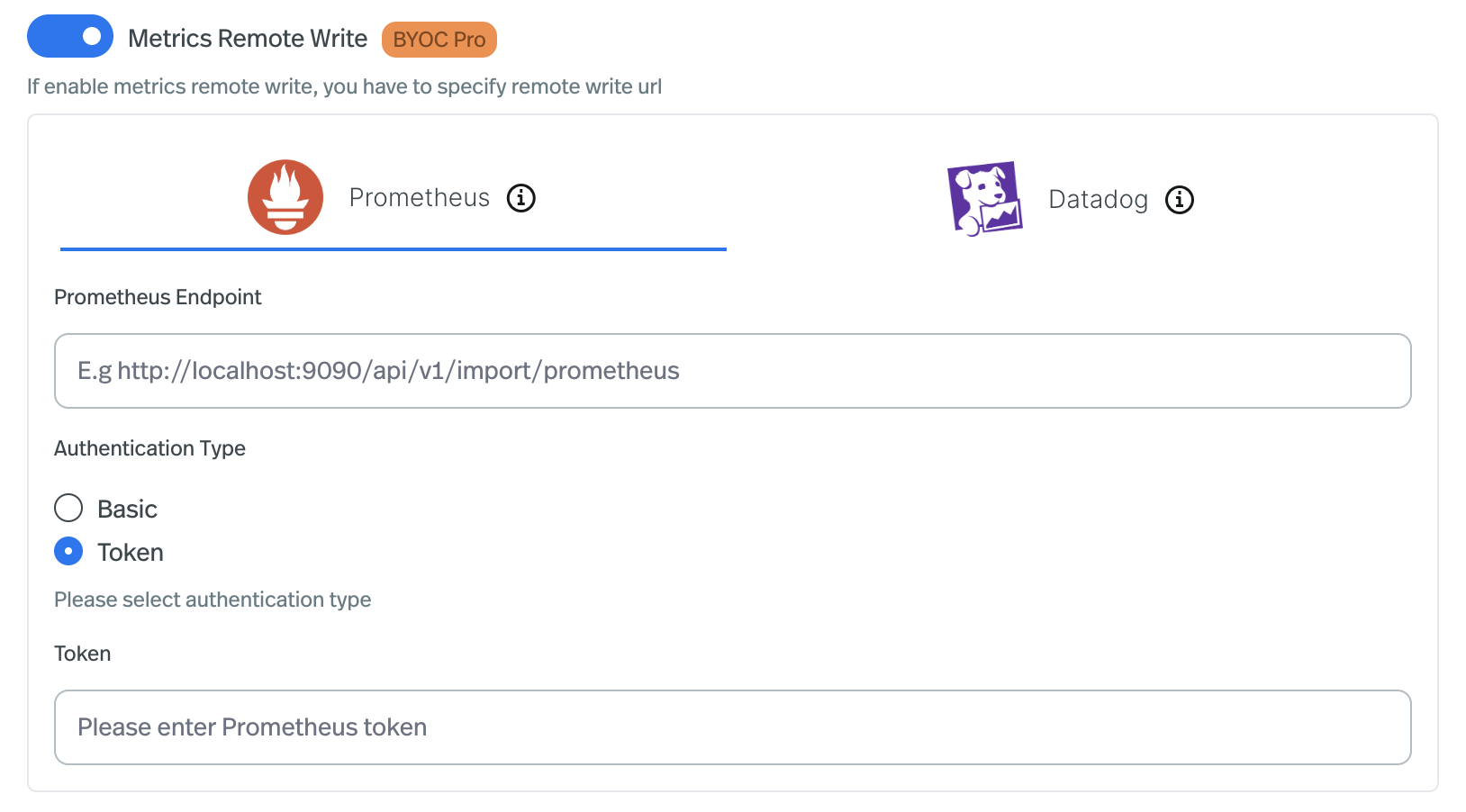 To enable the Prometheus Remote Write:
1. Enable the Metrics Remote Write switch.
2. Select the Prometheus icon.
3. Input the Prometheus endpoint address.
4. Select the Prometheus authentication type, for now supports Basic and Bearer token.
### Remote Write to Datadog
To enable the Prometheus Remote Write:
1. Enable the Metrics Remote Write switch.
2. Select the Prometheus icon.
3. Input the Prometheus endpoint address.
4. Select the Prometheus authentication type, for now supports Basic and Bearer token.
### Remote Write to Datadog
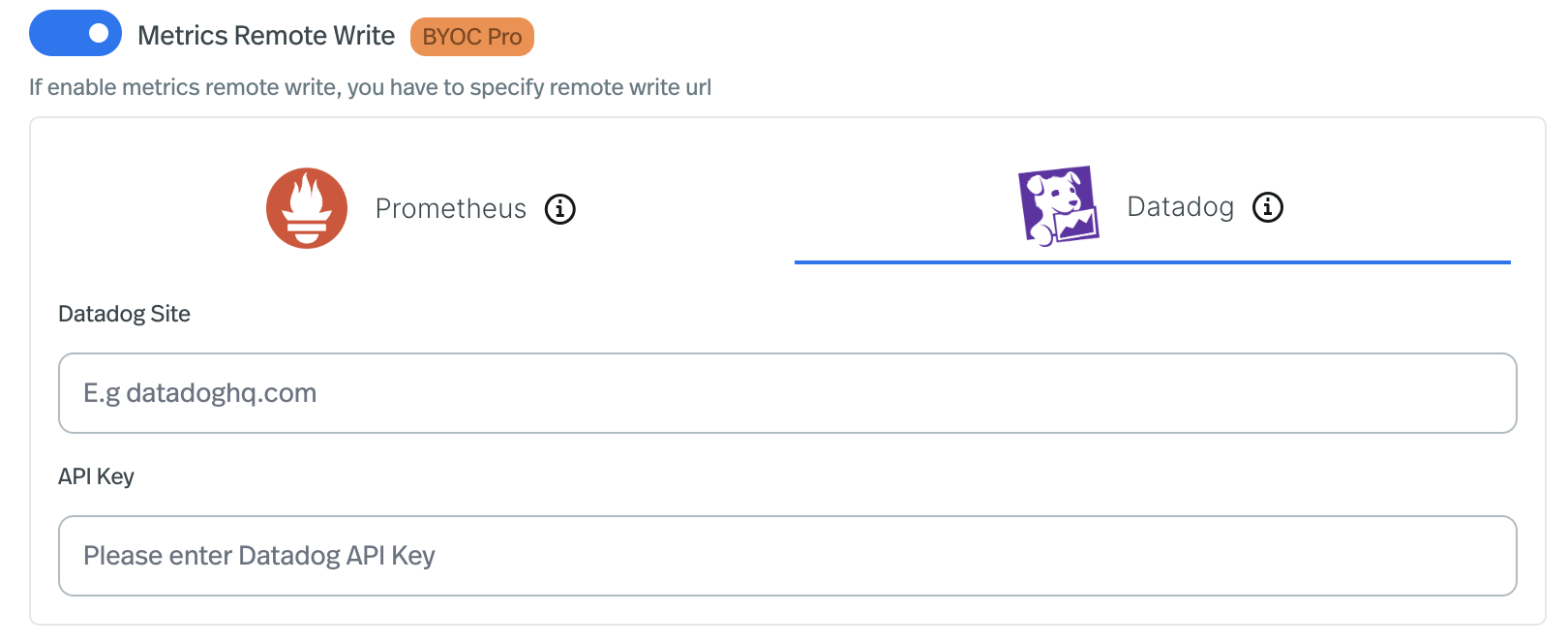 To enable the Datadog Remote Write:
1. Enable the Metrics Remote Write switch.
2. Select the Datadog icon.
3. Input the [Datadog Sites](https://docs.datadoghq.com/getting_started/site/).
4. Input the Datadog [API Key](https://docs.datadoghq.com/account_management/api-app-keys/#api-keys).
To enable the Datadog Remote Write:
1. Enable the Metrics Remote Write switch.
2. Select the Datadog icon.
3. Input the [Datadog Sites](https://docs.datadoghq.com/getting_started/site/).
4. Input the Datadog [API Key](https://docs.datadoghq.com/account_management/api-app-keys/#api-keys).