> ## Documentation Index
> Fetch the complete documentation index at: https://docs.streamnative.io/llms.txt
> Use this file to discover all available pages before exploring further.
# Data Lineage
> Trace lakehouse tables to their source topics with Databricks Unity Catalog.
Data lineage helps you trace a lakehouse table's data back to its source topic. StreamNative integrates with Databricks Unity Catalog to record and display these relationships, helping you understand data dependencies and identify the streams that supply your tables.
```text theme={null}
StreamNative topic → Unity Catalog table (Iceberg or Delta Lake)
```
## Supported Tables
Data lineage is available for [external lakehouse tables](/cloud/lakehouse/external-tables/external-tables-overview) using Iceberg or Delta Lake with Databricks Unity Catalog. Relationships are tracked at the topic-to-table level.
## Prerequisites
* [Register a Unity Catalog connection](/cloud/lakehouse/catalogs/register-catalog) and [enable lakehouse delivery](/cloud/lakehouse/enable-lakehouse-integration) for the source topic or namespace.
* Ask your Databricks administrator to grant the catalog connection's service principal **CREATE EXTERNAL METADATA** on the metastore, along with permission to manage the corresponding external metadata and lineage relationships.
### Grant CREATE EXTERNAL METADATA
A Databricks administrator can grant the permission in Catalog Explorer:
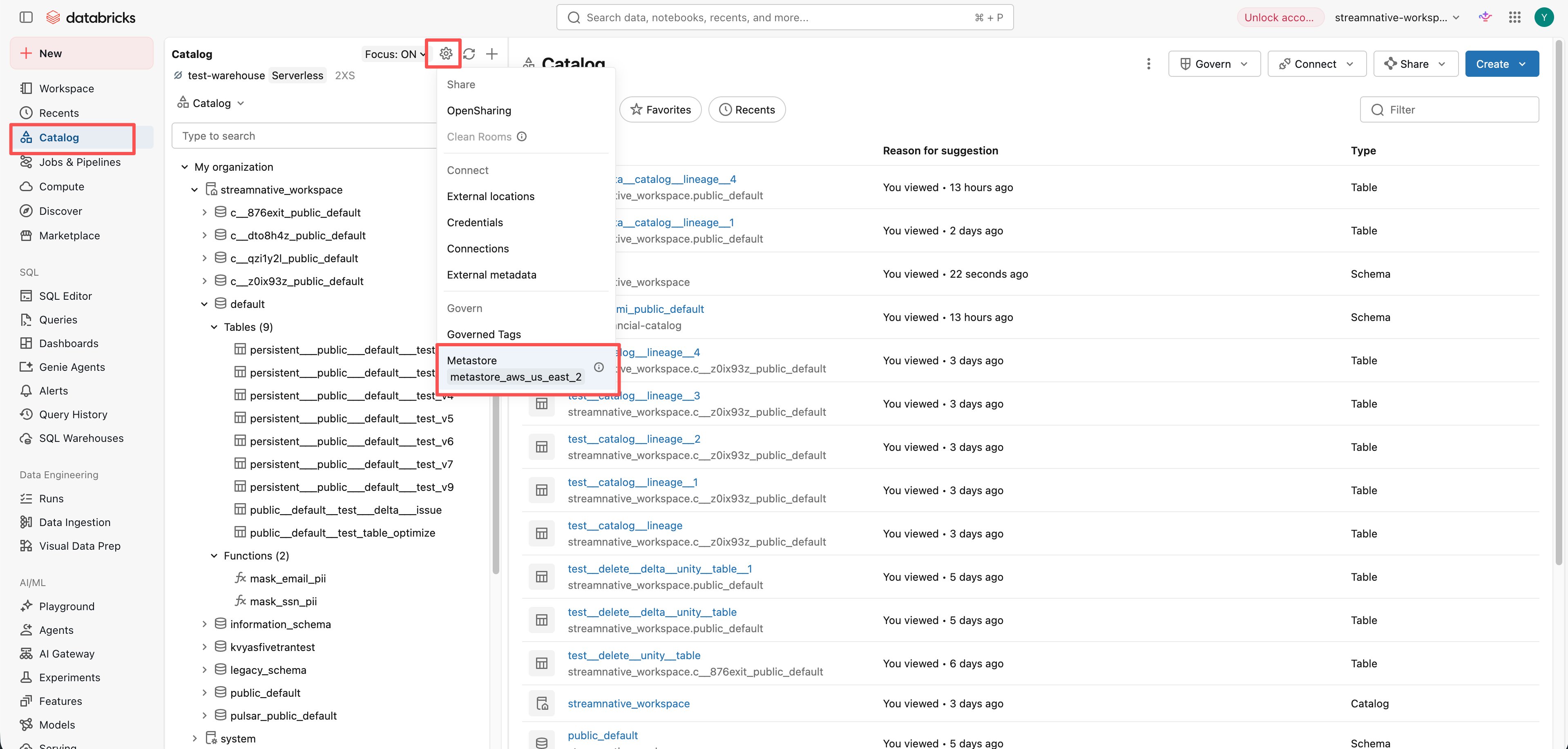
1. Open **Catalog**, click the settings icon, and select the metastore under **Metastore**.
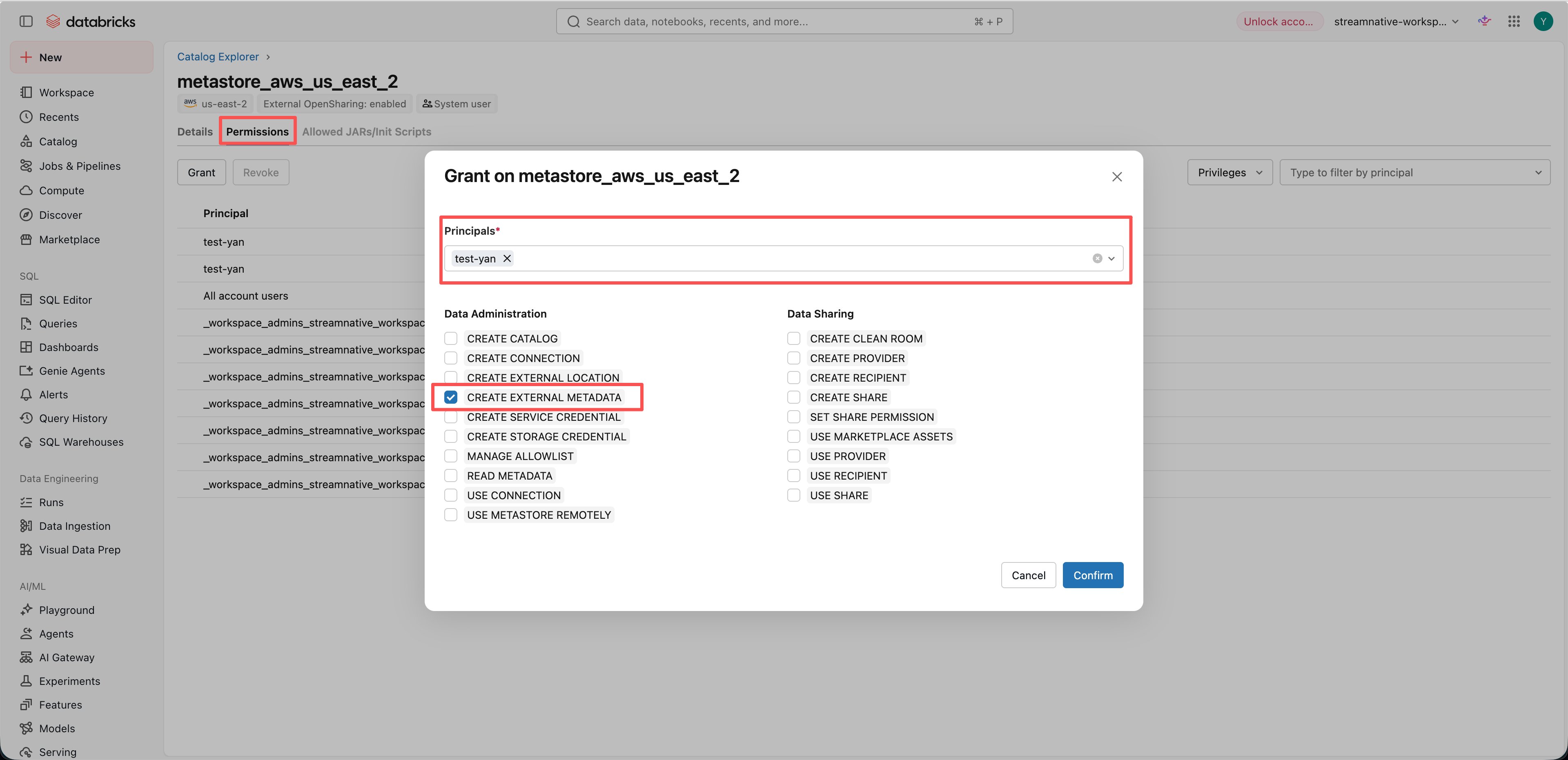
 2. On the metastore page, select **Permissions** and click **Grant**. In **Principals**, select the service principal used by your StreamNative catalog connection. Select **CREATE EXTERNAL METADATA**, then click **Confirm**.
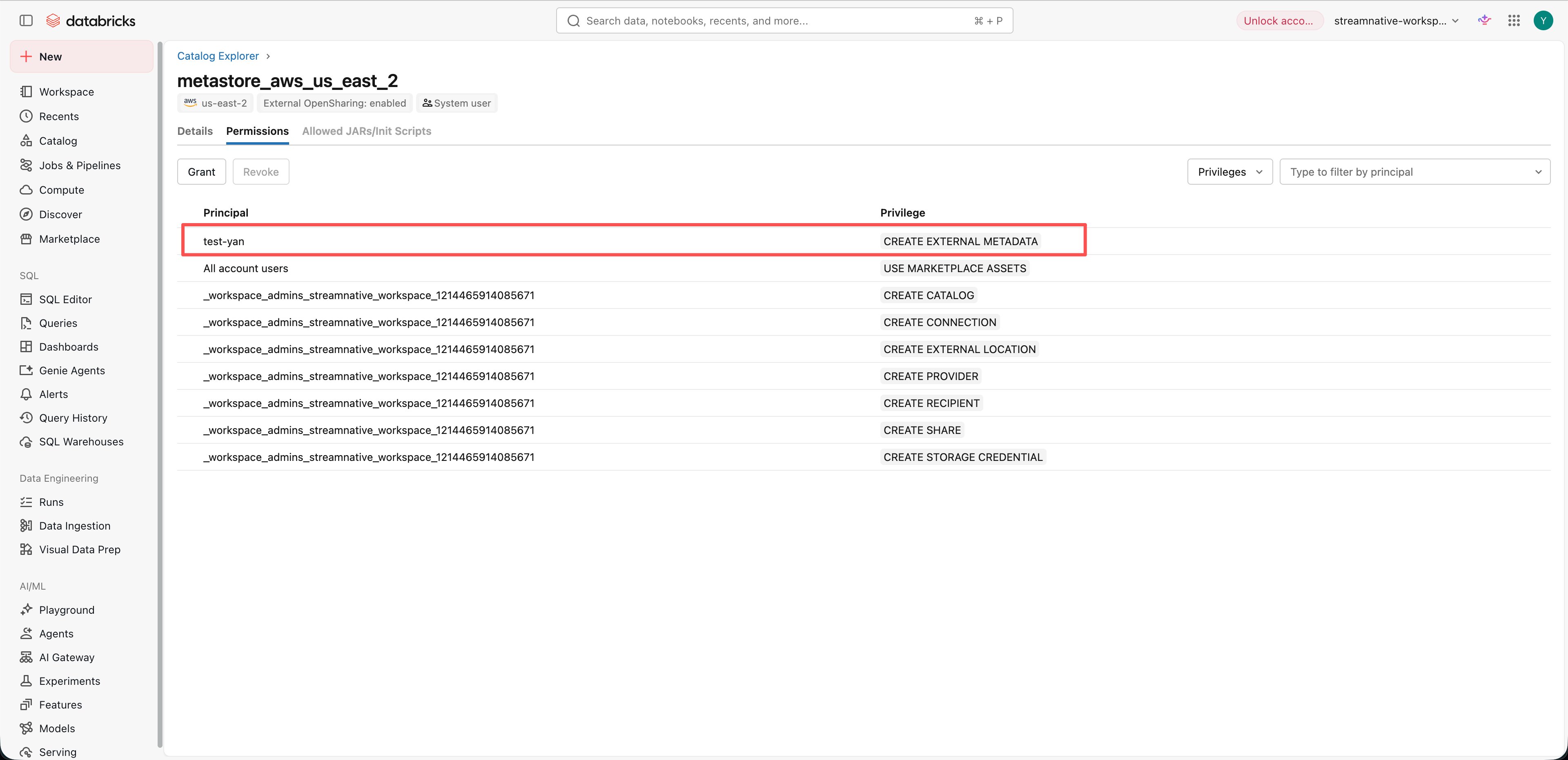
 3. Verify that the **Permissions** tab lists the selected principal with the **CREATE EXTERNAL METADATA** privilege.
 ## Enable Data Lineage
Data lineage is disabled by default. Set the following top-level property in the compaction service's custom configuration:
```yaml theme={null}
unityCatalogByolEnabled: "true"
```
For StreamNative Cloud deployments where you cannot edit this configuration, contact the StreamNative Support Team to enable data lineage for your cluster.
Lineage reporting reuses the connection and authentication settings of the topic's destination catalog. See [Register Catalog](/cloud/lakehouse/catalogs/register-catalog) for connection details.
## How It Works
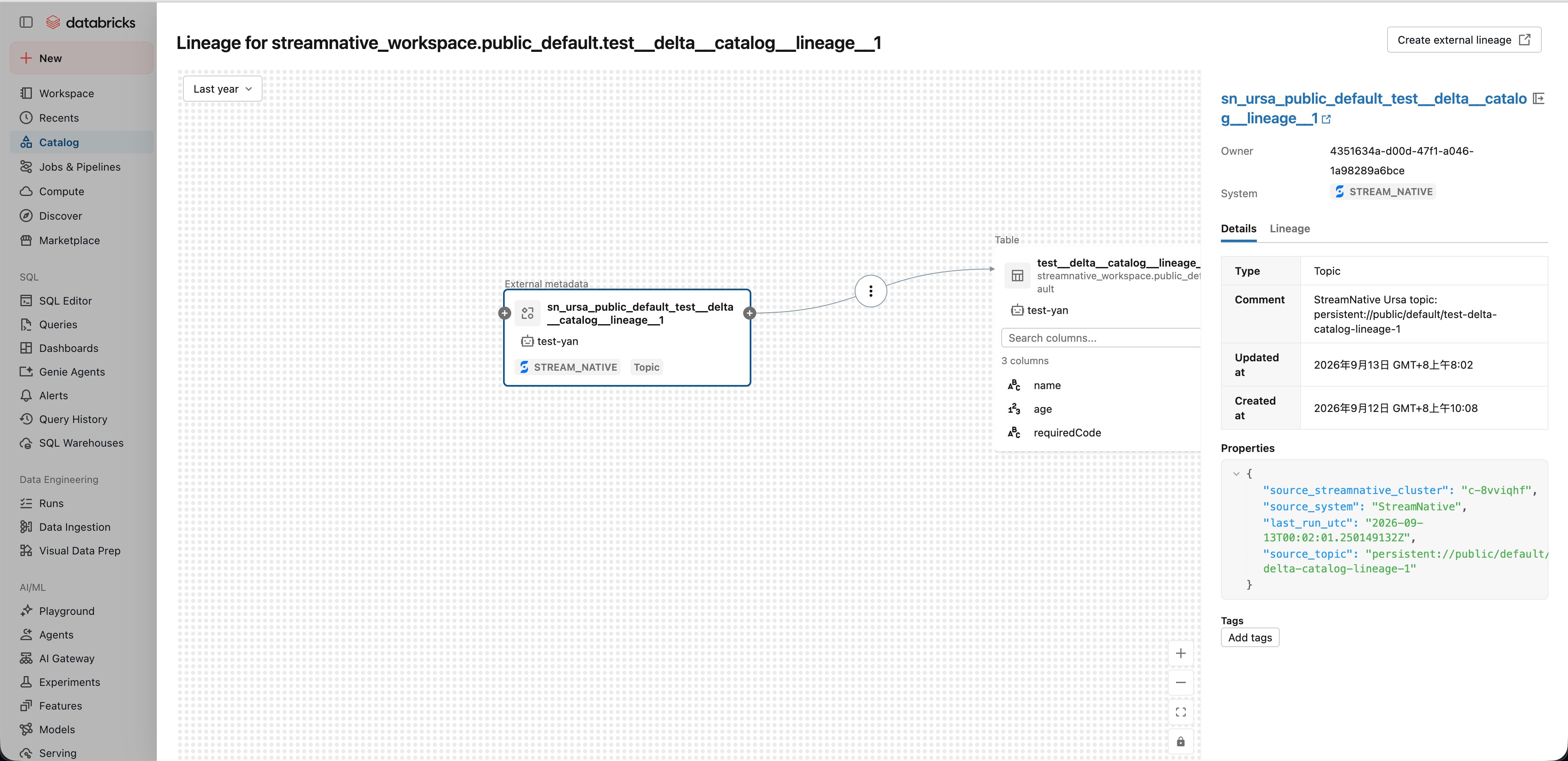
After topic data is committed to a lakehouse table, StreamNative registers the source topic as an external object in Unity Catalog and connects it to the destination table. The external object includes the topic name, StreamNative cluster name, source system, and latest report timestamp.
Subsequent commits refresh the source metadata and retain the existing relationship. Reporting begins with the next lakehouse commit after the feature is enabled.
Disabling data lineage stops future reports. Existing relationships remain in Unity Catalog.
## View Data Lineage
1. Produce data to the topic and wait for it to be committed to the lakehouse table.
2. In Databricks **Catalog Explorer**, select the destination table, open the **Lineage** tab, and click **See lineage graph**.
## Enable Data Lineage
Data lineage is disabled by default. Set the following top-level property in the compaction service's custom configuration:
```yaml theme={null}
unityCatalogByolEnabled: "true"
```
For StreamNative Cloud deployments where you cannot edit this configuration, contact the StreamNative Support Team to enable data lineage for your cluster.
Lineage reporting reuses the connection and authentication settings of the topic's destination catalog. See [Register Catalog](/cloud/lakehouse/catalogs/register-catalog) for connection details.
## How It Works
After topic data is committed to a lakehouse table, StreamNative registers the source topic as an external object in Unity Catalog and connects it to the destination table. The external object includes the topic name, StreamNative cluster name, source system, and latest report timestamp.
Subsequent commits refresh the source metadata and retain the existing relationship. Reporting begins with the next lakehouse commit after the feature is enabled.
Disabling data lineage stops future reports. Existing relationships remain in Unity Catalog.
## View Data Lineage
1. Produce data to the topic and wait for it to be committed to the lakehouse table.
2. In Databricks **Catalog Explorer**, select the destination table, open the **Lineage** tab, and click **See lineage graph**.
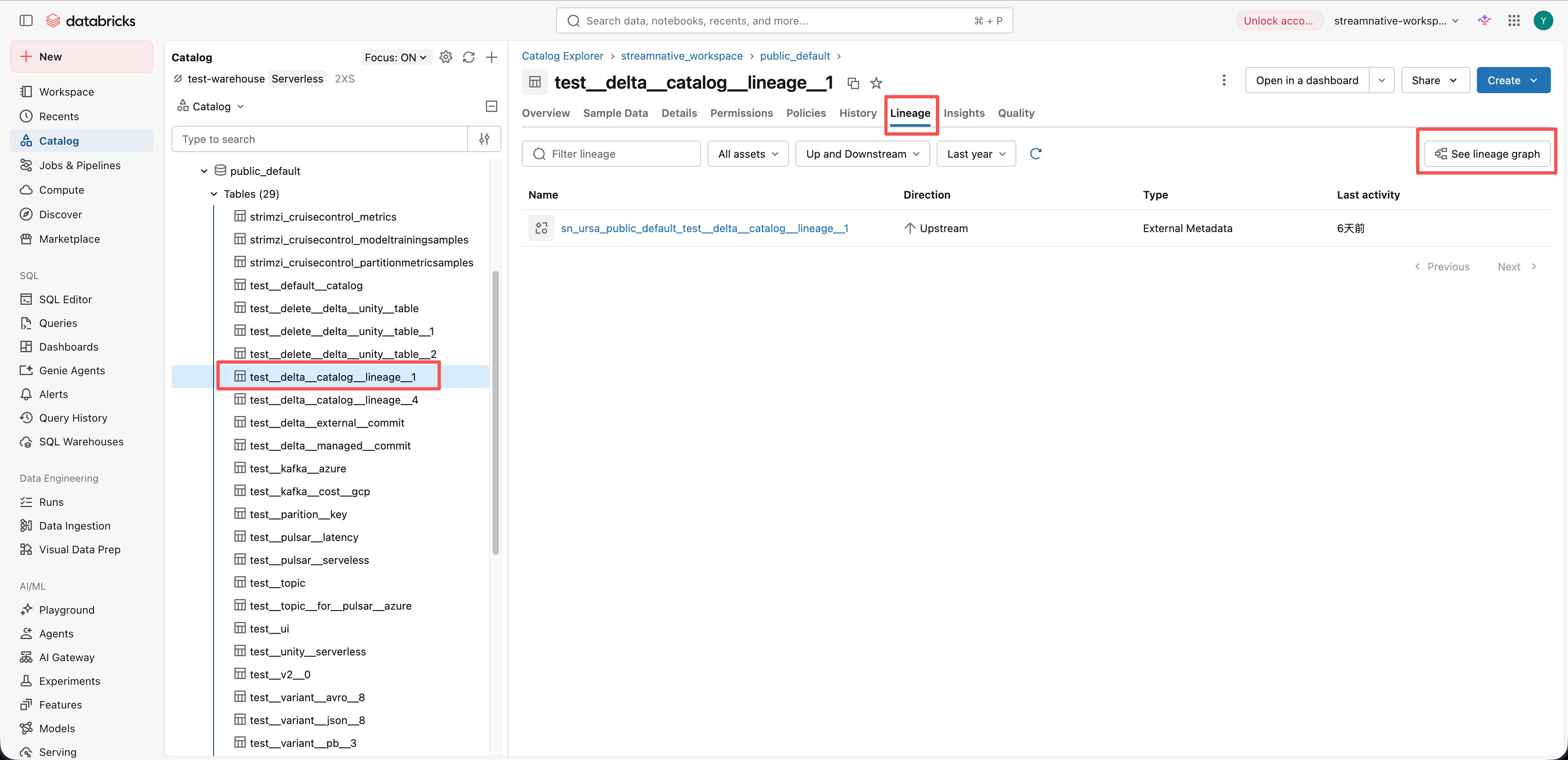 3. Select the upstream external metadata node representing the StreamNative topic. The graph shows the topic-to-table relationship. In the details panel, inspect `source_topic` and `source_streamnative_cluster` to identify the source, and `last_run_utc` for the latest report timestamp.
 ## Related
* [Databricks: Data lineage in Unity Catalog](https://docs.databricks.com/aws/en/data-governance/unity-catalog/data-lineage)
## Related
* [Databricks: Data lineage in Unity Catalog](https://docs.databricks.com/aws/en/data-governance/unity-catalog/data-lineage)