> ## Documentation Index
> Fetch the complete documentation index at: https://docs.streamnative.io/llms.txt
> Use this file to discover all available pages before exploring further.
# Kafka Schema Registry on Pulsar Clusters
> Enable the Confluent-compatible Kafka Schema Registry on a Pulsar cluster, find its endpoint, and grant the permissions clients need.
A Pulsar cluster with the Kafka protocol enabled also runs the **Kafka Schema Registry**, a registry
compatible with the Confluent Schema Registry API. Kafka clients use it through the standard
Confluent serializers and deserializers, and Pulsar clients can reach it through the
[External Schemas library](/cloud/governance/sr/external-schemas/external-avro-schema).
This page covers what's specific to running it on a **Pulsar cluster**: enabling it, finding its
endpoint, and granting access. The registry's concepts, compatibility rules, schema formats, and REST
API are the same on every cluster type—see
[Kafka Schema Registry](/kafka/governance/sr/overview) for those.
Pulsar clusters run two schema registries and they aren't interoperable. If you haven't decided which
one your applications should use, start with
[Data governance overview](/cloud/governance/governance-overview).
## Enable the Schema Registry
1. In the StreamNative Cloud Console, open the left navigation pane, and under **Admin** select
**Kafka Clients**.
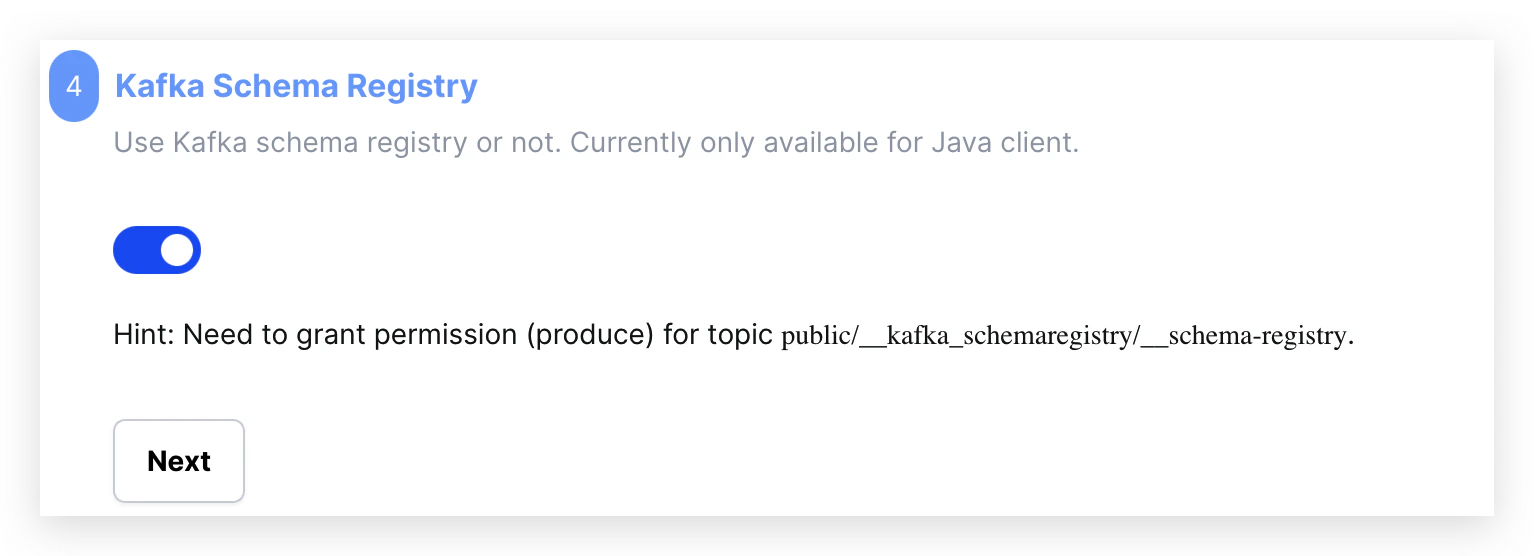
2. Choose the Java client, then turn on the Kafka Schema Registry toggle.
 ## Get the Schema Registry URL
On a Pulsar cluster, the Schema Registry URL is the cluster's HTTP service URL with **`/kafka`
appended**:
```
https:///kafka
```
That `/kafka` sub-path is specific to the Kafka Schema Registry running on a Pulsar cluster. A native
Kafka cluster serves the registry at its HTTP service URL with no sub-path, so a URL copied from one
cluster type won't work on the other.
```shell theme={null}
snctl get pulsarcluster \
-o jsonpath='https://{.spec.serviceEndpoints[?(@.type=="service")].dnsName}/kafka{"\n"}'
```
1. Go to the **Cluster Details** page.
2. Find the **HTTP Service URL** in the cluster dashboard.
3. Append `/kafka` to it.
The registry listens on port 443 over HTTPS. See [Networking](/cloud/networking/networking) for the
full list of cluster endpoints and ports.
## Grant access
Clients need permission to read and register schemas. StreamNative Cloud supports two authorization
models, and which one applies depends on your cluster.
### Role-based access control
Assign one of the Schema Registry roles, scoped to the subjects the client uses:
| Role | Grants |
| -------------------------------------------------------------------------------- | ---------------------------------------------------------------------- |
| [`schema-reader`](/cloud/security/access/rbac/manage-rbac-roles#schema-reader) | Read schema definitions. |
| [`schema-writer`](/cloud/security/access/rbac/manage-rbac-roles#schema-writer) | Create and update schemas. |
| [`schema-manager`](/cloud/security/access/rbac/manage-rbac-roles#schema-manager) | Manage compatibility policies, plus everything `schema-writer` grants. |
| [`schema-owner`](/cloud/security/access/rbac/manage-rbac-roles#schema-owner) | Full control, including deleting subjects. |
See [Manage RBAC roles](/cloud/security/access/rbac/manage-rbac-roles#schema-registry) for how to
bind a role to a service account.
### Topic-level permission
Older clusters authorize Schema Registry access through a single ACL on the registry's backing topic
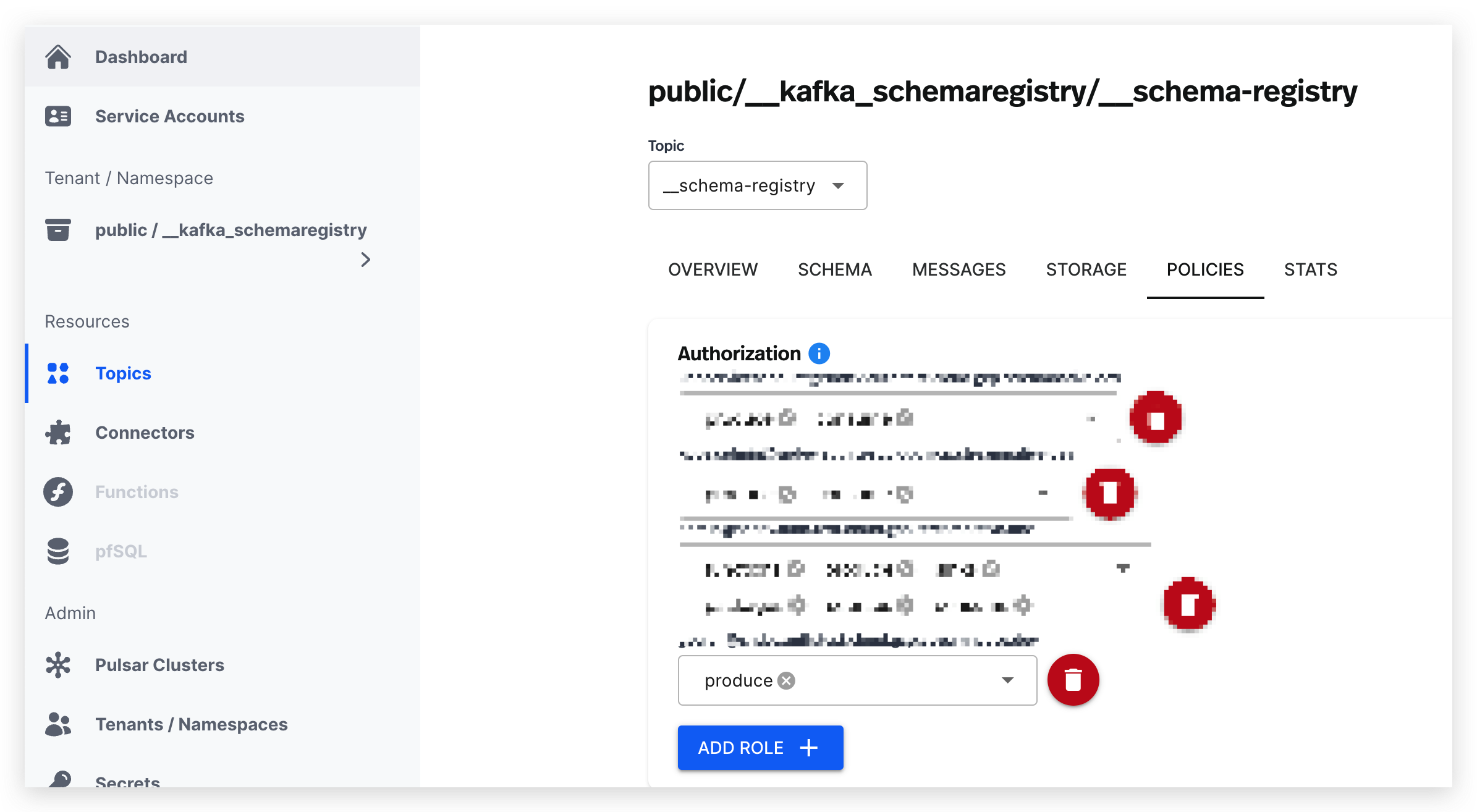
instead. Grant `produce` on `public/__kafka_schemaregistry/__schema-registry`:
## Get the Schema Registry URL
On a Pulsar cluster, the Schema Registry URL is the cluster's HTTP service URL with **`/kafka`
appended**:
```
https:///kafka
```
That `/kafka` sub-path is specific to the Kafka Schema Registry running on a Pulsar cluster. A native
Kafka cluster serves the registry at its HTTP service URL with no sub-path, so a URL copied from one
cluster type won't work on the other.
```shell theme={null}
snctl get pulsarcluster \
-o jsonpath='https://{.spec.serviceEndpoints[?(@.type=="service")].dnsName}/kafka{"\n"}'
```
1. Go to the **Cluster Details** page.
2. Find the **HTTP Service URL** in the cluster dashboard.
3. Append `/kafka` to it.
The registry listens on port 443 over HTTPS. See [Networking](/cloud/networking/networking) for the
full list of cluster endpoints and ports.
## Grant access
Clients need permission to read and register schemas. StreamNative Cloud supports two authorization
models, and which one applies depends on your cluster.
### Role-based access control
Assign one of the Schema Registry roles, scoped to the subjects the client uses:
| Role | Grants |
| -------------------------------------------------------------------------------- | ---------------------------------------------------------------------- |
| [`schema-reader`](/cloud/security/access/rbac/manage-rbac-roles#schema-reader) | Read schema definitions. |
| [`schema-writer`](/cloud/security/access/rbac/manage-rbac-roles#schema-writer) | Create and update schemas. |
| [`schema-manager`](/cloud/security/access/rbac/manage-rbac-roles#schema-manager) | Manage compatibility policies, plus everything `schema-writer` grants. |
| [`schema-owner`](/cloud/security/access/rbac/manage-rbac-roles#schema-owner) | Full control, including deleting subjects. |
See [Manage RBAC roles](/cloud/security/access/rbac/manage-rbac-roles#schema-registry) for how to
bind a role to a service account.
### Topic-level permission
Older clusters authorize Schema Registry access through a single ACL on the registry's backing topic
instead. Grant `produce` on `public/__kafka_schemaregistry/__schema-registry`:
 Under this model the same permission covers both reads and writes—a client that only reads schemas
still needs `produce` on that topic. Prefer role-based access control where it's available, since it
scopes permissions per subject.
## Connect a client
Point your client's `schema.registry.url` at the URL from above and supply credentials. Basic
authentication works with every Kafka client; OAuth2 is available for the Java client.
```java theme={null}
props.put(KafkaAvroSerializerConfig.SCHEMA_REGISTRY_URL_CONFIG, schemaRegistryUrl);
props.put(KafkaAvroSerializerConfig.BASIC_AUTH_CREDENTIALS_SOURCE, "USER_INFO");
props.put(KafkaAvroSerializerConfig.USER_INFO_CONFIG, String.format("%s:%s", "any-user", apiKey));
```
For the OAuth2 configuration, the full property reference, and per-language examples, see
[Connect to the Kafka Schema Registry](/kafka/governance/sr/connect).
## Next steps
Compatibility modes, the REST API, and schema ID validation.
Keep the Pulsar APIs while resolving schemas from this registry.
Set up active-standby replication with Universal Linking.
The other registry on this cluster.
Under this model the same permission covers both reads and writes—a client that only reads schemas
still needs `produce` on that topic. Prefer role-based access control where it's available, since it
scopes permissions per subject.
## Connect a client
Point your client's `schema.registry.url` at the URL from above and supply credentials. Basic
authentication works with every Kafka client; OAuth2 is available for the Java client.
```java theme={null}
props.put(KafkaAvroSerializerConfig.SCHEMA_REGISTRY_URL_CONFIG, schemaRegistryUrl);
props.put(KafkaAvroSerializerConfig.BASIC_AUTH_CREDENTIALS_SOURCE, "USER_INFO");
props.put(KafkaAvroSerializerConfig.USER_INFO_CONFIG, String.format("%s:%s", "any-user", apiKey));
```
For the OAuth2 configuration, the full property reference, and per-language examples, see
[Connect to the Kafka Schema Registry](/kafka/governance/sr/connect).
## Next steps
Compatibility modes, the REST API, and schema ID validation.
Keep the Pulsar APIs while resolving schemas from this registry.
Set up active-standby replication with Universal Linking.
The other registry on this cluster.