> ## Documentation Index
> Fetch the complete documentation index at: https://docs.streamnative.io/llms.txt
> Use this file to discover all available pages before exploring further.
# Pulsar Transactions
[Pulsar transactions](https://pulsar.apache.org/docs/txn-what/) enables event-streaming applications to consume, process, and produce messages in one atomic operation. That means:
* Atomic writes across multiple topic partitions
* Atomic acknowledgments across multiple topic partitions
* All the operations made within one transaction either all succeed or all fail
* Consumers are **ONLY** allowed to read committed messages
- Currently, Transactions is only available for Java clients.
- This document assumes that you have created a [StreamNative cluster](/cloud/clusters/manage-clusters/cluster#create-a-cluster-through-streamnative-cloud-console) and a [service account](/cloud/security/authentication/service-accounts/service-accounts), and have [granted the service account the consume permission](/cloud/manage-data-streams/topic#manage-topics) to the `persistent://pulsar/system/transaction_coordinator_assign` topic.
## Quick start
This section describes how to use the Transaction API to send and receive messages.
### Prerequisites
* Java 1.8 or higher version
* Pulsar cluster 2.9.1 or higher version
### Get the service URL of your StreamNative cluster
To get the service URL(s) of a StreamNative cluster, follow these steps.
1. Navigate to the **Cluster Dashboard** page by [switching to the cluster workspace](/cloud/get-started/cloud-console#switch-a-cluster).
2. On the **Cluster Dashboard** page, click **Details** tab.
3. You will see the available service URLs in the **Access Points** area.
4. You can click **Copy** at the end of the row of the service URL that you want to use.
### Get the OAuth2 credential file of your service account
To get an OAuth2 credential file of a service account through the StreamNative Console, follow these steps.
1. On the left navigation pane, click **Service Accounts**.
2. In the row of the service account you want to use, in the **Key File** column, click the **Download** icon to download the OAuth2 credential file to your local directory.
The OAuth2 credential file should be something like this:
```json theme={null}
{
"type": "SN_SERVICE_ACCOUNT",
"client_id": "CLIENT_ID",
"client_secret": "CLIENT_SECRET",
"client_email": "test@auth.streamnative.cloud",
"issuer_url": "https://auth.streamnative.cloud"
}
```
### Enable Transactions on your StreamNative cluster
1. [Log in to StreamNative Cloud Console](/cloud/get-started/quickstart-kafka#step-1:-log-in-to-streamnative-cloud-console).
2. On the left navigation pane, in the **Admin** area, click **Pulsar Clusters**.
3. Click **Edit Cluster**.
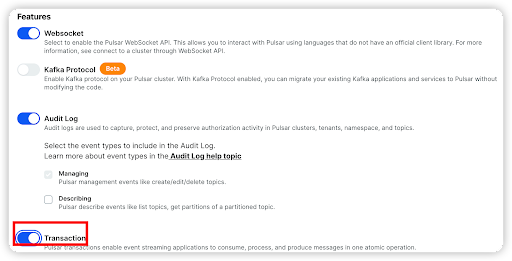
4. Select the **Advanced** tab. In the **Features** area, enable the **Transaction** option.
 ### Use Transactions on your application
This example enables you to perform the following operations.
1. Create a Pulsar client and enable Transactions.
2. Create three producers to produce messages with a transaction to one input topic (`input-topic`) and two output topics (`output-topic-1` and `output-topic-2`).
3. Create three consumers to consume messages with a transaction from one input topic (input-topic) and two output topics (`output-topic-1` and `output-topic-2`).
4. Commit the transaction after the consumers consume messages successfully.
```java theme={null}
package io.streamnative.examples.transaction;
import com.beust.jcommander.JCommander;
import org.apache.pulsar.client.api.Consumer;
import org.apache.pulsar.client.api.Message;
import org.apache.pulsar.client.api.Producer;
import org.apache.pulsar.client.api.ProducerBuilder;
import org.apache.pulsar.client.api.PulsarClient;
import org.apache.pulsar.client.api.PulsarClientException;
import org.apache.pulsar.client.api.Schema;
import org.apache.pulsar.client.api.transaction.Transaction;
import org.apache.pulsar.client.impl.auth.oauth2.AuthenticationFactoryOAuth2;
import org.slf4j.Logger;
import org.slf4j.LoggerFactory;
import java.net.URL;
import java.util.concurrent.ExecutionException;
import java.util.concurrent.TimeUnit;
public class TransactionSyncExample {
private static final Logger log = LoggerFactory.getLogger(TransactionSyncExample.class);
public static void main(String[] args) throws Exception {
JCommanderPulsar jct = new JCommanderPulsar();
JCommander jCommander = new JCommander(jct, args);
if (jct.help) {
jCommander.usage();
return;
}
String inputTopic = "persistent://public/default/input-topic";
String outputTopicOne = "persistent://public/default/output-topic-1";
String outputTopicTwo = "persistent://public/default/output-topic-2";
PulsarClient client = PulsarClient.builder()
// Create a Pulsar client and enable Transactions.
.enableTransaction(true)
.serviceUrl(jct.serviceUrl)
.authentication(
AuthenticationFactoryOAuth2.clientCredentials(new URL(jct.issuerUrl), new URL(jct.credentialsUrl), jct.audience))
.build();
// Create three producers to produce messages to input and output topics.
ProducerBuilder producerBuilder = client.newProducer(Schema.STRING);
Producer inputProducer = producerBuilder.topic(inputTopic)
.sendTimeout(0, TimeUnit.SECONDS).create();
Producer outputProducerOne = producerBuilder.topic(outputTopicOne)
.sendTimeout(0, TimeUnit.SECONDS).create();
Producer outputProducerTwo = producerBuilder.topic(outputTopicTwo)
.sendTimeout(0, TimeUnit.SECONDS).create();
// Create three consumers to consume messages from input and output topics.
Consumer inputConsumer = client.newConsumer(Schema.STRING)
.subscriptionName("your-subscription-name").topic(inputTopic).subscribe();
Consumer outputConsumerOne = client.newConsumer(Schema.STRING)
.subscriptionName("your-subscription-name").topic(outputTopicOne).subscribe();
Consumer outputConsumerTwo = client.newConsumer(Schema.STRING)
.subscriptionName("your-subscription-name").topic(outputTopicTwo).subscribe();
int count = 2;
// Produce messages to topics.
for (int i = 0; i < count; i++) {
inputProducer.send("Hello Pulsar! count : " + i);
}
// consume messages and produce to output topics with transaction
for (int i = 0; i < count; i++) {
// The consumer successfully receives messages. Then, create a transaction.
Message message = inputConsumer.receive();
Transaction txn = null;
try {
txn = client.newTransaction()
.withTransactionTimeout(10, TimeUnit.SECONDS).build().get();
// process the message here...
// The producers produce messages to output topics with the transaction
outputProducerOne.newMessage(txn).value("Hello Pulsar! outputTopicOne count : " + i).send();
outputProducerTwo.newMessage(txn).value("Hello Pulsar! outputTopicTwo count : " + i).send();
// The consumers acknowledge the input message with the transaction
inputConsumer.acknowledgeAsync(message.getMessageId(), txn).get();
// commit the transaction
txn.commit();
} catch (ExecutionException e) {
if (!(e.getCause() instanceof PulsarClientException.TransactionConflictException)) {
// if not TransactionConflictException,
// we should redeliver or negativeAcknowledge this message
// if you don't redeliver or negativeAcknowledge, the message will not receive again
inputConsumer.negativeAcknowledge(message);
}
// if a transaction has been created, should abort this transaction
if (txn != null) {
txn.abort();
}
}
}
// consume messages from output topics and print them
for (int i = 0; i < count; i++) {
Message message = outputConsumerOne.receive();
System.out.println("Receive transaction message: " + message.getValue());
}
for (int i = 0; i < count; i++) {
Message message = outputConsumerTwo.receive();
System.out.println("Receive transaction message: " + message.getValue());
}
}
}
```
* `serviceUrl`: the broker service URL of your StreamNative cluster.
* `issuerUrl`: the URL of your OAuth2 authentication provider. You can get the value from your downloaded OAuth2 credential file.
* `credentialsUrl`: the path to your downloaded OAuth2 credential file. The `privateKey` parameter supports the following pattern formats:
* `file:///path/to/file`
* `file:/path/to/file`
* `data:application/json;base64,`
* `audience`: the `audience` parameter is the [Uniform Resource Name (URN)](/cloud/references/glossary#urn), which is a combination of the `urn:sn:pulsar`, the organization name, and the Pulsar instance name, in this format `urn:sn:pulsar::`.
You should see the following output:
```bash theme={null}
Receive transaction message: Hello Pulsar! count : 1
Receive transaction message: Hello Pulsar! count : 2
Receive transaction message: Hello Pulsar! count : 1
Receive transaction message: Hello Pulsar! count : 2
```
For a complete example about how to connect to a StreamNative cluster through the Transaction API, see [Transaction API examples](https://github.com/streamnative/examples/tree/master/cloud/transaction/java/src/main/java/io/streamnative/examples/transaction).
### Use Transactions on your application
This example enables you to perform the following operations.
1. Create a Pulsar client and enable Transactions.
2. Create three producers to produce messages with a transaction to one input topic (`input-topic`) and two output topics (`output-topic-1` and `output-topic-2`).
3. Create three consumers to consume messages with a transaction from one input topic (input-topic) and two output topics (`output-topic-1` and `output-topic-2`).
4. Commit the transaction after the consumers consume messages successfully.
```java theme={null}
package io.streamnative.examples.transaction;
import com.beust.jcommander.JCommander;
import org.apache.pulsar.client.api.Consumer;
import org.apache.pulsar.client.api.Message;
import org.apache.pulsar.client.api.Producer;
import org.apache.pulsar.client.api.ProducerBuilder;
import org.apache.pulsar.client.api.PulsarClient;
import org.apache.pulsar.client.api.PulsarClientException;
import org.apache.pulsar.client.api.Schema;
import org.apache.pulsar.client.api.transaction.Transaction;
import org.apache.pulsar.client.impl.auth.oauth2.AuthenticationFactoryOAuth2;
import org.slf4j.Logger;
import org.slf4j.LoggerFactory;
import java.net.URL;
import java.util.concurrent.ExecutionException;
import java.util.concurrent.TimeUnit;
public class TransactionSyncExample {
private static final Logger log = LoggerFactory.getLogger(TransactionSyncExample.class);
public static void main(String[] args) throws Exception {
JCommanderPulsar jct = new JCommanderPulsar();
JCommander jCommander = new JCommander(jct, args);
if (jct.help) {
jCommander.usage();
return;
}
String inputTopic = "persistent://public/default/input-topic";
String outputTopicOne = "persistent://public/default/output-topic-1";
String outputTopicTwo = "persistent://public/default/output-topic-2";
PulsarClient client = PulsarClient.builder()
// Create a Pulsar client and enable Transactions.
.enableTransaction(true)
.serviceUrl(jct.serviceUrl)
.authentication(
AuthenticationFactoryOAuth2.clientCredentials(new URL(jct.issuerUrl), new URL(jct.credentialsUrl), jct.audience))
.build();
// Create three producers to produce messages to input and output topics.
ProducerBuilder producerBuilder = client.newProducer(Schema.STRING);
Producer inputProducer = producerBuilder.topic(inputTopic)
.sendTimeout(0, TimeUnit.SECONDS).create();
Producer outputProducerOne = producerBuilder.topic(outputTopicOne)
.sendTimeout(0, TimeUnit.SECONDS).create();
Producer outputProducerTwo = producerBuilder.topic(outputTopicTwo)
.sendTimeout(0, TimeUnit.SECONDS).create();
// Create three consumers to consume messages from input and output topics.
Consumer inputConsumer = client.newConsumer(Schema.STRING)
.subscriptionName("your-subscription-name").topic(inputTopic).subscribe();
Consumer outputConsumerOne = client.newConsumer(Schema.STRING)
.subscriptionName("your-subscription-name").topic(outputTopicOne).subscribe();
Consumer outputConsumerTwo = client.newConsumer(Schema.STRING)
.subscriptionName("your-subscription-name").topic(outputTopicTwo).subscribe();
int count = 2;
// Produce messages to topics.
for (int i = 0; i < count; i++) {
inputProducer.send("Hello Pulsar! count : " + i);
}
// consume messages and produce to output topics with transaction
for (int i = 0; i < count; i++) {
// The consumer successfully receives messages. Then, create a transaction.
Message message = inputConsumer.receive();
Transaction txn = null;
try {
txn = client.newTransaction()
.withTransactionTimeout(10, TimeUnit.SECONDS).build().get();
// process the message here...
// The producers produce messages to output topics with the transaction
outputProducerOne.newMessage(txn).value("Hello Pulsar! outputTopicOne count : " + i).send();
outputProducerTwo.newMessage(txn).value("Hello Pulsar! outputTopicTwo count : " + i).send();
// The consumers acknowledge the input message with the transaction
inputConsumer.acknowledgeAsync(message.getMessageId(), txn).get();
// commit the transaction
txn.commit();
} catch (ExecutionException e) {
if (!(e.getCause() instanceof PulsarClientException.TransactionConflictException)) {
// if not TransactionConflictException,
// we should redeliver or negativeAcknowledge this message
// if you don't redeliver or negativeAcknowledge, the message will not receive again
inputConsumer.negativeAcknowledge(message);
}
// if a transaction has been created, should abort this transaction
if (txn != null) {
txn.abort();
}
}
}
// consume messages from output topics and print them
for (int i = 0; i < count; i++) {
Message message = outputConsumerOne.receive();
System.out.println("Receive transaction message: " + message.getValue());
}
for (int i = 0; i < count; i++) {
Message message = outputConsumerTwo.receive();
System.out.println("Receive transaction message: " + message.getValue());
}
}
}
```
* `serviceUrl`: the broker service URL of your StreamNative cluster.
* `issuerUrl`: the URL of your OAuth2 authentication provider. You can get the value from your downloaded OAuth2 credential file.
* `credentialsUrl`: the path to your downloaded OAuth2 credential file. The `privateKey` parameter supports the following pattern formats:
* `file:///path/to/file`
* `file:/path/to/file`
* `data:application/json;base64,`
* `audience`: the `audience` parameter is the [Uniform Resource Name (URN)](/cloud/references/glossary#urn), which is a combination of the `urn:sn:pulsar`, the organization name, and the Pulsar instance name, in this format `urn:sn:pulsar::`.
You should see the following output:
```bash theme={null}
Receive transaction message: Hello Pulsar! count : 1
Receive transaction message: Hello Pulsar! count : 2
Receive transaction message: Hello Pulsar! count : 1
Receive transaction message: Hello Pulsar! count : 2
```
For a complete example about how to connect to a StreamNative cluster through the Transaction API, see [Transaction API examples](https://github.com/streamnative/examples/tree/master/cloud/transaction/java/src/main/java/io/streamnative/examples/transaction).