> ## Documentation Index
> Fetch the complete documentation index at: https://docs.streamnative.io/llms.txt
> Use this file to discover all available pages before exploring further.
# Build applications using Pulsar clients
You can use the [Pulsar clients](#pulsar-clients) to connect to your StreamNative cluster.
If you are familiar with command lines and environments, you can also use the [CLI tools](/tools/cli/pulsarctl/pulsarctl-overview) or [Message Rest API](/cloud/build/pulsar-clients/connect-restapi).
## Jumpstart for beginners
To help you get started with setting up client libraries and tools after provisioning your cluster, StreamNative Cloud Console provides a step-by-step wizard to walk you through the basic setup and configuration process, such as installing client libraries, downloading key files, selecting properties, generating sample codes to run, and so on.
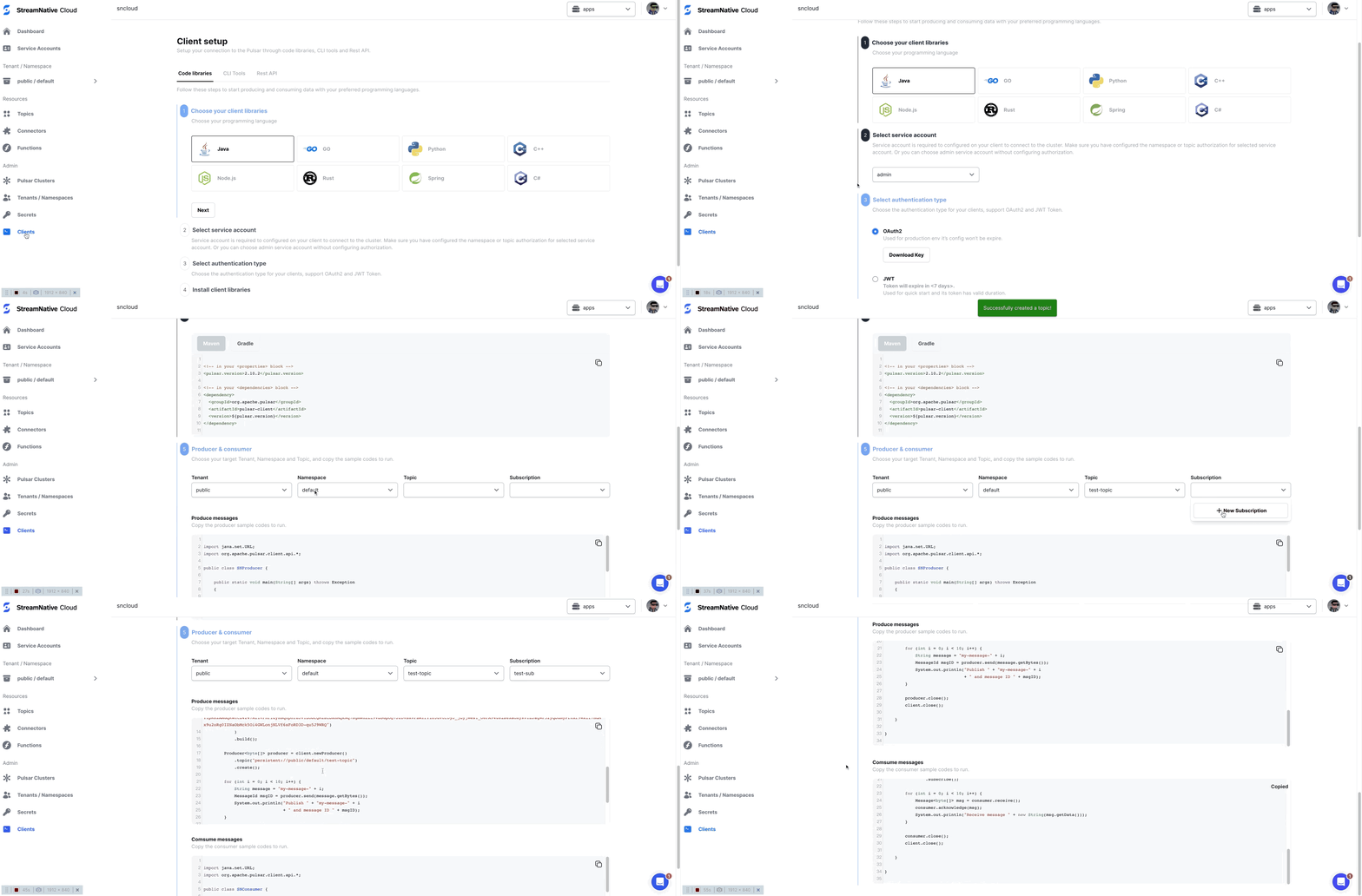 To get started with the client setup wizard, follow these steps.
1. On the left navigation pane of StreamNative Cloud Console, in the **Admin** section, click **Pulsar Clients**.
2. Follow the wizard to generate the sample code you need for connecting to your StreamNative cluster.
With a copy-and-paste, you can run the given sample code to produce and consume messages. For a quick walkthrough, check out this [video](https://www.youtube.com/watch?v=zwlXFIWdhQo) (starting from 1'57'').
You can also use the [Kafka clients](/cloud/build/kafka-clients/kafka-on-cloud#kafka-clients) to connect to your StreamNative cluster.
## Pulsar Clients
* [C# client](/cloud/build/pulsar-clients/cloud-connect-dotnet)
* [C++ client](/cloud/build/pulsar-clients/cloud-connect-cpp)
* [Go client](/cloud/build/pulsar-clients/cloud-connect-go)
* [Java client](/cloud/build/pulsar-clients/cloud-connect-java)
* [Node.js client](/cloud/build/pulsar-clients/cloud-connect-nodejs)
* [Python client](/cloud/build/pulsar-clients/cloud-connect-python)
* [Rust client](/cloud/build/pulsar-clients/cloud-connect-rust)
* [Spring client](/cloud/build/pulsar-clients/cloud-connect-spring)
* [WebSocket API](/cloud/build/pulsar-clients/cloud-connect-websocket)
* [Message REST API](/cloud/build/pulsar-clients/connect-restapi)
* [Transaction API](/cloud/build/pulsar-clients/transactions-overview)
To get started with the client setup wizard, follow these steps.
1. On the left navigation pane of StreamNative Cloud Console, in the **Admin** section, click **Pulsar Clients**.
2. Follow the wizard to generate the sample code you need for connecting to your StreamNative cluster.
With a copy-and-paste, you can run the given sample code to produce and consume messages. For a quick walkthrough, check out this [video](https://www.youtube.com/watch?v=zwlXFIWdhQo) (starting from 1'57'').
You can also use the [Kafka clients](/cloud/build/kafka-clients/kafka-on-cloud#kafka-clients) to connect to your StreamNative cluster.
## Pulsar Clients
* [C# client](/cloud/build/pulsar-clients/cloud-connect-dotnet)
* [C++ client](/cloud/build/pulsar-clients/cloud-connect-cpp)
* [Go client](/cloud/build/pulsar-clients/cloud-connect-go)
* [Java client](/cloud/build/pulsar-clients/cloud-connect-java)
* [Node.js client](/cloud/build/pulsar-clients/cloud-connect-nodejs)
* [Python client](/cloud/build/pulsar-clients/cloud-connect-python)
* [Rust client](/cloud/build/pulsar-clients/cloud-connect-rust)
* [Spring client](/cloud/build/pulsar-clients/cloud-connect-spring)
* [WebSocket API](/cloud/build/pulsar-clients/cloud-connect-websocket)
* [Message REST API](/cloud/build/pulsar-clients/connect-restapi)
* [Transaction API](/cloud/build/pulsar-clients/transactions-overview)